The Era of Express: Routes, Params and the Art of Handling Requests

Introduction
Every backend does one job again and again: a request comes in, some logic runs, a response goes out. Node.js can do this on its own, but the code becomes long and repetitive very fast. Express exists to remove that pain.
In this blog, we will clearly understand how Express handles requests, like routes, handlers, responses, URL params and query strings.
What is Express and Why Do We Need It?
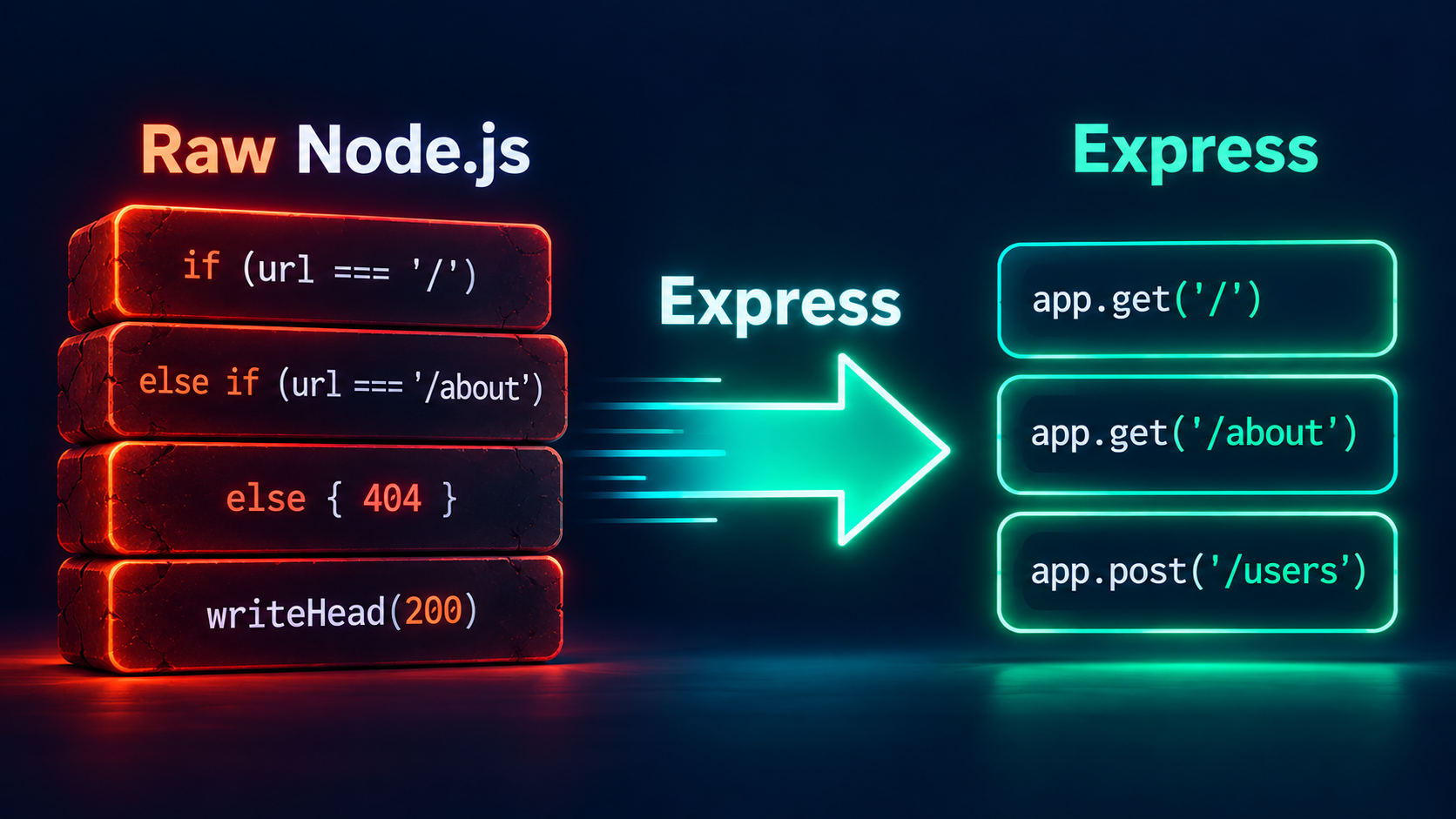
Express is a minimal web framework built on top of node.js. We can write node.js code without Express, but it becomes too repetitive and hard to manage when the project grows. That`s why TJ Holowaychuk took the http module of Node.js and built Express separately on top of it. With Express, we can create servers, write code efficiently, and handle routes easily, and keep our code organized as the project grows.
Let`s see a small server with raw Node.js (without express):
import http from 'http';

const server = http.createServer((req, res) => {
  if (req.method === 'GET' && req.url === '/') {
    res.writeHead(200, { 'Content-Type': 'text/plain' });
    res.end('Home page');
  } else if (req.method === 'GET' && req.url === '/about') {
    res.writeHead(200, { 'Content-Type': 'text/plain' });
    res.end('About page');
  } else {
    res.writeHead(404, { 'Content-Type': 'text/plain' });
    res.end('Not found');
  }
});

server.listen(3000);
Two routes, and it already looks heavy. Now imagine 40 routes, JSON bodies, URL parameters and query strings.
Now let`s see the same server in Express:
import express from 'express';

const app = express();

app.get('/', (req, res) => res.send('Home page'));
app.get('/about', (req, res) => res.send('About page'));

app.listen(3000, () => console.log('Server running on port 3000'));
As we can see, our code now looks much cleaner compared to the raw node.js server.Express gives a clear structure to our code, so it stays clean even when the project grows.
Comparing Raw Node.js and Express
| Responsibility | Raw Node.js http |
Express |
|---|---|---|
| Routing | Manual if/else on req.url |
app.get(), app.post() etc. |
| Parsing URL params | Manual | req.params |
| Parsing query string | Manual | req.query |
| Sending JSON | Set header + JSON.stringify yourself |
res.json() |
| Status codes | res.writeHead() |
res.status() |
Raw HTTP is manual, while Express makes it simple and fast.Express removes the boilerplate and makes routing easy.
Your First Express Server
npm init -y
npm install express
// server.js
import express from 'express';

const app = express();
const PORT = 3000;

app.get('/', (req, res) => {
  res.send('Hello from Express');
});

app.listen(PORT, () => {
  console.log(`Server running on http://localhost:${PORT}`);
});
Run it with node server.js and open http://localhost:3000.
Three things are happening here:
express()creates the application object,app.app.get(...)registers a route.app.listen(...)starts the server and waits for requests.
The Request Lifecycle
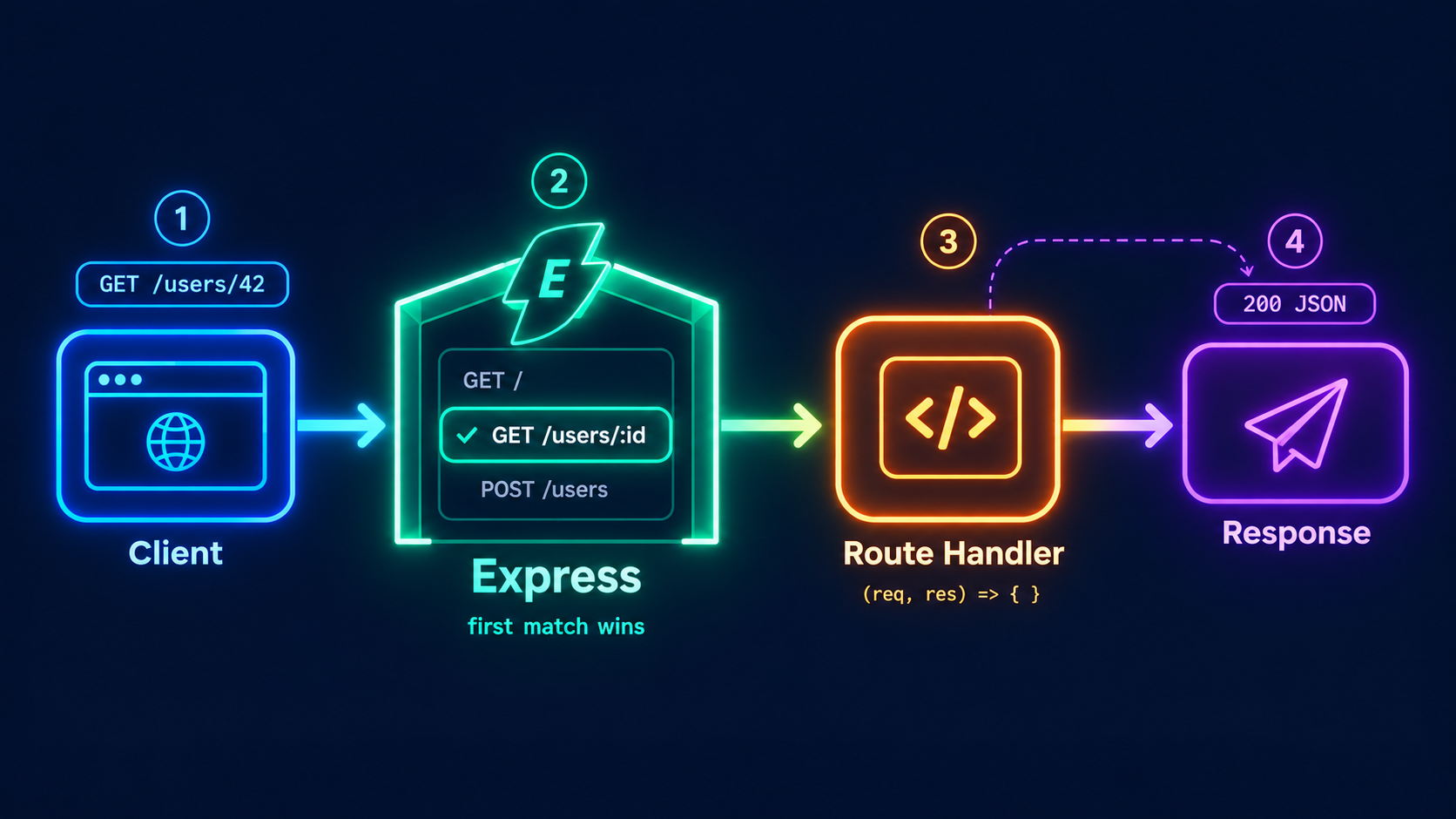
Before writing more routes, understand the path a request takes:
The client sends a request (method + URL).
Express looks at its list of routes, from top to bottom.
The first route that matches both the method and the path runs its handler.
The handler sends a response, and the request ends.
Routing Basics
app.METHOD(PATH, HANDLER);
METHOD: the HTTP method (get,post,put,patch,delete).PATH: the URL pattern to match.HANDLER: the function that runs when both match. It receivesreq(request) andres(response).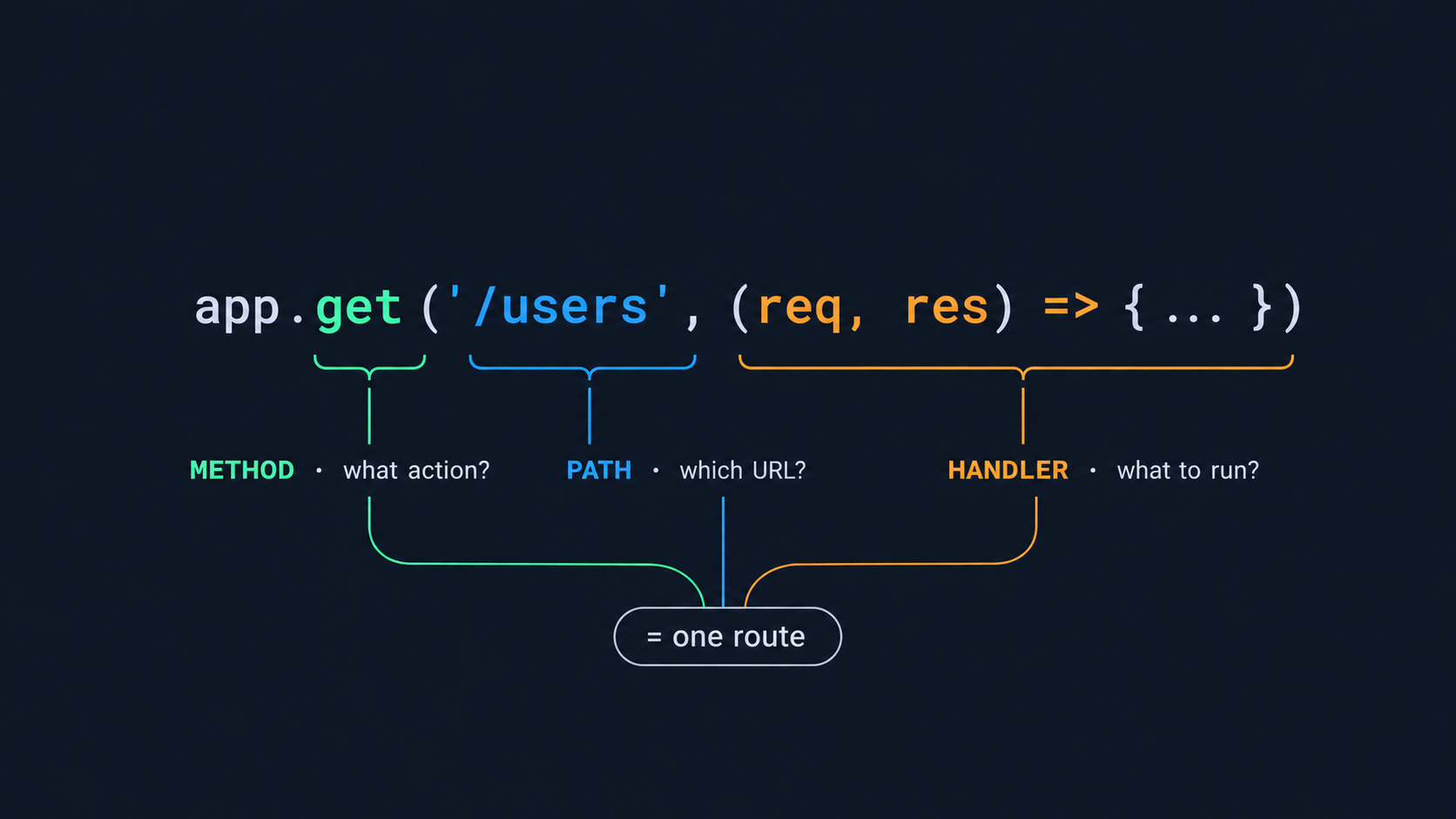
Handling POST Requests
POST is used to create data. The data comes in the request body, and Express does not read a JSON body by default. We must enable it with the built-in express.json() middleware.
app.use(express.json());

app.post('/users', (req, res) => {
  const name = req.body.name;

  if (!name) {
    return res.status(400).json({ error: 'name is required' });
  }

  // save the user in the database

  res.status(201).json({ message: 'User created', name: name });
});
Notice three good habits here:
Validate the input, and return
400if it is wrong.Return
201 Createdwhen something new is created.Take only the fields you need (like
name) fromreq.body. Don’t save the wholereq.bodydirectly, because the client can send extra fields.
PUT, PATCH and DELETE
//replace the whole resource
app.put('/users/:id', (req, res) => {
  const id = req.params.id;

  // find the user in the database
  // replace the whole user with the new data from req.body

  res.json({ message: `User ${id} replaced` });
});

// PATCH: update only some fields
app.patch('/users/:id', (req, res) => {
  const id = req.params.id;

  // find the user in the database
  // update only the fields sent in req.body

  res.json({ message: `User ${id} updated` });
});

// DELETE
app.delete('/users/:id', (req, res) => {
  const id = req.params.id;

  // find the user in the database
  // delete the user

  res.status(204).end(); // 204 = success, nothing to send back
});
Every handler must send a response. A handler that never responds leaves the client hanging until it times out.
Sending Responses
res gives us many ways to reply. These are the ones you will use daily:
| Method | What it does | Example |
|---|---|---|
res.send() |
Sends text, HTML, or an object/buffer | res.send('Hello') |
res.json() |
Sends JSON with the right Content-Type |
res.json({ ok: true }) |
res.status() |
Sets the status code (chainable) | res.status(404).json({...}) |
res.sendStatus() |
Sets the status and sends its text | res.sendStatus(200) sends OK |
res.redirect() |
Redirects to another URL | res.redirect(301, '/new') |
res.type() |
Sets the Content-Type |
res.type('application/xml') |
res.set() |
Sets a response header | res.set('Request-Id', 'abc') |
res.end() |
Ends the response without data | res.status(204).end() |
Rule: send only one response per request. Calling res.send() or res.json() twice throws the error "Cannot set headers after they are sent to the client". This usually happens when you forget a return:
// Wrong: both lines try to respond
if (!user) res.status(404).json({ error: 'Not found' });
res.json(user);

// Correct: return stops the function
if (!user) return res.status(404).json({ error: 'Not found' });
res.json(user);
Common Status Codes
| Code | Meaning | Use it when |
|---|---|---|
200 |
OK | Normal success |
201 |
Created | A new resource was created (POST) |
204 |
No Content | Success, nothing to return (DELETE) |
400 |
Bad Request | Invalid input |
404 |
Not Found | Resource or route does not exist |
500 |
Server Error | Something broke on the server |
URL Params vs Query Strings
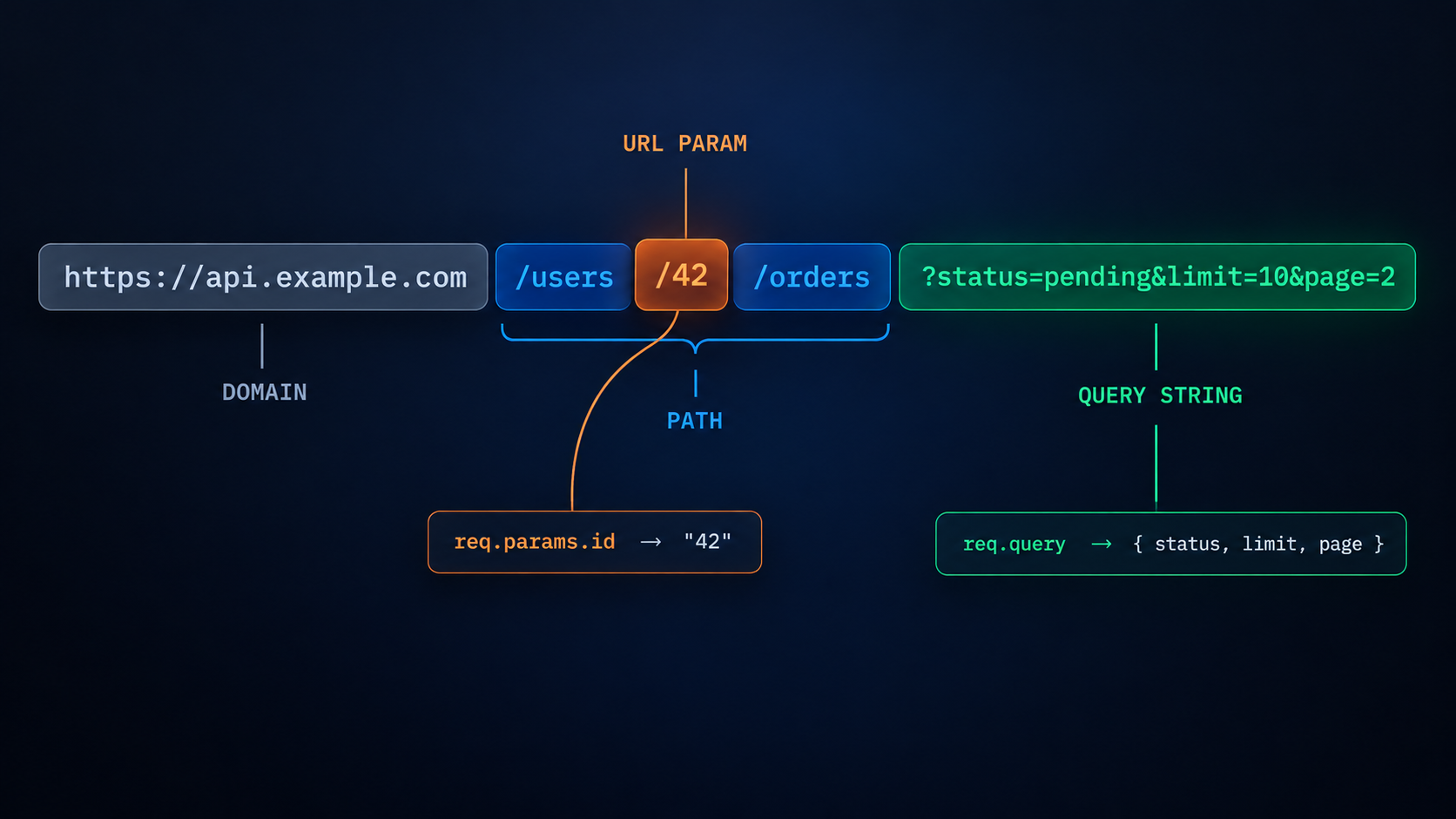
https://api.example.com/users/42/orders?status=pending&limit=10&page=2
It has three useful parts:
Path:
/users/42/ordersURL param:
42(a value inside the path)Query string:
?status=pending&limit=10&page=2(key-value pairs after the?) Both carry data from the client to the server. But they carry different kinds of data.
URL Parameters (req.params)
A URL param is a dynamic part of the path. We define it with a colon (:) in the route.
app.get('/users/:id', (req, res) => {
  const id = Number(req.params.id);

  if (!Number.isInteger(id)) {
    return res.status(400).json({ error: 'id must be an integer' });
  }

  const user = users.find((u) => u.id === id);
  if (!user) return res.status(404).json({ error: 'User not found' });

  res.json(user);
});
A request to /users/1 gives req.params the value { id: '1' }.
You can have more than one param:
app.get('/users/:userId/orders/:orderId', (req, res) => {
  res.json(req.params); // { userId: '5', orderId: '9' }
});
Params identify a specific resource. /users/42 means "the user whose id is 42".
Query Strings (req.query)
A query string is everything after the ?. It is not part of the route definition. Express reads it for you and puts it in req.query.
app.get('/users', (req, res) => {
  const { role, city, limit = '10', page = '1' } = req.query;

  let result = users;
  if (role) result = result.filter((u) => u.role === role);
  if (city) result = result.filter((u) => u.city === city);

  const l = Number(limit);
  const p = Number(page);

  res.json({
    count: result.length,
    page: p,
    data: result.slice((p - 1) * l, p * l),
  });
});
A request to /users?role=student&limit=5 gives req.query the value { role: 'student', limit: '5' }.
Query strings filter, sort or paginate a collection. They are usually optional.
A Very Common Mistake: Everything is a String
Both req.params and req.query always give you strings. Even ?limit=5 gives '5', not 5. Convert it yourself:
const limit = Number(req.query.limit);
And always validate the result. Number('abc') is NaN, and that should become a 400, not a crash.
Key Differences
| URL Params | Query String | |
|---|---|---|
| Example | /users/42 |
/users?role=admin |
| Defined in route | Yes (:id) |
No |
| Access with | req.params |
req.query |
| Purpose | Identify one resource | Filter, sort, paginate |
| Required? | Yes, route will not match without it | Usually optional |
| Position | Inside the path | After the ? |
When to Use Which
A simple rule that works almost always:
Which resource? Use a param.
GET /users/42How should I see the list? Use a query.
GET /users?role=admin&page=2You can combine both:
GET /users/42/orders?status=pending
The Code is saying: "Give me the orders of user 42, but only the pending ones."
The param picks the user, and the query filters the orders.
How to decide:
Use a param when the value tells you which resource you want. Example:
/users/42Use a query when the value tells you how you want the result. Example:
/users?role=admin
Route Order Matters
Express checks your routes one by one, from top to bottom. As soon as one route matches, it runs that route and stops. It does not check the rest.
This can create a bug when a fixed route and a dynamic route look similar.
// Wrong order
app.get('/users/:id', (req, res) => res.json({ route: 'by id' }));
app.get('/users/search', (req, res) => res.json({ route: 'search' }));
Here, a request to /users/search reaches /users/:id first. Express treats the word search as the id, so the second route never runs.
This is how you can fix it: put the fixed route before the dynamic route.
// Correct order
app.get('/users/search', (req, res) => res.json({ route: 'search' }));
app.get('/users/:id', (req, res) => res.json({ route: 'by id' }));
Now /users/search matches the first route and stops. Any other value, like /users/42, moves down and matches /users/:id.
Rule: put fixed routes first, and dynamic routes (:id) after them.
Express Class Github Link: https://github.com/abdulrdeveloper/FullStackHub/tree/main/Learn%20Backend/Intro%20to%20Express/express-class
You can find more of my work at abdulrdeveloper.me
Read more posts at blog.abdulrdeveloper.me