What is Node.js? JavaScript on the Server Explained
What is Node.js?
Node.js is not a programming language. It is also not a framework. Actually, Node.js is a JavaScript Runtime Environment.
Runtime means: a place where JavaScript code can run. With Node.js, we can run JavaScript on our laptop or on a server, without any browser.
node app.js
Just write this one command in terminal, and your JavaScript file will run.
Language vs Runtime
Language = the rules of code. Like
let,function,if.Runtime = the place where that code runs, and it gives some extra tools to us.
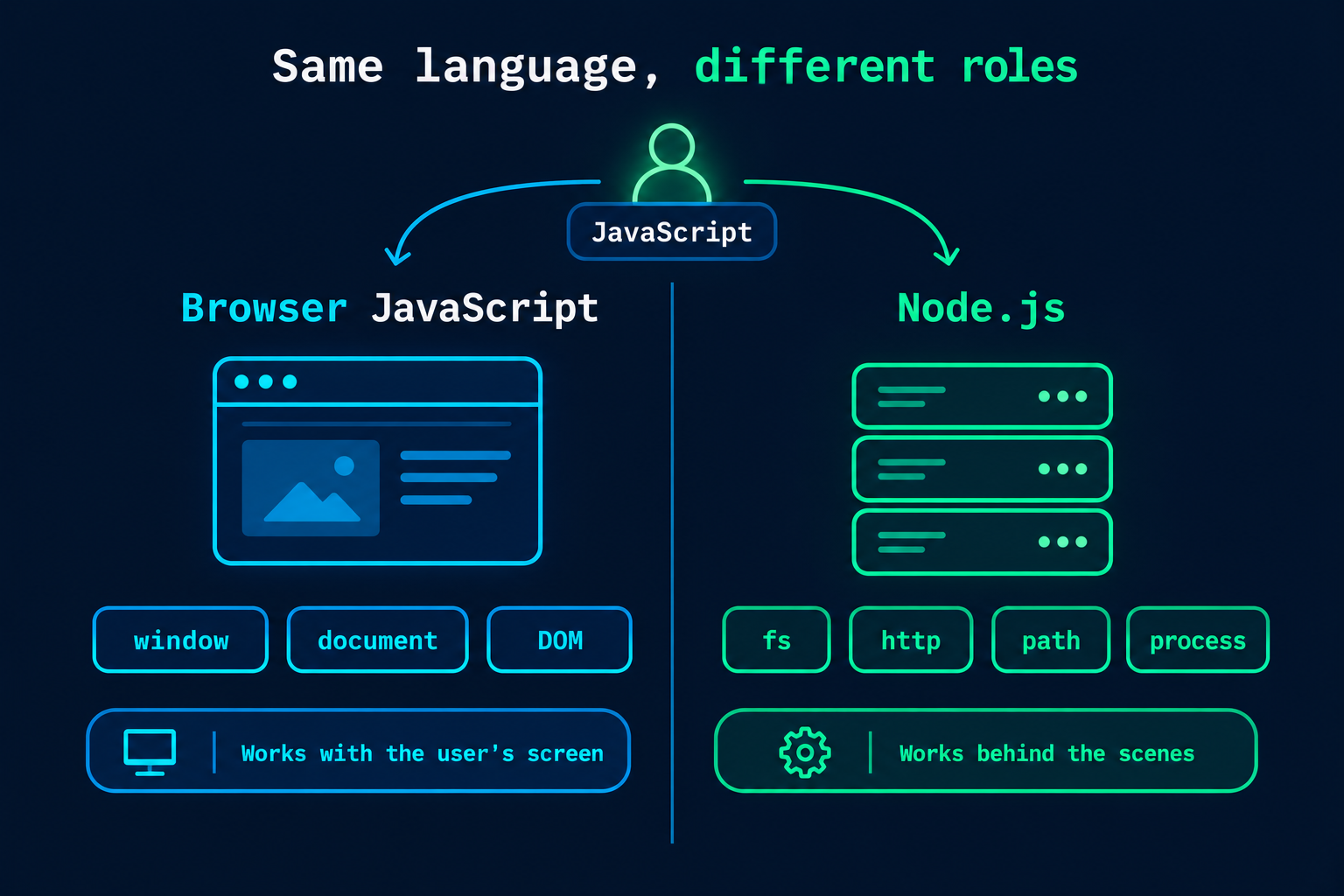
JavaScript is the same language everywhere, but the tools are different in different places:
| Browser | Node.js | |
|---|---|---|
| Language | JavaScript | JavaScript |
| Extra tools | window, document, DOM |
fs, http, path, process |
Why JavaScript Was Browser-Only
JavaScript was made in 1995 for the browser. It`s only job was small things on a webpage, like button click, form validation, or changing some text.
The problem was: JavaScript code could only run inside the browser, because only the browser had a JavaScript engine. If you wanted a backend (database, files, login), you had to use another language like PHP or Java. So developers needed to learn two languages: one for frontend, one for backend.
How Node.js Made JavaScript Run on Servers
In 2009, Ryan Dahl had a simple idea: Chrome's JavaScript engine (V8) is very fast. Why not take it out of the browser and use it on the server also?
So he took V8, added some extra things around it (like file system, network, etc.), and made Node.js.
Now JavaScript can do backend work too: read files, talk to database, create servers. Same language on frontend and backend.
V8 Engine (High Level)
Computer cannot understand JavaScript directly. It only understands machine code (0 and 1). V8 is the engine which converts our JavaScript code into machine code, and it does this very fast.
V8 is written in C++ and made by Google. Chrome uses it, and Node.js uses it also. That`s why Node.js is fast.
Important: V8 only runs JavaScript. It don`t know how to read a file or make a server. For that, Node.js adds other parts.
Node.js Runtime Architecture
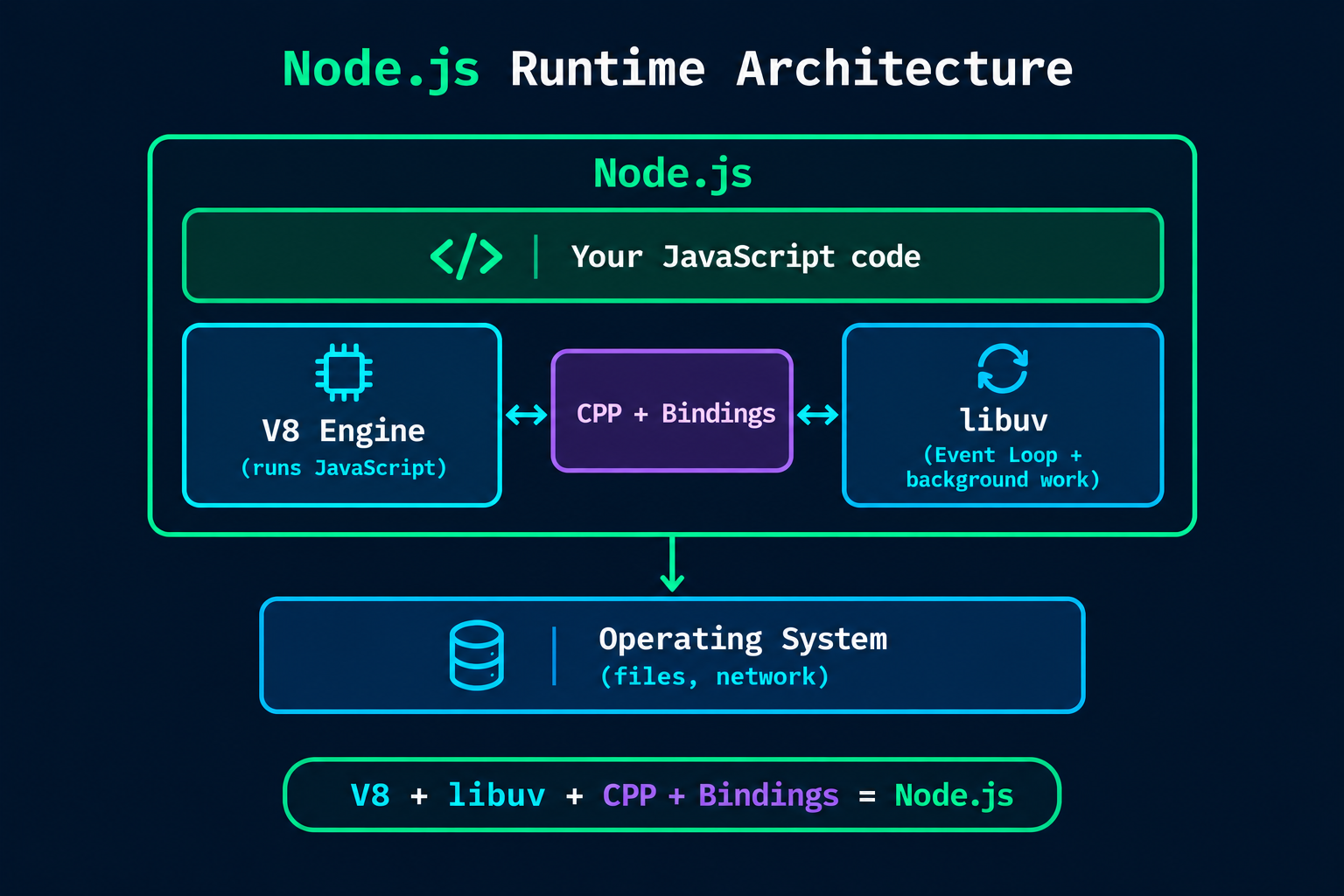
Node.js is made of 3 main parts:
V8: runs our JavaScript code.
libuv: a C++ library which handles background work like files and network. It manages the Event Loop also.
C++ Bindings: the bridge between our JavaScript and C++.
Formula: V8 + libuv + CPP + Bindings = Node.js
Browser JS vs Server JS
Same language, but different roles:
Browser JS: works with the user's screen. It changes the page using
documentandwindow.Server JS (Node.js): works behind the scene. It reads files, talks to database, and sends response using
fs,http,process.
Just suppose JavaScript is an actor. In browser, he works on the stage in front of the audience. In Node.js, he works behind the camera. Actor is same, but the role is different.
Node.js vs PHP / Java
| Traditional (PHP / Java) | Node.js | |
|---|---|---|
| Language | PHP or Java | JavaScript |
| Request handling | Traditionally, one thread for each request | One main thread with event loop |
| Waiting for file/DB | Thread waits | Does not wait, moves to next work |
| Frontend + backend | Two languages | One language |
In the traditional way, when 1000 users come, the server makes many threads, and each thread waits for its own work. It takes more memory. Node.js handles many requests on one main thread, and it does not wait. That is why Node.js is very good for apps with many users.
(Note: modern PHP and Java also have async options now, but this is how they were traditionally used.)
Event-Driven Architecture
Event-driven means: do the work when an event happens, don't sit and wait.
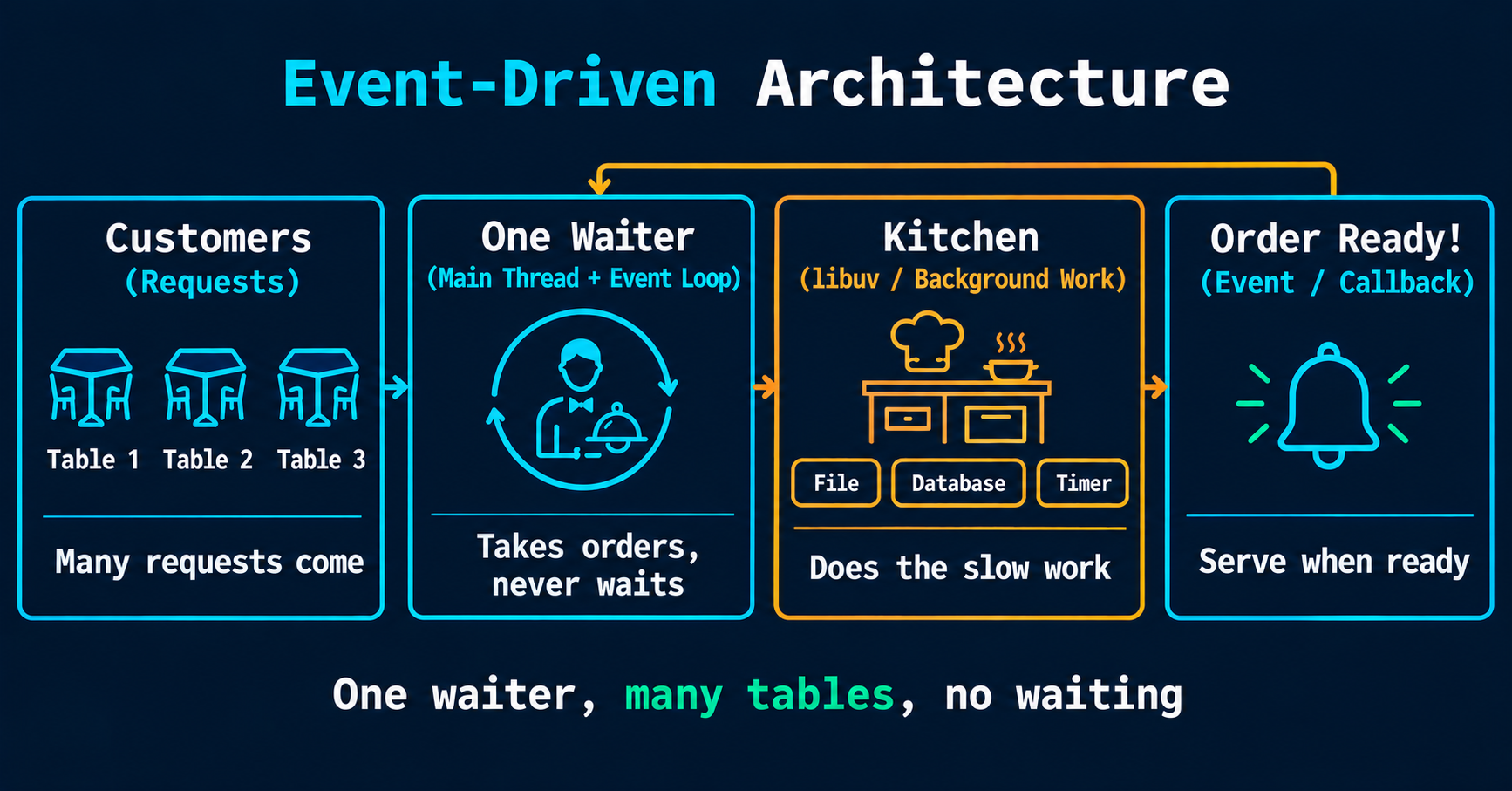
Think of a restaurant with one waiter:
He takes order from table 1, gives it to the kitchen, and does not stand there waiting.
He goes to table 2, takes the order.
When the kitchen says "order ready" (event), he serves the food.
One waiter handles many tables, because he never waits. Node.js works exactly like this.
console.log("Order 1 taken");

setTimeout(() => {
    console.log("Order 1 ready");
}, 2000);

console.log("Order 2 taken");

// Output:
// Order 1 taken
// Order 2 taken
// Order 1 ready  (after 2 seconds)
Node did not wait for 2 seconds. It moved ahead, and came back when the timer was done. The part which manages this is called the Event Loop.
Real-World Use Cases
Node.js is used when many users are connected and lots of input/output is happening:
REST APIs and backends: most common use.
Chat apps: real-time messages (with WebSockets).
Streaming: video and audio streaming.
Developer tools: tools like Vite and many build tools run on Node.js.
Server-side rendering: frameworks like Next.js.
Where not to use: heavy CPU work (like video editing or big calculations), because it blocks the main thread.
Why Developers Adopted Node.js
One language: JavaScript for frontend and backend.
Fast: V8 engine and non-blocking work.
npm: a huge collection of ready-made packages.
Big community: easy to find help.
Quick Note:
Node.js is a JavaScript runtime, not a language.
JavaScript was browser-only, until Node.js took V8 out of the browser.
Node.js = V8 + libuv + CPP + Bindings.
It is event-driven: one waiter, many tables, no waiting.
Best for APIs, chat apps, streaming and tools.
Node.js lets JavaScript run outside the browser.
You can find more of my work at abdulrdeveloper.me
Read more posts at blog.abdulrdeveloper.me