WebSockets Explained: How Real-Time Chat Works and Why It’s Hard to Scale
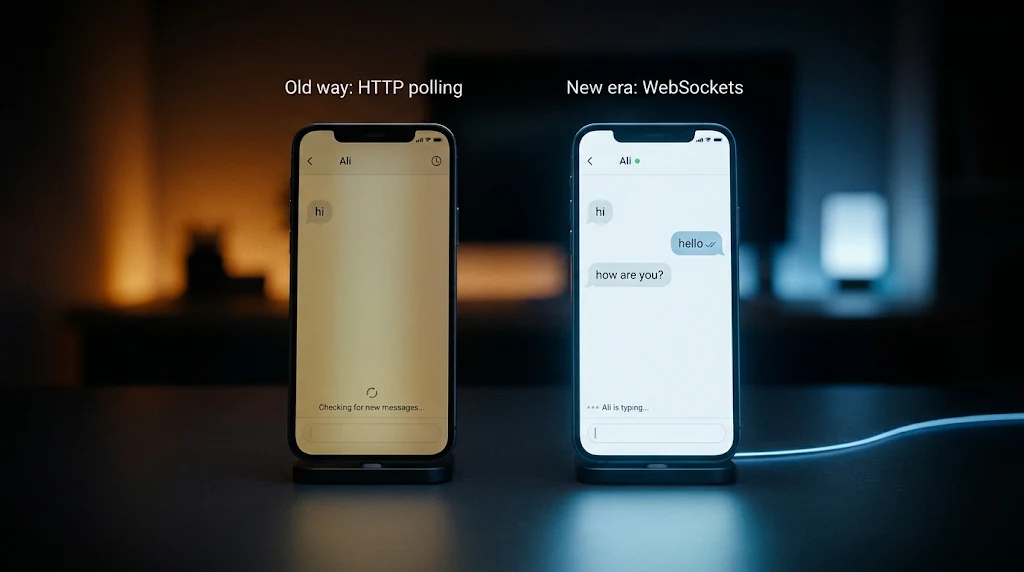
Everyone knows real-time apps. Chat, live scores, notifications, multiplayer games, live dashboards. You open the app, and things just update by themselves.
The idea behind it is simple. You can build a working chat app in twenty lines of code.
The real engineering starts when a thousand people join one room, and then a hundred thousand. In this blog we will start from the simple idea, look inside the protocol itself, build up to Socket.IO, and then go deep into what happens inside a Linux server when connections grow.
Why Normal HTTP Is Not Enough
HTTP works like this: the client asks, the server answers, and that is the end of it.
Now imagine a chat between two friends, Adam and Ali:
Adam: hi
Ali:  hello
Adam: how are you?
Ali:  I am fine, and you?
When Adam sends "hi", the server receives it. But how does Ali's app find out?
The most important rule of HTTP is that the server can never speak first. It can only reply to a request. So Ali's app has to ask.
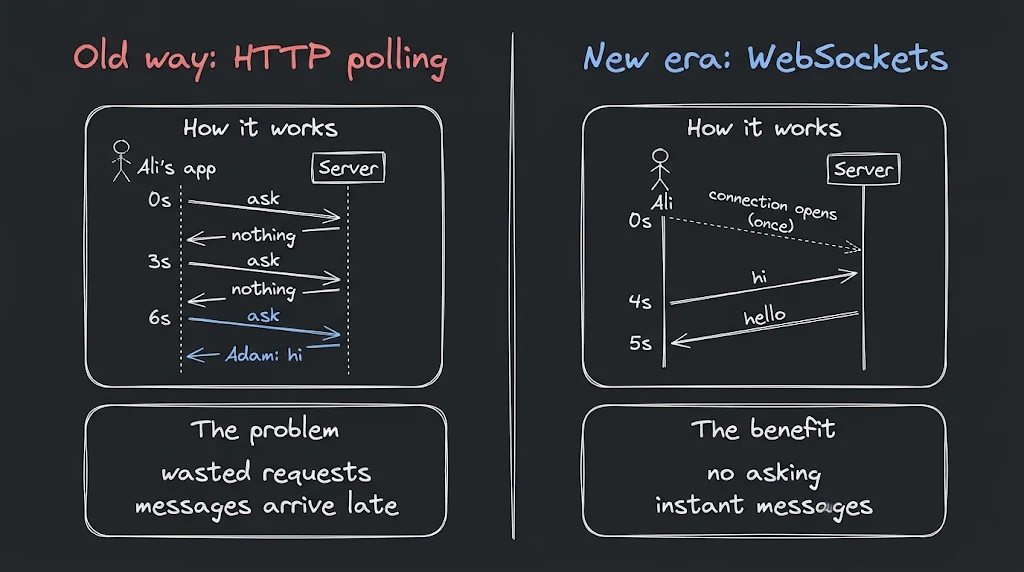
The simple way to build a chat with HTTP is polling: Ali's app asks the server "anything new for me?" every 3 seconds, and the server answers with whatever it has at that moment.
 0s   ask  ->  nothing
 3s   ask  ->  nothing
 4s   (Adam sends "hi")
 6s   ask  ->  Adam: hi              (2 seconds late)
 9s   ask  ->  nothing
12s   ask  ->  nothing
13s   (Adam sends "how are you?")
15s   ask  ->  Adam: how are you?    (2 seconds late)
This has two problems:
- Wasted requests. Most answers are "nothing new", and each request carries headers and costs the server some work.
- Delay. A message that arrives right after a request waits until the next one.
We need a connection where the server can send data whenever it wants.
What Is a WebSocket?
A WebSocket is a technology that creates a permanent, two-way open communication line between a browser and a server, so both sides can send messages to each other instantly.
It starts as a normal HTTP request. The client asks to upgrade the connection, and if the server agrees, the same connection stays open and changes into a WebSocket. After that, either side can send a message at any time. This is called full-duplex communication.
Technically, a WebSocket is an application-layer protocol that runs on top of a TCP connection. That is why it is reliable and ordered, and why the same connection can be reused again and again.
| HTTP polling | WebSocket | |
|---|---|---|
| Who starts the message | Client only | Both sides |
| Connection | Asked again and again | One, kept open |
| Delay | Up to the polling interval | Instant |
| Wasted requests | Many | None |
Inside the Handshake
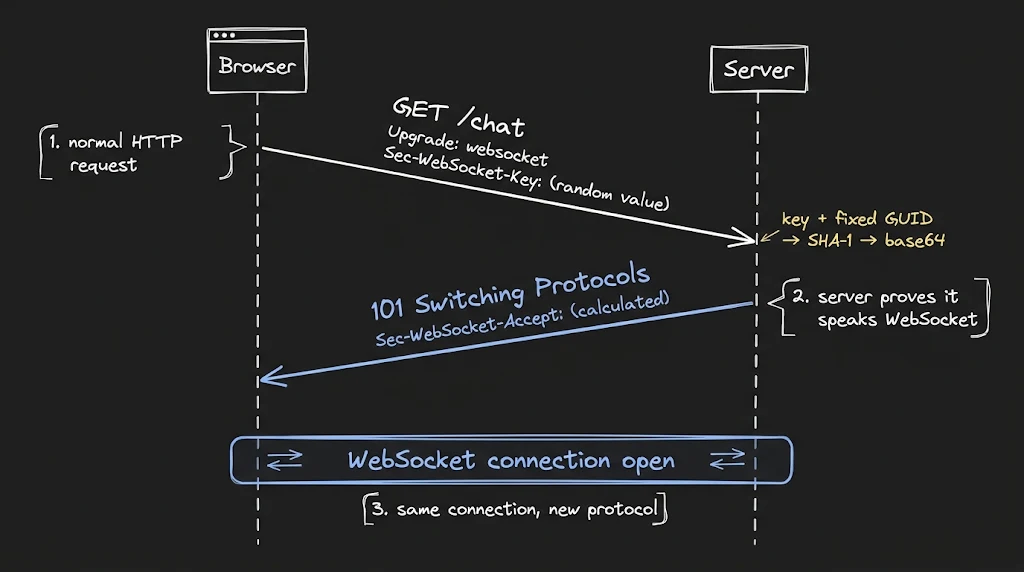
Let's look at what really happens when a browser opens new WebSocket("ws://localhost:8080").
The browser sends a normal HTTP request with a few special headers:
GET /chat HTTP/1.1
Host: localhost:8080
Upgrade: websocket
Connection: Upgrade
Sec-WebSocket-Version: 13
Sec-WebSocket-Key: dGhlIHNhbXBsZSBub25jZQ==
Sec-WebSocket-Key is a random value (16 random bytes, base64 encoded) that the browser generates for every connection.
The server must prove that it really understands the WebSocket protocol. It does this with a small calculation:
import { createHash } from "node:crypto";

// fixed value defined by the WebSocket standard
const GUID = "258EAFA5-E914-47DA-95CA-C5AB0DC85B11";

// key from the client + fixed GUID -> SHA-1 -> base64
const accept = createHash("sha1").update(key + GUID).digest("base64");
Then it replies:
HTTP/1.1 101 Switching Protocols
Upgrade: websocket
Connection: Upgrade
Sec-WebSocket-Accept: s3pPLMBiTxaQ9kYGzzhZRbK+xOo=
The browser repeats the same calculation and compares. If the values match, the connection is accepted. The status code 101 means "we are switching protocols", and from this moment the same TCP connection no longer speaks HTTP. It speaks the WebSocket protocol.
One important detail: this check is not security or login. It only confirms that the server is a real WebSocket server, and not an ordinary HTTP server or a cache that blindly sent back some response. Authentication is a separate job that you must do yourself.
Inside a Frame
After the handshake, data does not travel as raw text. It is split into small packets called frames. Each frame has a very small header:
FIN | opcode | MASK | payload length | masking key | payload
- FIN: is this the last frame of the message? A large message can be split into several frames.
- Opcode: the type of the frame: text, binary, close, ping or pong.
- MASK: tells whether the payload is masked.
- Payload length: the size of the data.
- Masking key: 4 bytes used for masking.
- Payload: the actual data.
Two things are interesting here.
1. The header is tiny. For a small message, the header is only 2 bytes from the server to the client, and 6 bytes from the client to the server (2 plus the 4-byte masking key). Compare that with an HTTP request, which carries hundreds of bytes of headers every time. This is why WebSockets are efficient for small, frequent messages.
2. Client frames are masked. Every frame from the browser is XOR-ed with a random 4-byte key. This is not encryption, and anyone can undo it. It exists to protect old proxies and caches from being tricked by data that looks like an HTTP request. Frames from the server are not masked.
A Raw WebSocket in a Few Lines
Here is a complete server using the ws package:
import { WebSocketServer } from "ws";

const wss = new WebSocketServer({ port: 8080 });

wss.on("connection", (socket) => {
  socket.on("message", (data) => {
    // reply to the same client
    socket.send(`You said: ${data}`);
  });
});
And the browser side:
const ws = new WebSocket("ws://localhost:8080");

ws.onopen = () => ws.send("hello");
ws.onmessage = (event) => console.log(event.data);
The library handled the handshake and the frames for us.
It works. But as soon as you build a real app, many questions appear:
- Which message came from which user?
- How do I send a message to only one person?
- How do I make groups, like a chat room?
- What if the connection drops? Who reconnects it?
With raw WebSockets, you build all of this yourself. That is why modern projects usually use a library on top.
Socket.IO
Socket.IO is the most popular library for real-time apps in Node.js. It was created by Guillermo Rauch, who later founded Vercel.
It gives you what raw WebSockets do not:
- A unique id for every connected client
- Rooms (groups of clients)
- Automatic reconnection
- A fallback to HTTP long-polling if WebSockets are blocked
- Simple event-based messages
One note: Socket.IO has its own protocol on top of WebSocket, so you should use the Socket.IO client library on the browser side, not the plain WebSocket object.
import { Server } from "socket.io";

const io = new Server(3000);

io.on("connection", (socket) => {
  // every client gets a unique id
  console.log(socket.id);

  socket.on("join-room", (room) => socket.join(room));

  socket.on("message", ({ room, text }) => {
    // send to everyone inside that room
    io.to(room).emit("message", { from: socket.id, text });
  });
});
How Socket.IO Knows Who Is Who
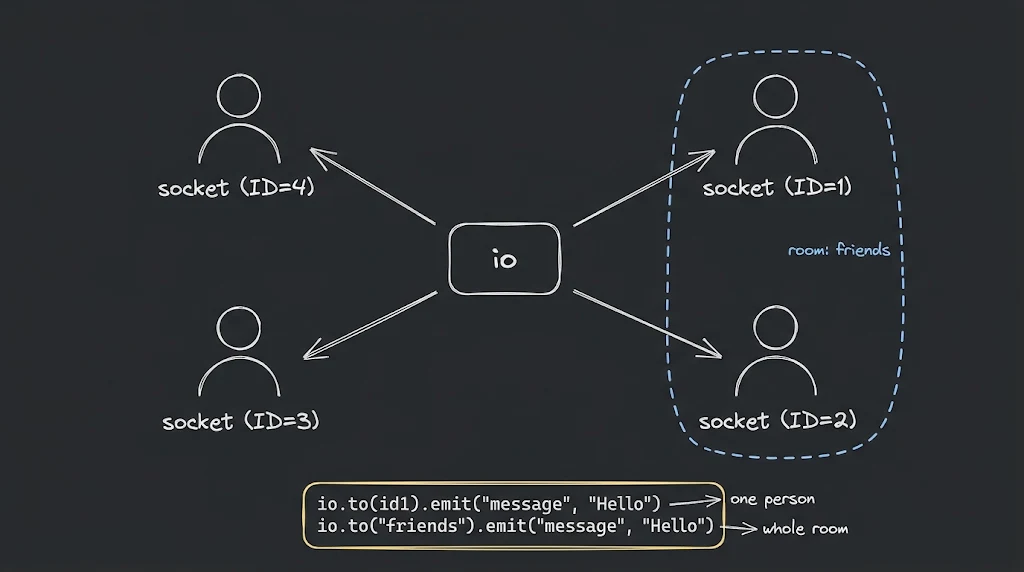
Imagine four people connected at the same time.
- Each person has their own socket (their own connection).
- The server gives each socket a unique id.
- There is one io server that knows about all of them.
When user 1 sends "hello", the message goes to io. io looks at who should receive it, finds their ids, and sends it to exactly those sockets.
There are a few ways to send:
socket.emit(...): to that one client onlyio.emit(...): to everyone connectedsocket.broadcast.emit(...): to everyone except the senderio.to(room).emit(...): to everyone in one room
Rooms: Group Chat
A group chat is just a room. A user joins a room, and a message sent to the room reaches every member of that room.
This is simple, and it works great for ten people. But what happens with a thousand?
The Scale Problem: Fan-Out
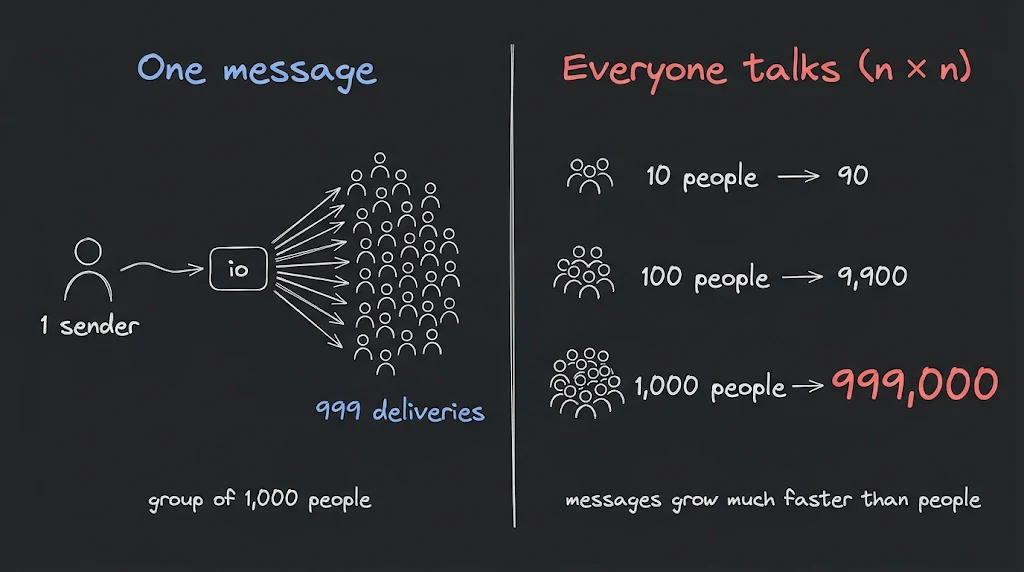
Say a group has 1,000 members. One person sends one message. The server must deliver it to the other 999 people. That is 999 sends for one message.
Now imagine many people talking at the same time. Every message must reach every other member, so the total work grows with n × n. This is called the n² fan-out problem.
Every one of those deliveries costs:
- CPU to prepare and send it
- Bandwidth, which is also money on the cloud
- Memory for the open connection that receives it
So the cost of real-time does not depend only on the number of messages. It depends on the number of people who must receive each message.
What Happens Inside Linux
To understand the limits, we need to look at how Linux treats connections.
Everything Is a File
In Linux, almost everything is treated like a file, and that includes a network connection. When your server accepts a connection, the operating system opens a new resource for it and gives your process a file descriptor (FD).
An FD is simply a small number. The process uses it to refer to that open resource. The first three numbers (0, 1, 2) are already taken by input, output and error. The next connection gets 3, then 4, and so on.
So one connection = one file descriptor.
How One Thread Watches Thousands of Connections
Here is the question behind the whole topic: if 100,000 clients are connected, who is listening to all of them?
The old way: one thread per connection. Every connection gets its own thread, and the thread waits for data. This is easy to write, but it does not scale. Every thread needs its own stack memory, and the operating system must keep switching between thousands of threads. After a few thousand connections, the server spends more time switching than working. In the early 2000s this became a famous problem, known as the C10K problem: how can one server handle 10,000 connections at the same time?
The modern way: one thread watches many connections. Linux provides a system called epoll. Your program registers its connections once, and then asks the kernel to wake it up only when something happens.
epfd = epoll_create()
epoll_ctl(epfd, ADD, socket_fd)     // register each connection once

loop:
  ready = epoll_wait(epfd)          // sleep until at least one connection has data
  for fd in ready:                  // handle ONLY the connections that are ready
    handle(fd)
The important part: the kernel returns only the connections that are ready. Your program never wastes time checking 99,990 idle connections to find the 10 that have data.
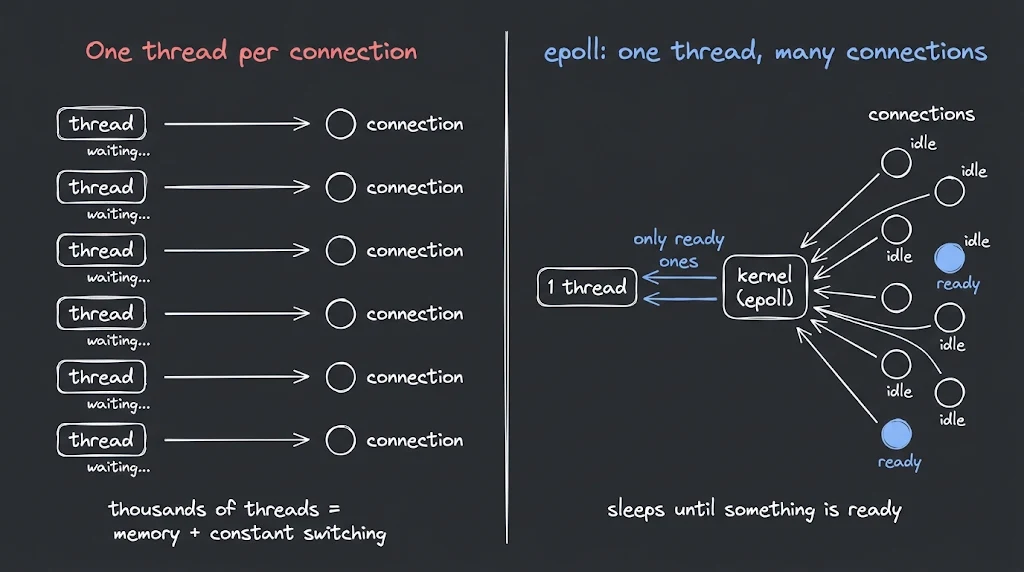
This is how Node.js works. Its event loop (libuv) uses epoll on Linux. One thread, many non-blocking connections, and a callback that runs when data is ready. That is why Node is a natural fit for WebSockets.
It also gives a clear warning: because one thread serves everyone, a heavy CPU task in your handler blocks every connected user. Heavy work should go to a worker or another service.
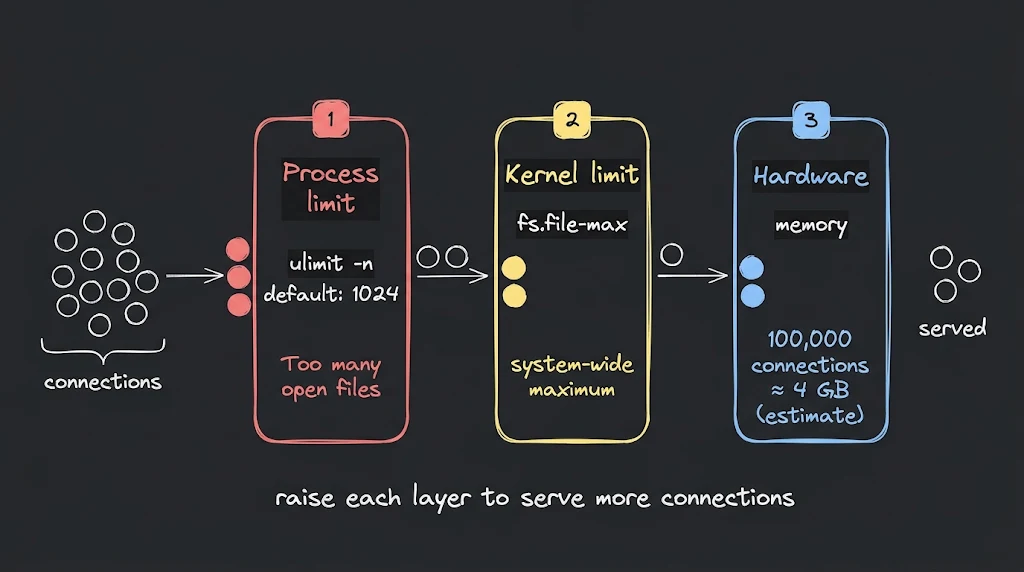
Limit 1: The Process Limit
Every process has a maximum number of file descriptors it may open. This is checked with:
ulimit -n
On many systems the default is 1024. If your server tries to open more, it fails with the error Too many open files.
That means a default Linux server is limited to roughly a thousand connections before you change anything. For a real-time server you raise this limit.
Limit 2: The Kernel Limit
There is also a global limit for the whole system (for example fs.file-max). Even if one process is allowed a lot, the kernel will not allow more than the system-wide maximum. These settings live in system configuration files and must be tuned when you prepare a machine for many connections.
Limit 3: Hardware
Every open connection uses memory (kernel buffers and the objects in your runtime). It is roughly tens of kilobytes per connection, depending on the runtime. As a rough estimate, 100,000 idle connections need around 4 GB of RAM, and that is before any message buffers or application data.
"But a Server Only Has One Port, Right?"
Your server listens on one port, for example 3000. Yet it can hold a very large number of connections at the same time. How?
Because a connection is identified by four values together:
client IP + client port + server IP + server port
Two clients may connect to the same server port, as long as the full combination is different. Each client has its own IP and its own port, so each connection is unique.
There is one place where port numbers become a real limit: when one machine opens many connections to the same destination (for example a load balancer, a proxy, or a load-testing tool). Each of those connections needs its own local port, and Linux gives only about 28,000 by default for this. This is something you must know when you test your server with many connections from one machine.
When Many Clients Arrive at Once
Before your code can handle a new connection, the kernel completes the TCP handshake and puts the connection in a waiting line called the accept queue (the backlog). Your server picks connections from this queue. If a huge number of clients connect in the same moment (for example after a server restart, when everyone reconnects together), this queue can fill up, and new connections are dropped or delayed. The queue size is set by your server (listen backlog, 511 by default in Node.js) and capped by a kernel setting (net.core.somaxconn). For a big real-time server, both should be reviewed.
The Slow Client Problem (Backpressure)
Here is a problem that appears only in production.
You send a message to a client. The data does not go straight to the client. It first goes into a send buffer inside the kernel, and from there the network delivers it. If the client has a slow or weak connection, it reads slowly. The kernel's buffer fills up. Then your runtime starts holding the extra data in your own process memory.
Now imagine one thousand slow clients, and you keep sending to all of them. Your memory grows and grows, even though the code looks perfectly fine. This is called a lack of backpressure: the sender is faster than the receiver, and nothing slows it down.
The fix is to check how much data is still waiting before you send more:
// ws exposes how many bytes are still waiting to be sent
if (socket.bufferedAmount > 1_000_000) {
  // this client is too slow: skip this update, or disconnect it
} else {
  socket.send(data);
}
Socket.IO also offers socket.volatile.emit(...), which drops the message if the client is not ready. This is perfect for data that quickly becomes useless, such as live cursor positions.
The rule: never assume that a client can keep up.
Dead Connections and Heartbeats
Another production problem: a user's phone loses signal, or the Wi-Fi is switched off. The connection does not close politely. The server may never receive any message that the client is gone. This is called a half-open connection. TCP will eventually notice, but the default can take hours. Meanwhile, the server keeps a file descriptor and memory for a user who is not there.
The solution is a heartbeat. The WebSocket protocol has special ping and pong frames for this. The server sends a ping every few seconds, and a living client answers with a pong. If no pong arrives in time, the server closes the connection.
wss.on("connection", (socket) => {
  socket.isAlive = true;
  socket.on("pong", () => (socket.isAlive = true));
});

setInterval(() => {
  wss.clients.forEach((socket) => {
    // no pong since the last ping -> connection is dead
    if (!socket.isAlive) return socket.terminate();
    socket.isAlive = false;
    socket.ping();
  });
}, 30000);
Socket.IO does this for you with its pingInterval and pingTimeout settings. Heartbeats have a second benefit: load balancers and proxies often close connections that stay silent for too long, and regular pings keep the connection alive.
How Big Apps Do It
Apps like Discord and WhatsApp handle millions of connected users. They do not do it with one server and one setting. They combine several ideas.
1. Many Servers, Not One
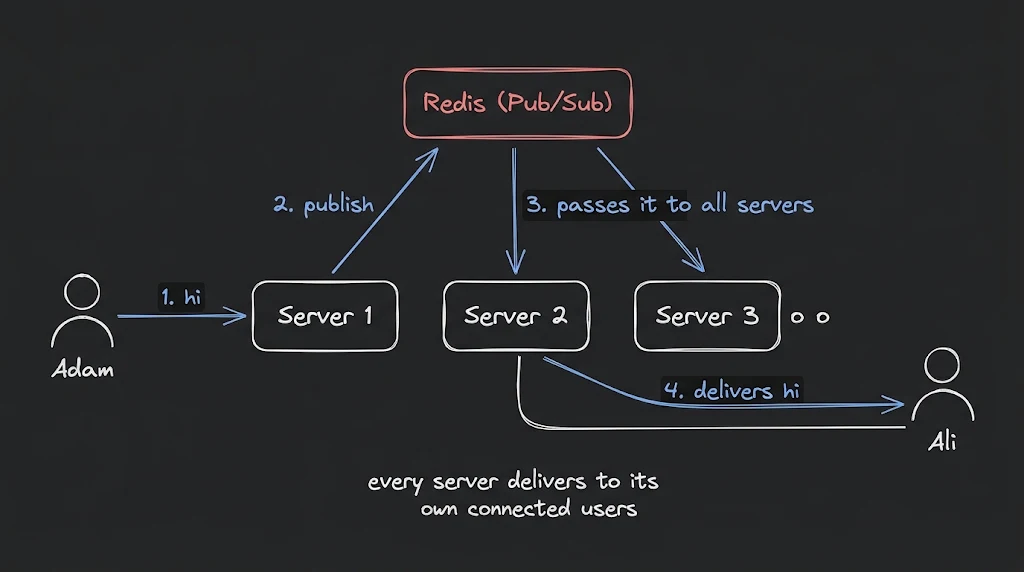
A single server has limits, so the connections are spread across many servers behind a load balancer. But now there is a new problem: user A may be connected to server 1 and user B to server 2. A message from A must reach B on a different server.
The solution is a shared message channel between the servers. With Socket.IO this is done with an adapter, commonly one built on Redis Pub/Sub. When a server wants to broadcast, it publishes the message to Redis, and every other server delivers it to its own connected users.
One more detail: when Socket.IO uses its HTTP long-polling fallback, a single session sends several HTTP requests, and they must all reach the same server. For this, the load balancer needs sticky sessions. If you allow only the WebSocket transport, the connection is one long TCP connection and this problem disappears.
2. Technology Built for Connections
Some technologies are designed for huge numbers of light connections. The Erlang virtual machine uses very lightweight processes, and WhatsApp's backend is built on Erlang. Phoenix, a framework in Elixir that runs on the same virtual machine, became famous for a benchmark that held 2 million WebSocket connections on a single large machine.
3. Managed Real-Time Platforms
Some platforms handle the real-time layer for you. Convex is one example. You do not write emit code or manage rooms. You simply store data in the database, and every client that is watching that data is updated automatically.
It is a great developer experience. But remember the fan-out problem: every change is sent to every subscribed user, and that is data you pay for.
A live learning platform with more than 100 rooms, each with 40 to 400 users watching in real time, can produce a very large bandwidth bill. The code was easy. The cost of delivering every update to every viewer was not.
This is the main lesson: the tools can hide the complexity, but they cannot remove the cost.
About the author
I'm Abdul Rahman, a full stack developer and CS student. I write about software engineering.
- Portfolio: abdulrdeveloper.me
- Blog: blog.abdulrdeveloper.me
- GitHub: abdulrdeveloper
About the author
- CS student and full-stack developer from Pakistan. Building with JavaScript, TypeScript, React, Next.js and Node.js. Currently in ChaiCode Web Dev Cohort 2026.
Comments
Join the discussionNo comments yet. Be the first to comment.