Authentication vs Authorization: Who Are You, and What Can You Do?
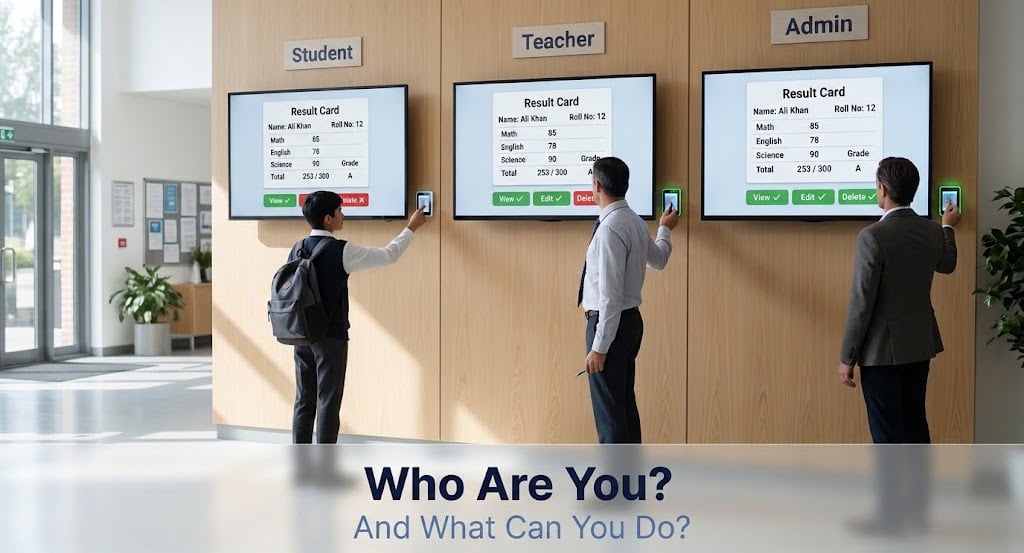
Many beginners ask this question: "Should I learn Node.js first, or should I learn authentication first?"
The answer is that authentication and authorization are not Node.js things. They are backend concepts, like routing or databases. The same ideas work in Node.js, Python, Java, PHP and every other backend language. Node.js and Express are just tools that we use to build them.
So first we understand the concept, and then we can build it in any language. In this blog, we will understand what authentication and authorization mean, how they are different, and how they work together in a real backend, using a simple example: a school result card.
Two Questions Every Backend Asks
Every time a request comes to a protected part of your backend, the server asks two questions:
- Who are you? This is authentication.
- What can you do? This is authorization.
The order is always the same. First we find out who the user is, and only then we decide what that user is allowed to do.
What is Authentication?
Authentication means proving who you are. The server must be sure that you are really that user.
The most common proof is a password. In general, there are three kinds of proof:
- Something you know: a password or a PIN.
- Something you have: a phone that receives an OTP, or an ID card.
- Something you are: a fingerprint or a face scan.
When we use two of these together (for example, a password and an OTP), it is called multi-factor authentication (MFA), and it is much safer.
There are many ways to build login in a backend: passwords with sessions, JWT tokens, or login with Google. We covered JWT in the last blog. In this blog, we only need to know one thing: after authentication, the server knows who the user is.
What is Authorization?
Authorization means deciding what an authenticated user is allowed to do.
Logging in does not mean you can do everything. A student and a teacher can both log in to the same school system, but they are not allowed to do the same things.
Authorization usually works in two ways:
- Roles: the user has a role like
student,teacheroradmin, and each role has its own permissions. - Ownership: the user can only access their own data. A student can see only their own result.
Example: The Result Card
Let`s use a school system with three users: a student, a teacher and an admin. They all log in, so all of them are authenticated. But they are authorized differently:
| Action | Student | Teacher | Admin |
|---|---|---|---|
| View own result | Yes | Yes | Yes |
| View other students' results | No | Yes | Yes |
| Edit marks | No | Yes | Yes |
| Delete a result | No | No | Yes |
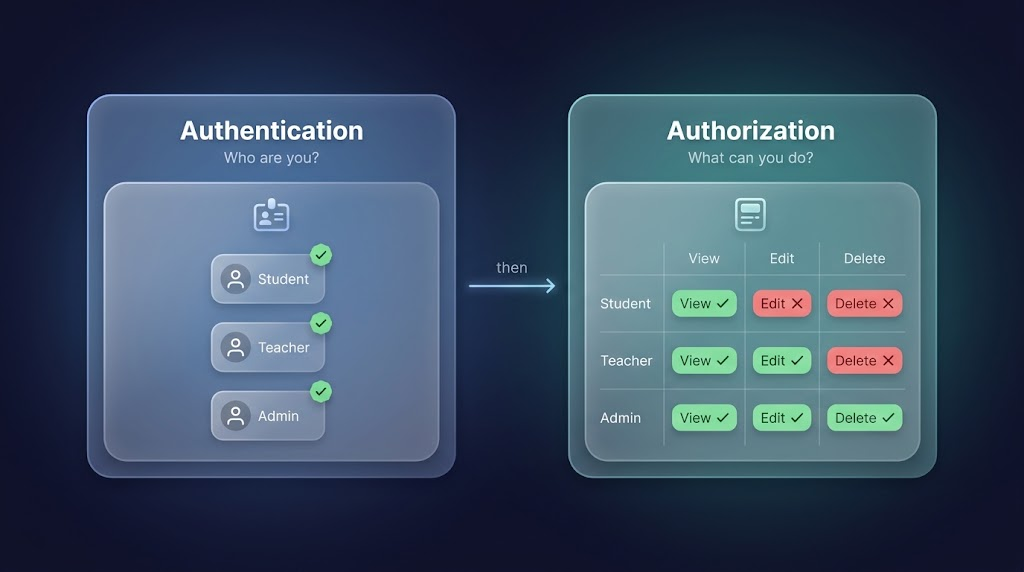
All three users prove who they are in the same way. The difference comes after that, in what each of them is allowed to do.
Authentication vs Authorization
Remember the status codes: 401 means "we do not know who you are", and 403 means "we know who you are, but you are not allowed".
How They Work Together in a Request
In a real backend, every protected request passes through these steps:
- The request comes in with a token.
- Authenticate: the server verifies the token and finds out who the user is. If this fails, the answer is
401. - Authorize: the server checks the user's role or ownership. If this fails, the answer is
403. - The route handler runs and sends the response.
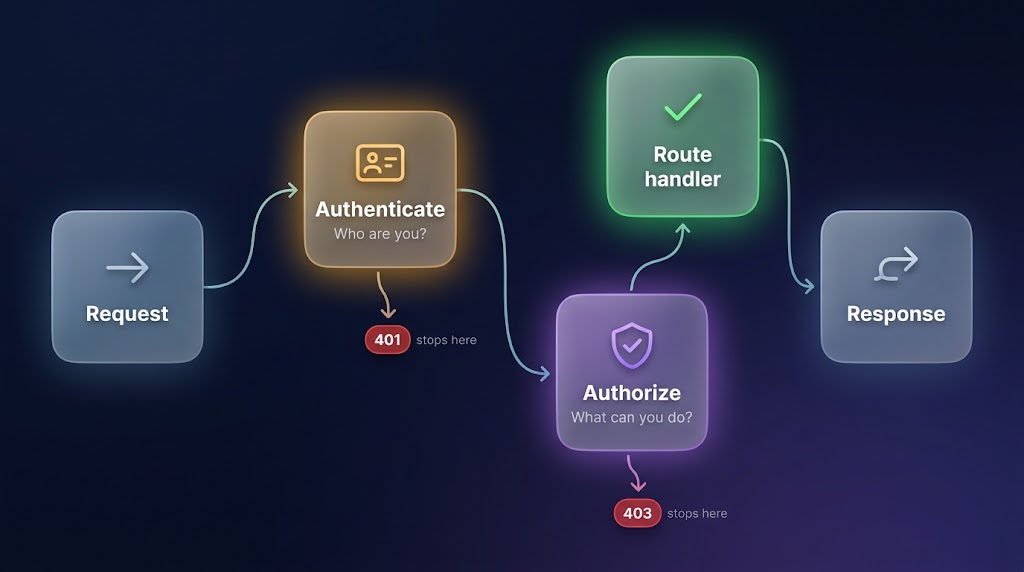
This is exactly a pipeline of middlewares, and each step does one small job.
Building It in Express
Let's build the result card rules. First, we need an authentication middleware. Its job is to find out who the user is and save it in req.user, so every next step can use it.
function verifyToken(req, res, next) {
  // read the token from the request
  // verify the token (for example, with a JWT library)
  // if the token is missing or invalid:
  // return res.status(401).json({ error: 'You are not logged in' });

  req.user = { id: 12, role: 'student' }; // data taken from the token
  next();
}
After this middleware, req.user holds the user`s id and role. Now we can build authorization as the next step of it.
Authorization by Role
We create a middleware that returns a middleware, so we can reuse it for any role:
function requireRole(...roles) {
  return (req, res, next) => {
    if (!roles.includes(req.user.role)) {
      return res.status(403).json({ error: 'You do not have permission' });
    }
    next();
  };
}
Now we protect the routes:
// Teacher or admin can edit marks
app.put('/results/:id', verifyToken, requireRole('teacher', 'admin'), (req, res) => {
  // update the marks in the database
  res.status(200).json({ message: 'Marks updated' });
});

// Only admin can delete a result
app.delete('/results/:id', verifyToken, requireRole('admin'), (req, res) => {
  // delete the result from the database
  res.status(204).end();
});
The order is important , verifyToken runs first and sets req.user, then requireRole reads it.
Authorization by Ownership
A role is not enough for viewing a result. A student can view a result, but only their own. So we also check who owns the result:
app.get('/results/:id', verifyToken, (req, res) => {
  // get the result from the database using req.params.id
  const result = { id: req.params.id, studentId: 12 }; // imagine this came from the database

  const isOwner = result.studentId === req.user.id;
  const isStaff = req.user.role === 'teacher' || req.user.role === 'admin';

  if (!isOwner && !isStaff) {
    return res.status(403).json({ error: 'You can only view your own result' });
  }

  res.status(200).json(result);
});
Here, a student with id 12 can open their own result. If the student changes the id in the URL to see someone else's result, the server returns 403.
Things to avoide as a best practice:
- Mixing : a user who is logged in is not automatically allowed to do everything. Always check authorization after authentication.
- Hiding buttons only on the frontend: if the edit button is hidden, the API is still open. Anyone can send the request with Postman. Always check on the server.
- Trusting the user id from the request body or the URL: take the user`s identity from the verified token (
req.user), not from what the client sends. - Skipping the ownership check: if a user can change an id in the URL and see another person`s data, it is a serious security bug. It is known as broken access control.
- Storing plain passwords: always hash passwords before saving them in the database so that in case of db leak, the hacker or any attacker still can`t get the password .
- Giving too much power by default: give every user the lowest role, and give more permissions only when needed.
Some Points to note down :
- Authentication and authorization are backend concepts. They are not limited to Node.js.
- Authentication answers "Who are you?". Authorization answers "What can you do?".
- Authentication always comes first, and authorization comes after it.
- Authentication fails with
401, authorization fails with403. - Authorization works through roles and ownership.
- In Express, both are middlewares:
verifyTokenfor authentication,requireRoleand an ownership check for authorization. - Always check on the server. Never trust the frontend.
logging in proves who you are, but it does not give you permission to do everything.
You can find more of my work at abdulrdeveloper.me
Read more posts at blog.abdulrdeveloper.me
About the author
- CS student and full-stack developer from Pakistan. Building with JavaScript, TypeScript, React, Next.js and Node.js. Currently in ChaiCode Web Dev Cohort 2026.
Comments
Join the discussionThe 401 vs 403 mapping is the cleanest way to keep the two straight. The ownership point deserves the extra emphasis: a role check like "is a student" still lets one student read another's result, so ownership has to be enforced per resource, not only per role.