Think Like a Factory: JavaScript Fundamentals That Actually Stick

Let’s Go in deep dive of JS :
Main work in programming languages is this:
What to do (identify the problem)
How to do (implement the solution)
JavaScript is like a factory, in a factory :
Some input is given and that input gets process
There are some functions which are like rooms - input goes there, get process and come back to the main hall.
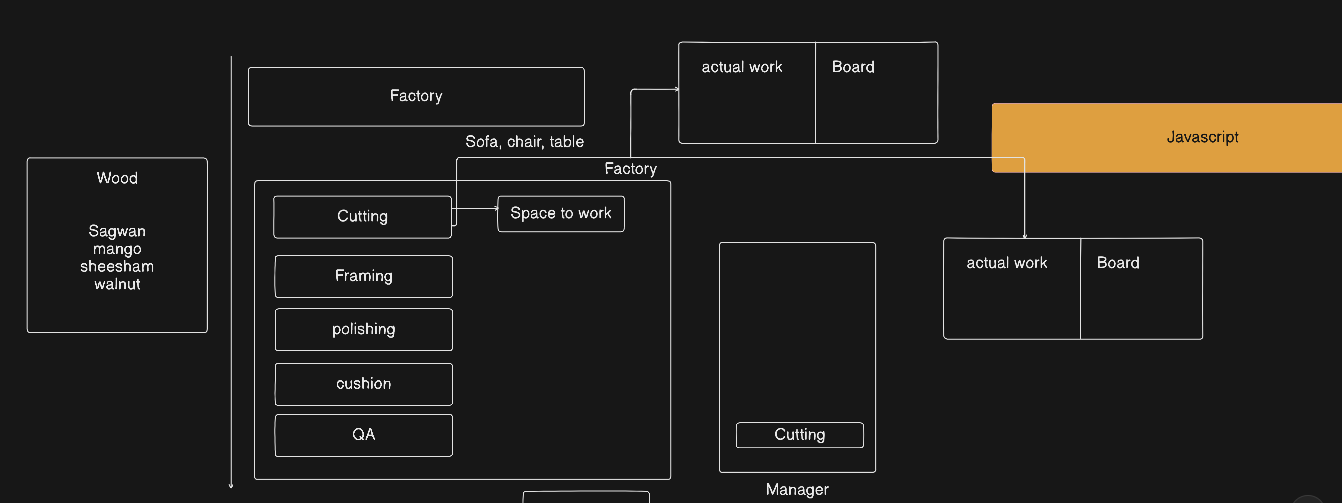
Example - Wood Factory :
There is a factory in which woods are coming:
First of all the woods are cut
Then they are polish
Then cushion and carve is done
Every step is happening in a proper flow
This complete process is handled by the factory manager :
He receive the order
First he show it on the globally board (so everyone know about it)
Then manager send the work in a flow to every room of factory
First wood go to cutting room → then polish room → then carving room
In this way the complete flow is running
Wood factory workflow diagram:
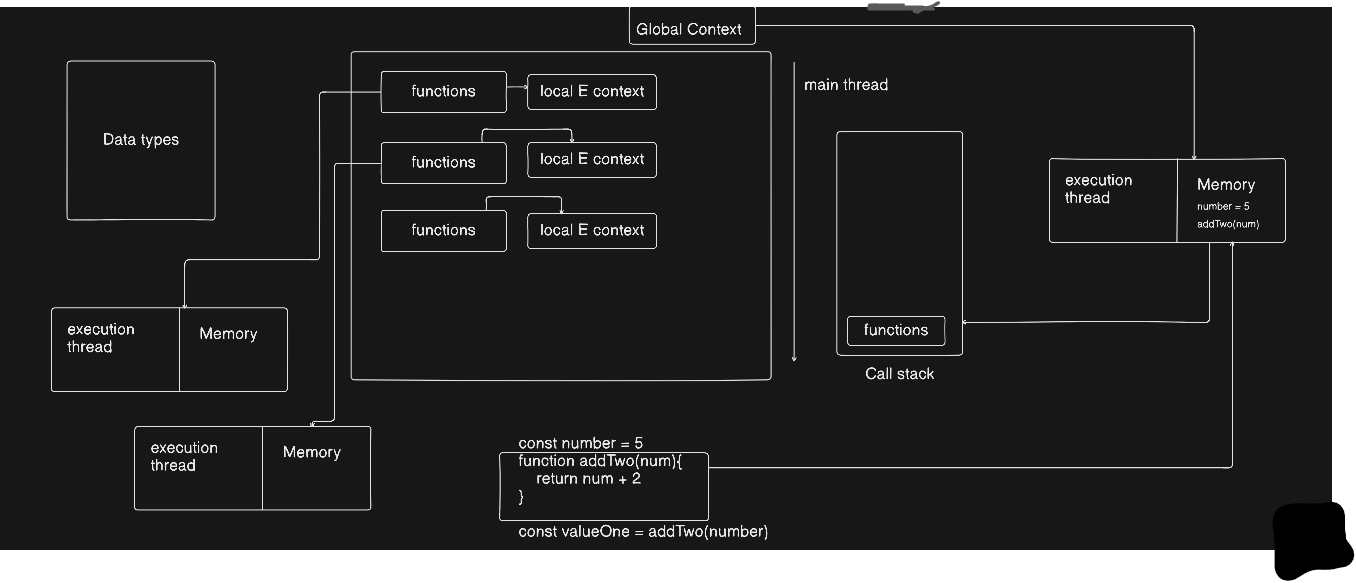
JavaScript Also Work Exactly Like This :
First of all we check the data types
We save them on globally board (in variables) so we can use them later
We make small small functions (we can also call them rooms)
They help us
Code is not overwrite (every function do its own work)
can be reuse, same as room we can send anything in any room and it come back after process
They help in processing every input
All this flow is managed by Call Stack (factory manager) - it decide which function will run when and in which order.
JS Factory WorkFlow diagram:
Important Devtools in inspect:
elements: for html/css
console : for js (can write any kind of valid js)
sources : for watching what is loading and from where
Network tab : for seeing if your browser is calling external APIs
performance tab : for measuring website performance.
Learn Function Here :
A function does not care from where and what the data is coming, user, hard-coded, API, anything , it only knows that how to proceed the given input and return a result.
     let num1 = Number(prompt("Enter First Number: "));
       let num2 = Number(prompt("Enter Second Number: "));
        function sayhello(a,b){
            return a * b;
        }
        /* we give 2 numbers in function (those numbers are given by the user) */
        let finaloutput = sayhello(num1,num2);
        console.log(`Hello Dear , Your calculation is: ${finaloutput}`);

        /* it`s reuse of function, we give 2 numbers to the function by ourself */

        let userinput = sayhello(5,8);
        console.log(userinput);
Ways to write Function:
Function Declaration
function sayhello() {
    return "Hello!";
}
let result = sayhello();
console.log(result);
Important Points:
It start with
functionkeywordFunction must have a name
We can call it directly
Hoisting happen (means we can call it first, and define it later)
Function Expression:
const greet = function() {
    return "Hello!";
};
let result = greet();
console.log(result);
Important Points:
We store the function in a variable
Function has no name of its own (anonymous)
We call it using the variable name
Semicolon (
;) is recommended at the endWe use
constorletNo hoisting (first we define it, then we call it)
Arrow Function :
const greet = () => {     //just => added at the place of function
    return "Hello!";
};

// Short form (single line):
const greet = () => "Hello!";

let result = greet();
console.log(result);
Arrow function is same as Function expression. It just replaced function into => this
Important Points:
=>is used in place offunctionkeywordEverything else is same like Function Expression
Short form: if there is only one line return then remove
{}andreturn.
Learn If-else :
let userage = Number(prompt(`Enter Your Age`));
    if(userage <= 10){
        console.log(`you are a child`);
   }
    else if(18 >= userage && userage > 10 ){
         console.log(`you are a teen`);
    }
    else if(20 >= userage && userage > 18){
        console.log(`you are an adault`);
    }
    else if(40 >= userage && userage > 20 ){
        console.log(`you are mature man .`);
    }
    else{
        console.log(`Best of luck , dear senior dev. `);
    }
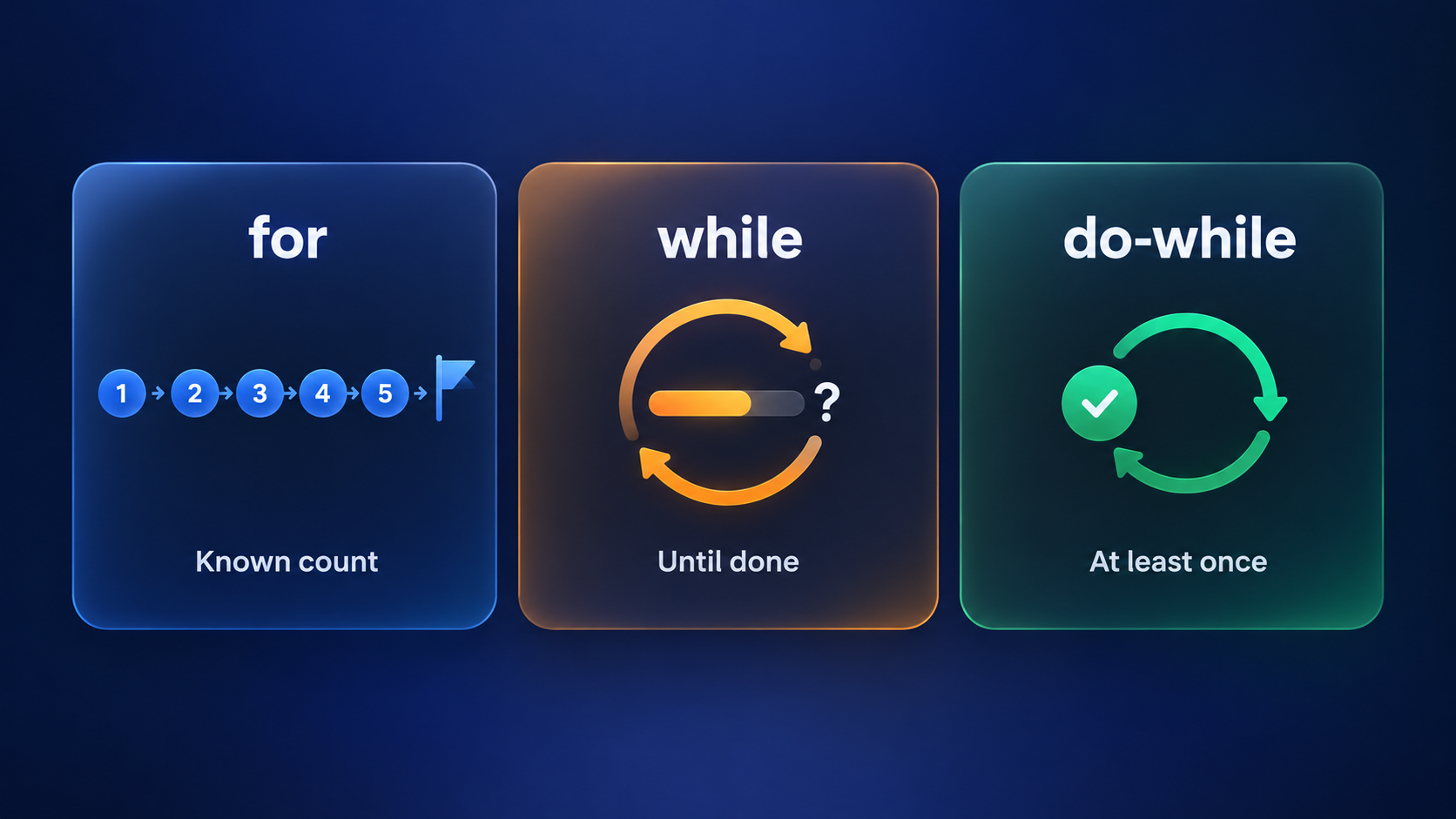
For-Loop :
let firstnumber = Number(prompt(`Enter Starting Number: `));
let lastnum = Number(prompt(`Enter Last Number: `));

for (let i = firstnumber; i <= lastnum; i++) {
    console.log(i);
}
Always remember this, i = 0 or i = firstnumber it means here we add the exact starting number of the loop, from where it should start ,
and in
i <= 10 or i <= lastnumwe have to enter the last number where the loop go and stop .i++ increase 1 every time in code, here we can also write i += 2 or i += 3 then it will add 2 or 3 every time in code
Use for loop when you already know exactly how many iteration needed . exactly how many lines to print .
Real-world use case For Loop:
Printing a table
- table is from 1 to 10, we have to print it
Students list
- there are 30 students in the class, we have to print them
Array / list data
- we know the size of the items inside the array
Game levels
- Game has 10 levels
While Loop:
when we don't know how many times the work will repeat
while loop iterate the code until the code is complete . We don't know in exactly how many iteration it will complete but it will keep running until code is complete .
Example :
We are downloading a file from server but we don't know in exactly how many iteration the file will download, because sometime file come 1MB per second and sometime 10MB per second.
let filesize = 1024 ;            // Just suppose the file size is 1024MB
let currentfiledownload = 0;
// current download MB of the file eg (100MB , 200MB , 500MB)
while (filesize > currentfiledownload){
    console.log("increase the mb after every iterate");
    currentfiledownload = currentfiledownload + 40;
/* data comes in chunk from the server so it can be 10,20,30 etc everytime) */
}
Real-World use case While loop:
File download
- don't know how much time it will take
Login system
- until the password is wrong
Game life
- until life > 0
Loading Screen
- until the data is not loaded
do-while loop:
It is same like while loop but it run the code at least one time even if the statement is false, still it will run at least 1 time ;
let filesize = 1024 ;
let currentfiledownload = 3000;
do{
    console.log("increase the mb after every iterate");
    currentfiledownload = currentfiledownload + 40;
}
while (filesize > currentfiledownload);
Just suppose the file size is 1024MB
We wrote current download 3000MB of the file means statement is false , so the loop will not work,
but it will run code atleast 1 time because of
do-whilethen it checks the statement.
Real world use case Do-while loop :
Menu system (ATM / Calculator)
- Menu is always show first
Login form
User have to enter the password at least 1 time, whether password is wrong or right,
prompt will run one time for sure .
Game start
- Game start screen always come one time
Ternary Operator:
It is the shortest version of if else statements . Use it in simpler codes/tasks , it is not suitable for big projects because we can get confused.
Example of ternary
let age = 18;

let result = age >= 18 ? "Adult" : "Minor";
console.log(result);
How it works:
age >= 18→ condition"Adult"→ runs if condition is true"Minor"→ runs if condition is false
Switch Statement:
let day = prompt("Enter day of the week");

switch(day) {
    case "Monday":
        console.log("Start of the week");
        break;
    case "Friday":
        console.log("Almost weekend");
        break;
    case "Saturday":
    case "Sunday":
        console.log("Weekend!");
        break;
    default:
        console.log("Midweek day");
}
Always remember this:
in
switch(expression)expression = the variable we want to checkcase value:→ it check if the value of variable is equal to case or notbreak→ it make sure that after match, come out of the switchdefault→ if no case match, then this run
Use switch when: we need different action for multiple exact values of one variable
Real-world use case Switch Statement:
Calculator operator:
User enters+,-,*,/→ different calculation for every operatorMenu systems:
ATM / Game menu / App menu → user select 1,2,3,4 → different actionDay scheduler / Calendar apps:
Variable ="Monday","Saturday"etc → show message or activityGame levels:
Level number = 1,2,3 → different difficulty or enemiesPayment method selection:
Credit Card, PayPal, Bank Transfer → take different action
Arrays (List of items)
Array is a container in which we can store multiple values together.
Every item has an index, start from 0.
let colors = ["red", "green", "blue"];
// index        0       1       2
colors[0]→ "red"colors[1]→ "green"colors[2]→ "blue"
Real-world examples:
| Use Case | Example |
|---|---|
| Student list | Storing the names of 30 students in class |
| Shopping cart | Storing items in the cart of user |
| Game scores | Storing scores of players in game |
| Colors / Settings | Storing theme colors of website |
Use with Loop:
- It help us to access every element of array one by one.
for (let i = 0; i < colors.length; i++) {
  console.log(colors[i]); // prints red, green, blue
}
Nested Loops (Loops inside loops)
When one loop run inside another loop, we call it nested loop.
It is used when we have to process 2D data or grid.
Example:
Printing 3×3 grid
Printing the combination of Row and Column
for (let row = 1; row <= 3; row++) {
  for (let col = 1; col <= 3; col++) {
    console.log(`Row ${row} Col ${col}`);
  }
}
Real-world use cases:
| Situation | Example |
|---|---|
| Classroom seating | Assigning number to students in rows and columns |
| Game boards | Chess, Tic-Tac-Toe, 2D map grid |
| Website table | Showing data in row and column |
| Calendar / Schedule | Making the grid of Weekdays × Hours |
| Image / Pixels | Processing every pixel (photo editing) |
Hoisting :
Hoisting means:
In JavaScript, variable and function declarations are automatically taken to the top before execution.
Only declaration go up, not the value assignment.
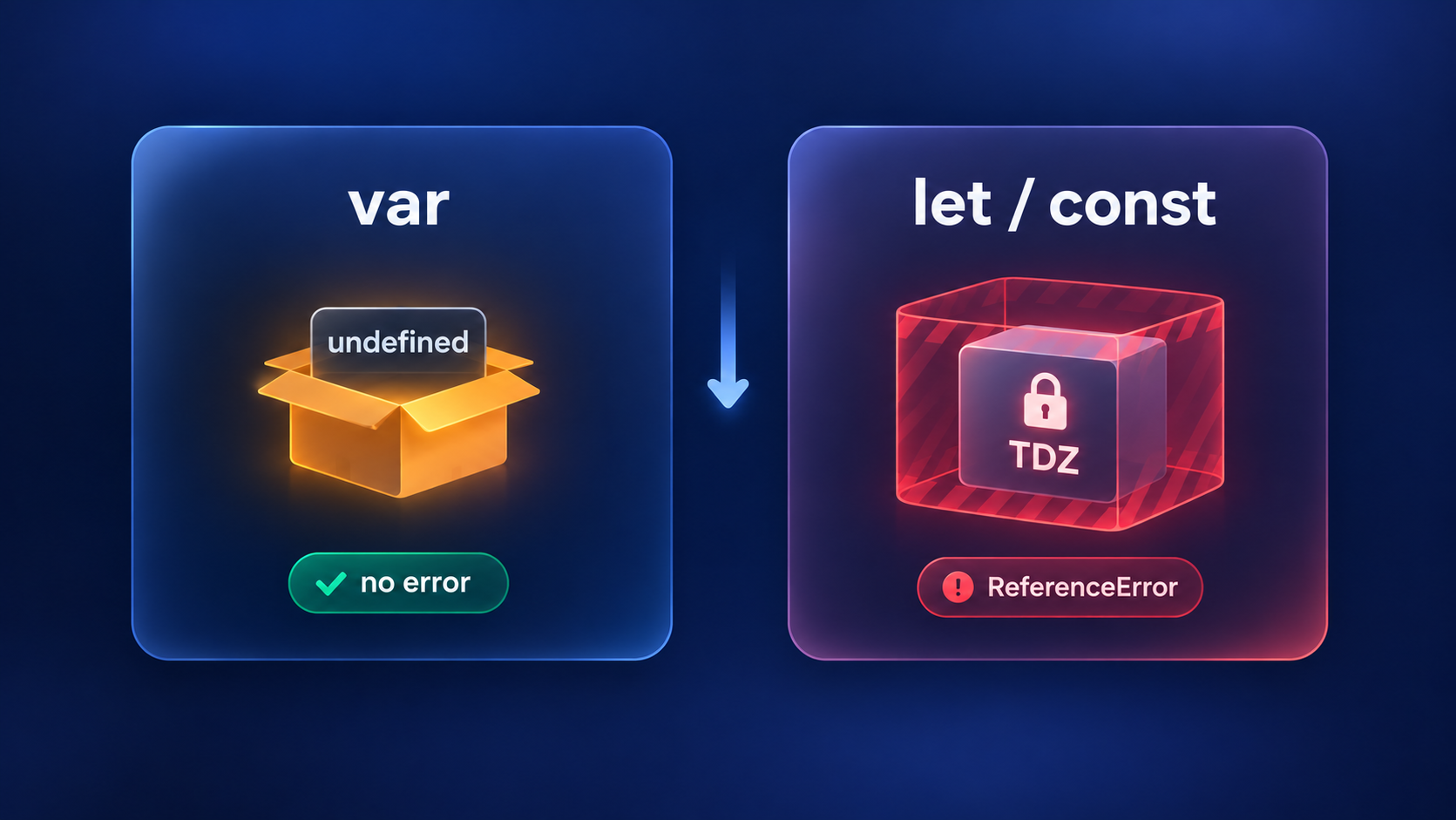
In
varvariables we get undefined if we use it before.In
letandconstthere is Temporal Dead Zone (TDZ) → if we access it before then we get error.
var
Declaration get hoisted.
Default value =
undefined.If we access it before, no error, we just get
undefined.
console.log(x); // undefined
var x = 5;
let / const
Declaration technically get hoisted.
It stay in TDZ → access before = ReferenceError.
We can use it after initialize.
console.log(y); // ReferenceError
let y = 10;
Finding a specific item in Array:
We can find a specific item data in an array using its index number.
let students = ["Abdul","Ali","Ahmad","Hamza","Sohail","Anas"];
console.log(students[0], students[2]);
// Output: Abdul Ahmad (Abdul is on 0 index and Ahmad is on 2 index)
Check item by Name (Available or Not) in Array:
We can check if a specific item exists in the array using includes().
let students = ["Abdul","Ali","Ahmad","Hamza","Sohail","Anas"];
console.log(students.includes("Anas"));
// Output: true

console.log(students.includes("Zain"));
// Output: false
Get a slice of items from the Array:
We can extract a portion of array using slice(start, end). End index is not included.
let students = ["Abdul","Ali","Ahmad","Hamza","Sohail","Anas"];
console.log(students.slice(2, 5));
// Output: ['Ahmad', 'Hamza', 'Sohail']
// (index 2, 3, 4      index 5 not included)
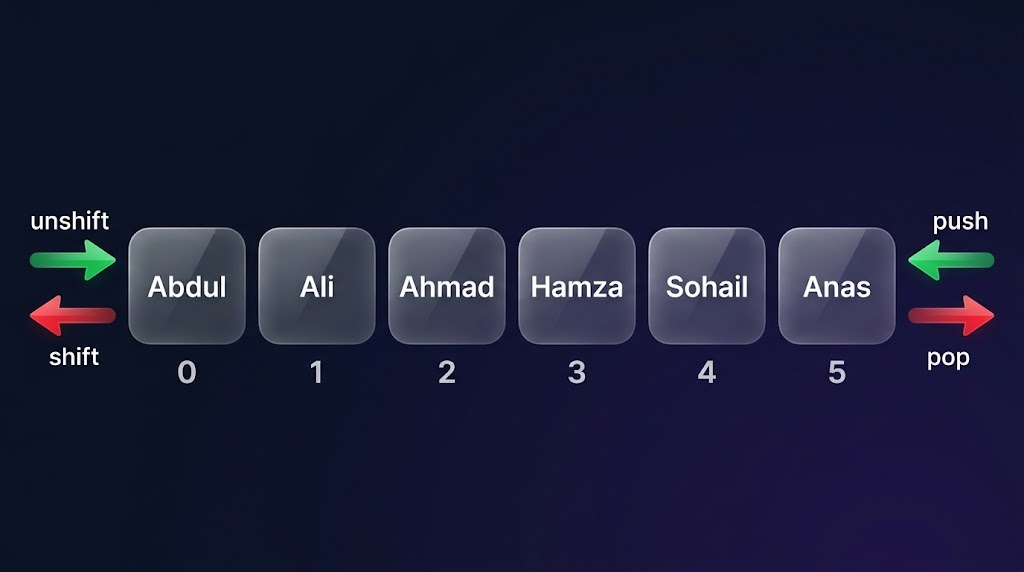
Add item at the Start in Array:
We can add item at the beginning using unshift().
let students = ["Abdul","Ali","Ahmad","Hamza","Sohail","Anas"];
students.unshift("Rahul");
console.log(students);

/* Output:
   ['Rahul', 'Abdul', 'Ali', 'Ahmad', 'Hamza', 'Sohail', 'Anas'] */
Add item at the End in Array:
We can add item at the end using push().
let students = ["Abdul","Ali","Ahmad","Hamza","Sohail","Anas"];
students.push("Adam");
console.log(students);

/* Output:
   ['Abdul', 'Ali', 'Ahmad', 'Hamza', 'Sohail', 'Anas', 'Adam'] */
Remove item from the Start in Array:
We can remove the first item using shift().
let students = ["Abdul","Ali","Ahmad","Hamza","Sohail","Anas"];
students.shift();
console.log(students);

/* Output:
   ['Ali', 'Ahmad', 'Hamza', 'Sohail', 'Anas'] */
Remove item from the End in Array:
We can remove the last item using pop().
let students = ["Abdul","Ali","Ahmad","Hamza","Sohail","Anas"];
students.pop();
console.log(students);

/* Output:
   ['Abdul', 'Ali', 'Ahmad', 'Hamza', 'Sohail'] */
Check length of the Array:
We can check the total number of items in the array using length.
let students = ["Abdul","Ali","Ahmad","Hamza","Sohail","Anas"];
console.log(students.length);
// Output: 6
Find index of an item:
We can find the position (index) of an item using indexOf().
let students = ["Abdul","Ali","Ahmad","Hamza","Sohail","Anas"];
console.log(students.indexOf("Ahmad"));
// Output: 2

console.log(students.indexOf("Zain"));
// Output: -1 (not found)
Reverse the Array:
We can reverse the order of items using reverse().
let students = ["Abdul","Ali","Ahmad","Hamza","Sohail","Anas"];
students.reverse();
console.log(students);

/* Output:
   ['Anas', 'Sohail', 'Hamza', 'Ahmad', 'Ali', 'Abdul'] */
Join Array items into a String:
We can combine all items into one string using join().
let students = ["Abdul","Ali","Ahmad","Hamza","Sohail","Anas"];
console.log(students.join(", "));
// Output: "Abdul, Ali, Ahmad, Hamza, Sohail, Anas"

console.log(students.join(" - "));
// Output: "Abdul - Ali - Ahmad - Hamza - Sohail - Anas"
Quick Reference Table:
| Method | Action | Position | Returns |
|---|---|---|---|
push() |
Add | End | New length |
pop() |
Remove | End | Removed item |
unshift() |
Add | Start | New length |
shift() |
Remove | Start | Removed item |
slice(start, end) |
Extract | Any | New array |
includes(item) |
Check | - | true/false |
indexOf(item) |
Find index | - | Index or -1 |
reverse() |
Reverse | - | Reversed array |
join(separator) |
Convert | - | String |
length |
Count | - | Number |
Higher Order Functions :
A function which:
Take another function as argument (input)
Or return a function (output)
Without Higher Order Function (Repetition):
function makeBiryani() {
    return "Biryani";
}

function makePizza() {
    return "Pizza";
}

function makeBurger() {
    return "Burger";
}

// Every time we have to write the SAME pattern
console.log("Order liya");
console.log("Bana raha hoon...");
console.log(makeBiryani());
console.log("Serve kiya!");
console.log("---");

console.log("Order liya");
console.log("Bana raha hoon...");
console.log(makePizza());
console.log("Serve kiya!");
console.log("---");

console.log("Order liya");
console.log("Bana raha hoon...");
console.log(makeBurger());
console.log("Serve kiya!");
Problem: Every time the same things repeat !
With Higher Order Function (Smart Way):
function makeBiryani() {
    return "Biryani";
}

function makePizza() {
    return "Pizza";
}

function makeBurger() {
    return "Burger";
}

// WRITTEN ONE TIME (reusable!)
function cook(recipeFunction) {
    console.log("Order liya");
    console.log("Bana raha hoon...");
    return recipeFunction();
}

// Now just do this
console.log(cook(makeBiryani));    // it will print, you can print others also
cook(makePizza);
cook(makeBurger);
Benefit: We write cook one time, now we can use it as many times as we want !
For Each :
forEach() is a Higher Order Function which run a function on every element of the array.
let students = ["Abdul", "Ali", "Ahmad", "Hamza"];

students.forEach(function(student) {
    console.log(student);
});

/* Output:
Abdul
Ali
Ahmad
Hamza
*/
let names = ["Abdul", "Ali", "Ahmad"];

const greet = name => {
    console.log(`Hello ${name}! Welcome to the class!`);
};

names.forEach(greet);

/* Output:
Hello Abdul! Welcome to the class!
Hello Ali! Welcome to the class!
Hello Ahmad! Welcome to the class!
*/
Map Method :
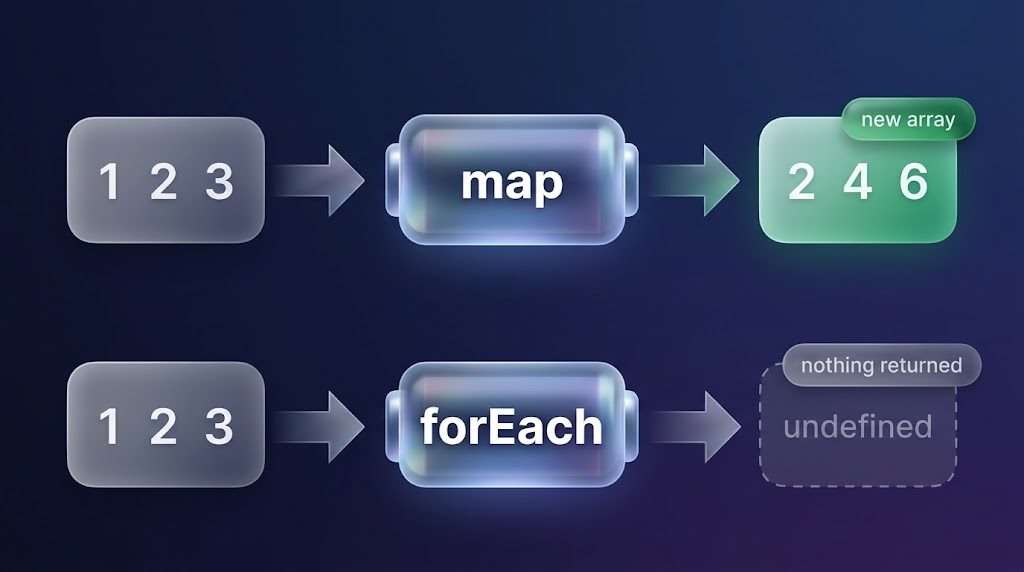
Map always return a new array
on whichever array we apply map, map make a new array,
and it apply on all items of the real array,
but it don't touch the real array, all the output is saved in the new array .
in this way it make a new array without touching the old/real array and save the output in it.
let students = [1, 2, 3, 4, 5, 6];

function double(numberinside){
  return (numberinside * 2);
}

let numbersDouble = students.map(double);
console.log(numbersDouble);  // output: [2, 4, 6, 8, 10, 12]

/* or short version

let numbersDouble = students.map(numberinside => numberinside * 2);
console.log(numbersDouble);
output : [2, 4, 6, 8, 10, 12] */
Map() vs For-each function :
map() - Return a new array:
let numbers = [1, 2, 3];
let doubled = numbers.map(num => num * 2);
console.log(doubled);  // [2, 4, 6]
forEach() - Return nothing (undefined):
let numbers = [1, 2, 3];
let doubled = numbers.forEach(num => num * 2);
console.log(doubled);  // undefined
Use Case (When to Use)
map function:
map() - When we need a new array:
let students = ["Abdul", "Ali", "Ahmad"];

// We need every name in uppercase
let upperNames = students.map(name => name.toUpperCase());
console.log(upperNames);  // ["ABDUL", "ALI", "AHMAD"]
For-each Function:
forEach() - When we only want to do some action (display, save, etc):
let students = ["Abdul", "Ali", "Ahmad"];

// Just want to print
students.forEach(name => console.log(name));
// Abdul
// Ali
// Ahmad
If you did not find a topic you were looking for, please check my notes. I hope you will find it there: FullStackHub / Learn JavaScript
You can find more of my work at abdulrdeveloper.me
Read more posts at blog.abdulrdeveloper.me
About the author
- CS student and full-stack developer from Pakistan. Building with JavaScript, TypeScript, React, Next.js and Node.js. Currently in ChaiCode Web Dev Cohort 2026.
Comments
Join the discussionNo comments yet. Be the first to comment.