Behind the Gate: What Node.js Really Does When You Run node app.js
Introduction
We use Node.js every day. We write node app.js and our code runs. But if somebody asks "what is happening behind the scene?", very few developers know the answer. For most of us, Node.js is a black box.
In this blog, we will open this box and look inside: V8, libuv, Event Loop and Thread Pool. We will also run small experiments, so we can see everything working with our own eyes.
Node.js Formula
Node.js is not one single thing. It is a mixture of 3 big parts:
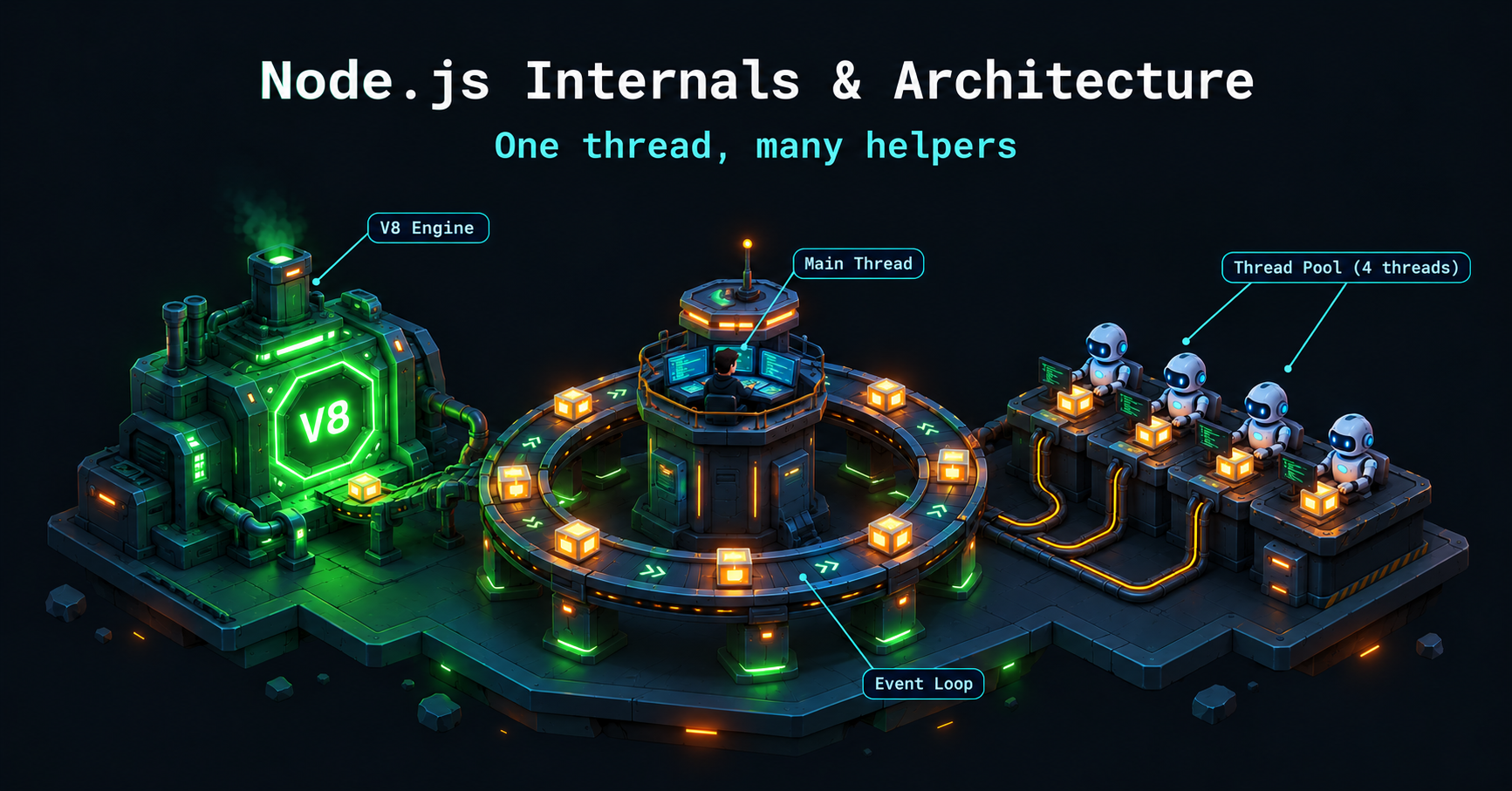
V8 Engine: made by Google, written in C++. It converts our JavaScript into machine code, very fast.
libuv: a C library which handles async work (files, network, timers). It manages the Event Loop and the Thread Pool.
C++ Bindings: the bridge between our JavaScript and the C/C++ parts.
Formula: V8 + libuv + CPP + Bindings = Node.js
Simple way to remember:
V8 = the brain (understands JavaScript)
libuv = the hands and legs (does the work in background)
C++ Bindings = the nerves (connect brain and hands)
Important: V8 only understands JavaScript. It does not know how to read a file or make a network call. For that, it needs libuv.
The Life Cycle of node app.js
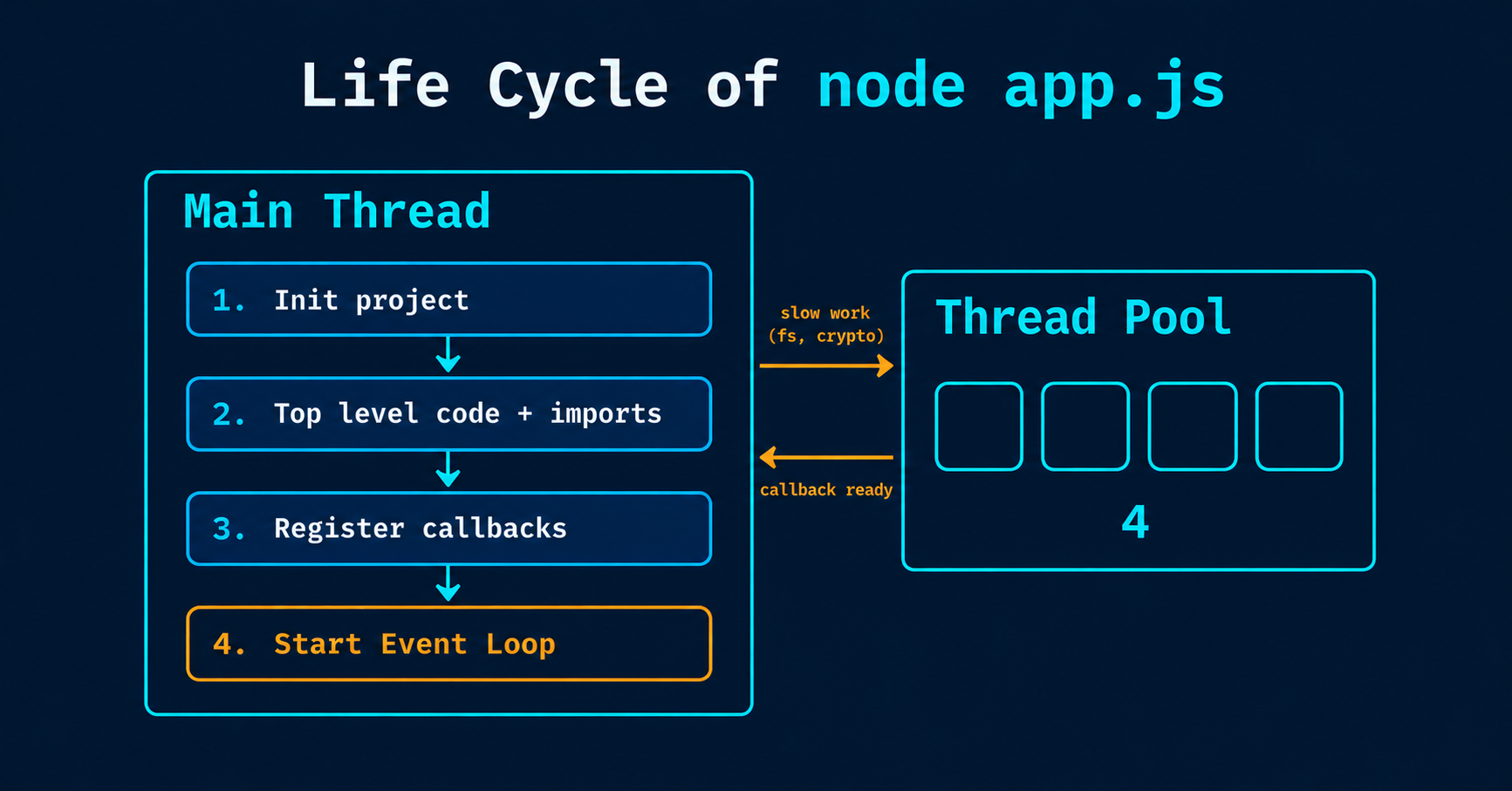
When we run node app.js in terminal, this happens on the main thread:
Init project: Node sets up its environment.
Top level code: all the code outside callbacks runs first, and imports are loaded.
Register callbacks: async work (timers, file reading) is registered, to run later.
Start the Event Loop.
That is why top level code always prints first. Callbacks wait for their turn.
The Event Loop
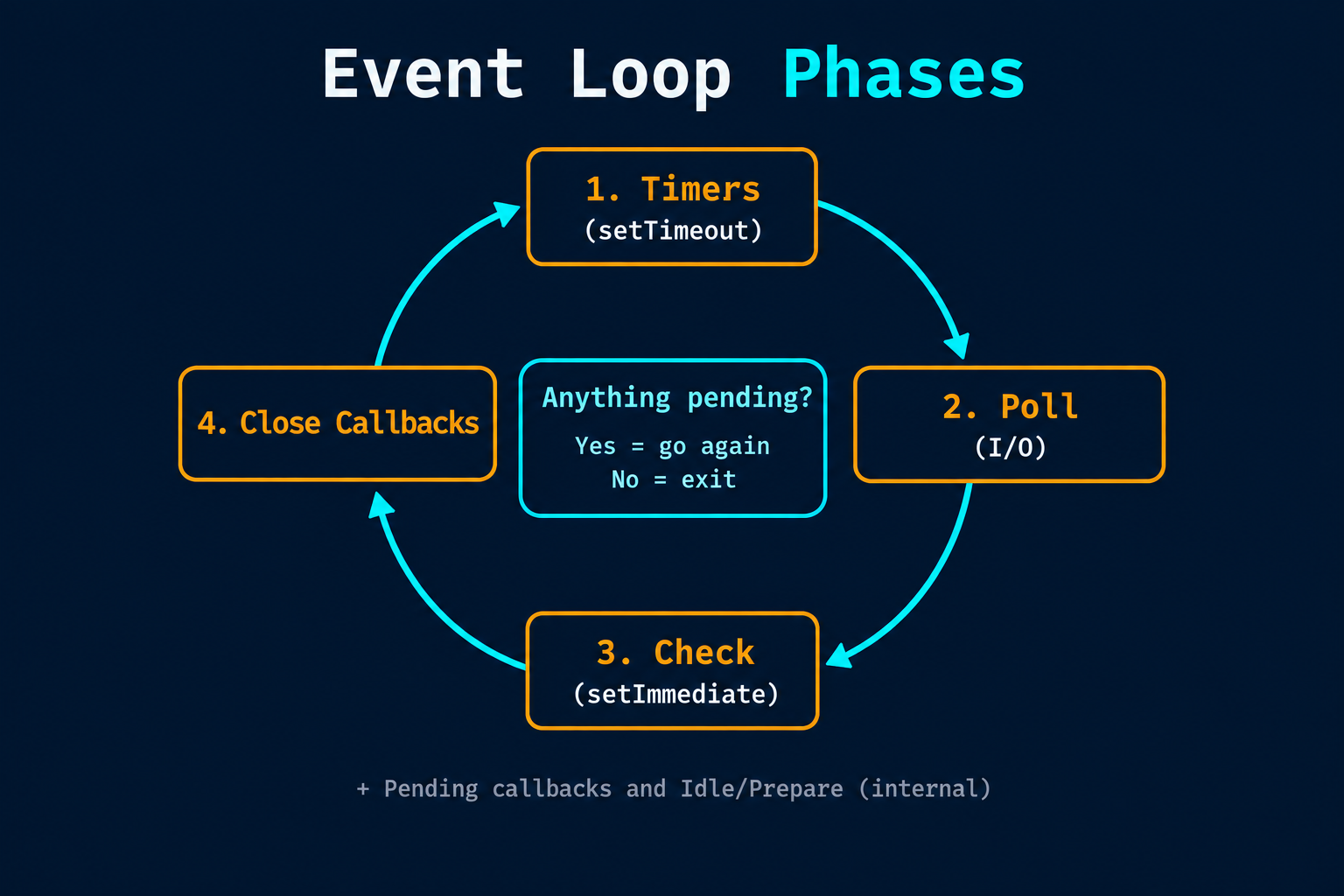
Event Loop is like a while loop which keeps running as long as there is some work to do. Think of it like a traffic signal: it decides which callback goes next.
while True {
  ExpiredCallbacks()   // run setTimeout / setInterval callbacks whose time is finished
  IO Polling()         // run callbacks of finished I/O work (file reading, network)
  setImmediate()       // run setImmediate callbacks
  close callbacks()    // run cleanup callbacks (like closing a connection)

  check if anything pending?
  No = Exit                    // nothing left: loop stops, program ends
  Yes = Continue               // work left: start the next round
}
After every round, Node checks: is anything still pending? If yes, the loop goes again. If no, the loop stops and the program exits.
That is why a simple script ends by itself after the last callback, and a server keeps running (because it is always waiting for new requests).
Exercises: Guess the Output First
Now let's test the phases with small experiments. (Your project needs "type": "module" in package.json, because we use import.)
Exercise 1: Timer vs Top Level Code
import fs from 'fs';

setTimeout(() => console.log('Hello from Timer'), 0);

console.log('Hello from Top Level Code');
Output:
Hello from Top Level Code
Hello from Timer
Even with 0 ms, the timer callback waits. First the top level code finishes, then the Event Loop starts and runs the timer.
Exercise 2: Timer vs Immediate
import fs from 'fs';

setTimeout(() => console.log('Hello from Timer'), 0);
setImmediate(() => console.log('Hello from Immediate'));

console.log('Hello from Top Level Code');
Top level code is always first. But the order of Timer and Immediate is not guaranteed here. Why?
setTimeout(fn, 0) is not really "zero". Node treats it as 1 ms. When the loop starts, it checks the Timers phase first:
If 1 ms has already passed, Timer runs first, then Immediate.
If 1 ms has not passed, Timer is skipped, and Immediate (Check phase) runs first.
It depends on your machine speed, so run it 5-6 times. On some machines you will see Timer first, on some Immediate first.
Exercise 3: Adding File Reading
import fs from 'fs';

setTimeout(() => console.log('Hello from Timer'), 0);
setImmediate(() => console.log('Hello from Immediate'));

fs.readFile('sample.txt', 'utf-8', function (err, data) {
  console.log('File Reading Complete...');
});

console.log('Hello from Top Level Code');
Output (usually):
Hello from Top Level Code
Hello from Timer
Hello from Immediate
File Reading Complete...
Reading a file takes time, because it is done in the background (thread pool). So its callback comes in the Poll phase of a later round, after Timer and Immediate.
Thread Pool: The Helpers
Event Loop runs on the main thread. But slow work like file reading or hashing cannot be done on the main thread, otherwise everything will freeze. So libuv has a Thread Pool: a group of helper threads (4 by default).
What goes to the Thread Pool:
fs(file system operations, likereadFile)crypto(heavy functions likepbkdf2,scrypt,randomBytes)zlib(compression)dns.lookup
What does NOT go to the Thread Pool:
Your own JavaScript code. A heavy
forloop with 1 billion iterations runs on the main thread, and it blocks everything.Network work (HTTP, TCP). It is handled by the operating system, without thread pool.
Timers (
setTimeout,setInterval).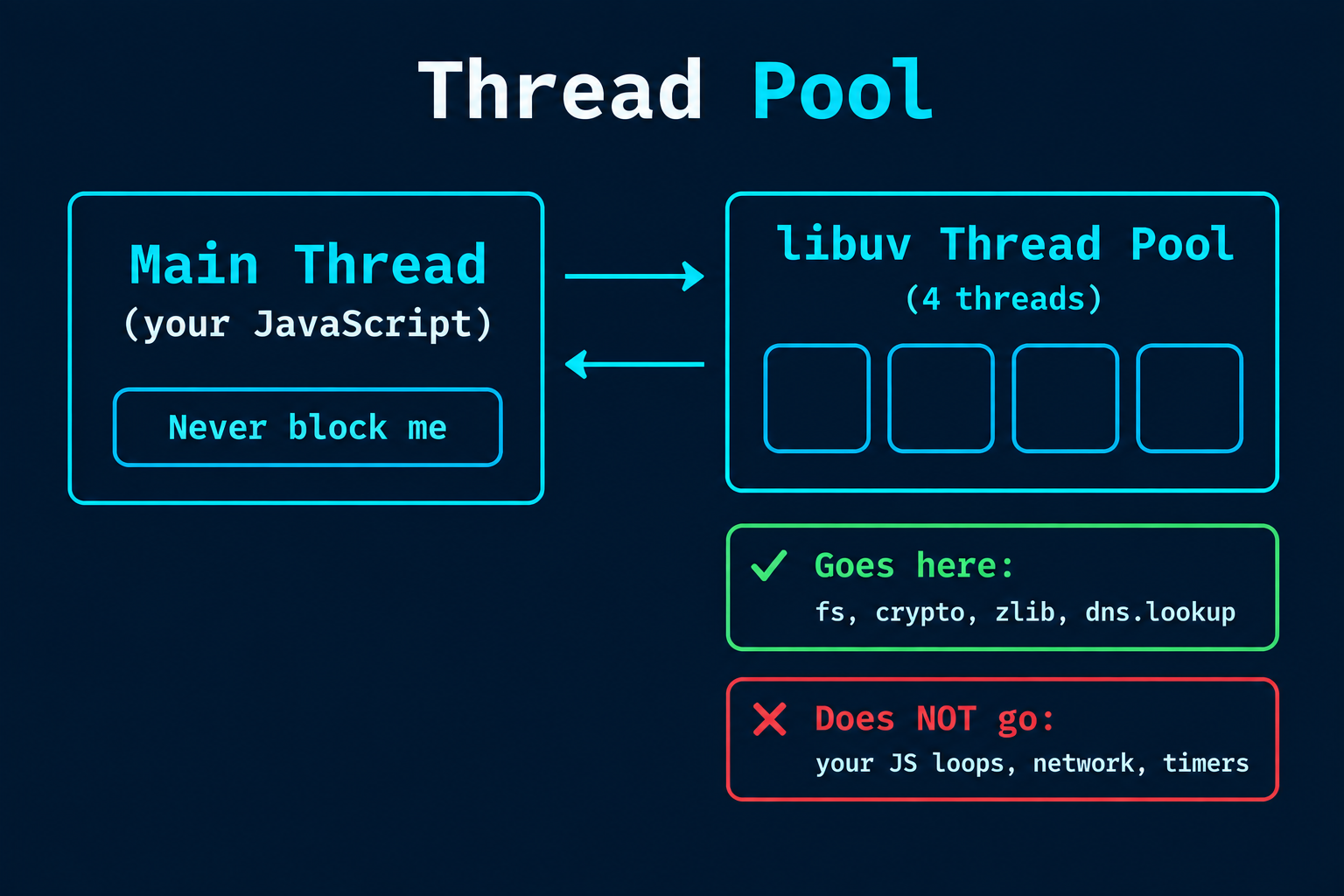
Exercise 5 and 6: 5 Tasks with 4 Threads
Inside the readFile callback, we start 5 crypto.pbkdf2 hashing tasks (heavy work, so it goes to the thread pool):
import crypto from 'crypto';

const start = Date.now();

for (let i = 1; i <= 5; i++) {
  crypto.pbkdf2('password', 'salt', 300000, 1024, 'sha256', () => {
    console.log(`Password ${i} has been hashed`, Date.now() - start);
  });
}
The thread pool has only 4 threads, but we have 5 tasks. So 4 tasks start together, and the 5th task waits until one thread is free. That is why the first 4 finish at almost the same time, and the 5th finishes later.
Now run the same code with 8 threads:
# Mac / Linux
UV_THREADPOOL_SIZE=8

# Windows (PowerShell)
$env:UV_THREADPOOL_SIZE=8;
Now all 5 tasks can start together. In our file, Password 4 has 10 times more iterations (1,000,000), so it finishes last.
Note: more threads does not always mean more speed. Real parallel work also depends on your CPU cores. If you have 4 cores and 8 threads, the threads share the cores. Also, set UV_THREADPOOL_SIZE from the terminal, because setting it inside the script does not work on every system.
Blocking the Main Thread
Now the most important lesson. See this code:
const start = Date.now();

setTimeout(() => {
  console.log('Timer fired after', Date.now() - start, 'ms');
}, 100);

// Blocking code: main thread is busy for 3 seconds
while (Date.now() - start < 3000) {}
We asked for 100 ms, but the timer fires after about 3000 ms. Why? The main thread was busy in our while loop, so the Event Loop could not move ahead.
This is why we say: never block the main thread. One heavy loop can freeze your whole server for all users. In real projects, heavy work should go to the thread pool, a worker, or another service.
Is Node.js Single-Threaded?
The honest answer: your JavaScript code runs on a single main thread. But Node.js itself uses more threads in the background (libuv thread pool, and some helper threads of V8).
Your JS code: single thread
libuv thread pool: 4 helper threads by default
Network work: handled by the operating system
Think of a restaurant: one waiter (main thread), and many cooks in the kitchen (thread pool).
Interview Questions
1. Is Node.js single-threaded? Your JavaScript runs on one main thread, but Node uses libuv threads in the background.
2. What is the Event Loop? A loop which keeps checking if the call stack is free and runs ready callbacks in phases (Timers, Poll, Check, Close).
3. What goes in the Thread Pool, and what does not?fs, crypto, zlib and dns.lookup go. Our own JavaScript code and network work do not.
4. setTimeout(0) vs setImmediate: which runs first? From the main module, no guarantee. Inside an I/O callback, setImmediate always runs first.
If you remember one line, remember this: JavaScript runs on one thread, but Node.js works with many.
Try the exercises yourself here: https://github.com/abdulrdeveloper/FullStackHub/tree/main/Learn%20Backend/intro%20to%20NODE%20JS/nodejs-internals
first guess the output of every file, then run it.
You can find more of my work at abdulrdeveloper.me
Read more posts at blog.abdulrdeveloper.me