Your Server Has Amnesia. JWT Is the Cure.

Introduction
You log in to a website. You click on your profile. Then you click on your orders. And the website still knows who you are. It never asks for your password again.
It looks very normal, but it is not. By default, a server forgets you after every request. HTTP is stateless, so every request reaches the server like it is the first one, and the server has no memory of the last one.
So how does the server remember you? In this blog, we will understand what authentication means, what JWT is, how a token is built, and how to log in a user and protect routes in Node.js and Express.
What is Authentication?
Authentication means proving who you are. It answers one question: "Who are you?"
A login form with an email and a password is the most common example. If the details are correct, the server accepts you as that user.
Authentication is "who are you?". Authorization is "what are you allowed to do?". In this blog, we only focus on authentication.
The Problem: Stateless Servers
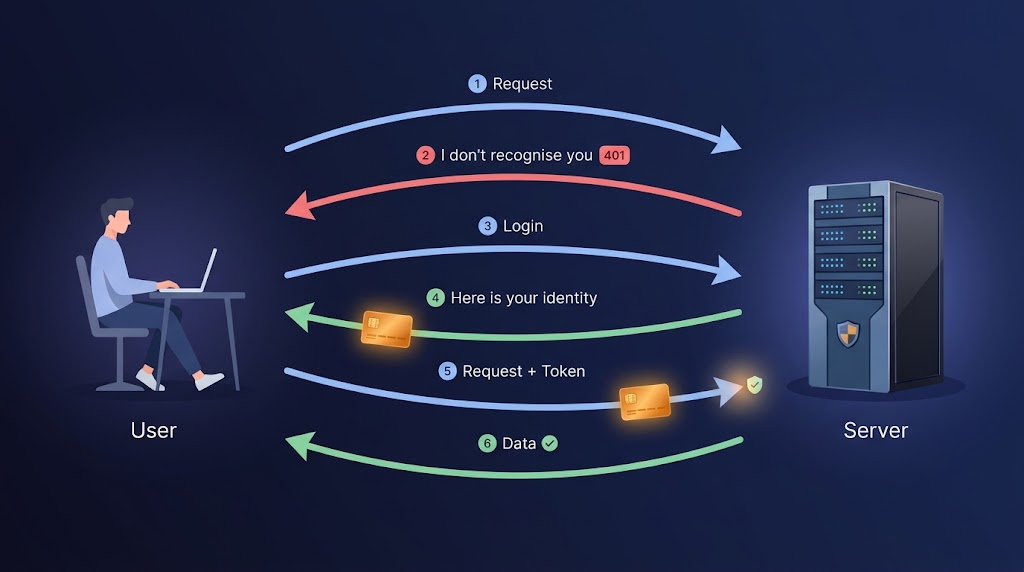
Let's say you log in successfully. Now you send a second request to /profile. The server has already forgotten the first one, so it has no idea that you just logged in.
We need a way for the client to prove itself on every request, without sending the password again and again. This is where a token comes in.
What is a JWT?
JWT stands for JSON Web Token. It is a small piece of text that the server gives you after login. You send it back with every request, and the server uses it to know who you are.
A JWT looks like this:
eyJhbGciOiJIUzI1NiIsInR5cCI6IkpXVCJ9.eyJzdWIiOiIxMjM0NTY3ODkwIiwibmFtZSI6IkpvaG4gRG9lIiwiaWF0IjoxNTE2MjM5MDIyLCJleHAiOjE1MTYyNDI2MjJ9.SflKxwRJSMeKKF2QT4fwpMeJf36POk6yJV_adQssw5c
It looks like random text, but it has a clear structure.
Stateless Authentication
The most important idea of JWT is that the server does not need to store anything. All the information is inside the token, and the server only checks if the token is valid.
Think of it like an entry pass. The guard does not need to remember your face. He only checks if your pass is real.
Structure of a JWT
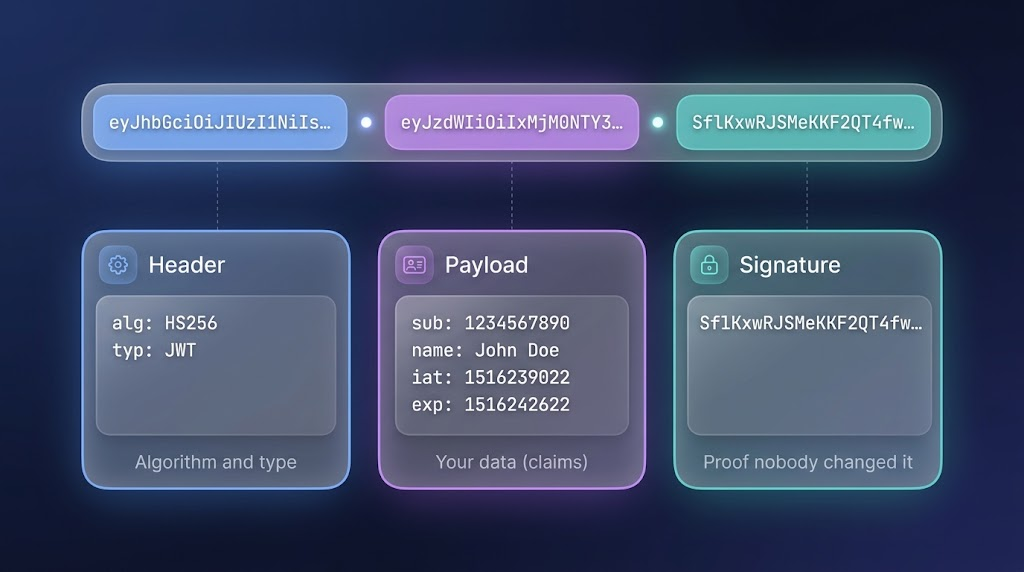
A JWT has three parts, separated by dots:
header.payload.signature
1. Header
The header tells which algorithm is used to create the signature, and the type of token.
{
  "alg": "HS256",
  "typ": "JWT"
}
2. Payload
The payload holds the data, which are called claims. This is where we put things like the user's id.
{
  "id": 1,
  "iat": 1760000000,
  "exp": 1760000900
}
id: our own data, who the user isiat: issued at, when the token was createdexp: expiry, when the token stops working
3. Signature
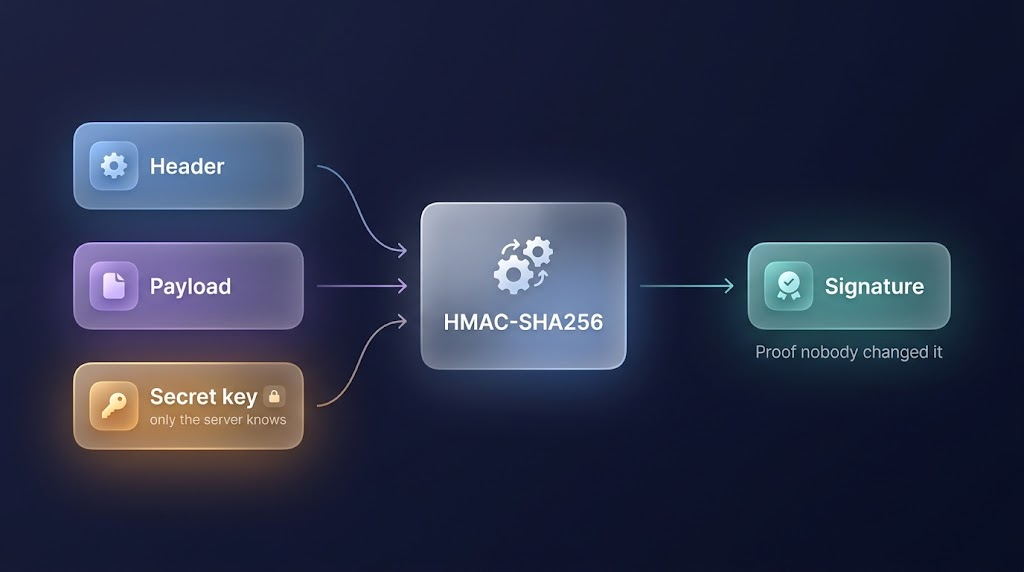
The signature is created from the header, the payload and a secret key that only the server knows. It makes sure that nobody has changed the token.
// jsonwebtoken does this for us automatically, we never write it ourselves
HMAC-SHA256( base64url(header) + "." + base64url(payload), secret )
headerandpayload: the first two parts of the tokensecret: a key that only the server knowsHMAC-SHA256: the method that mixes them into one signature
On every request, the server creates this signature again and compares it with the one in the token. If both are the same, the token is valid.
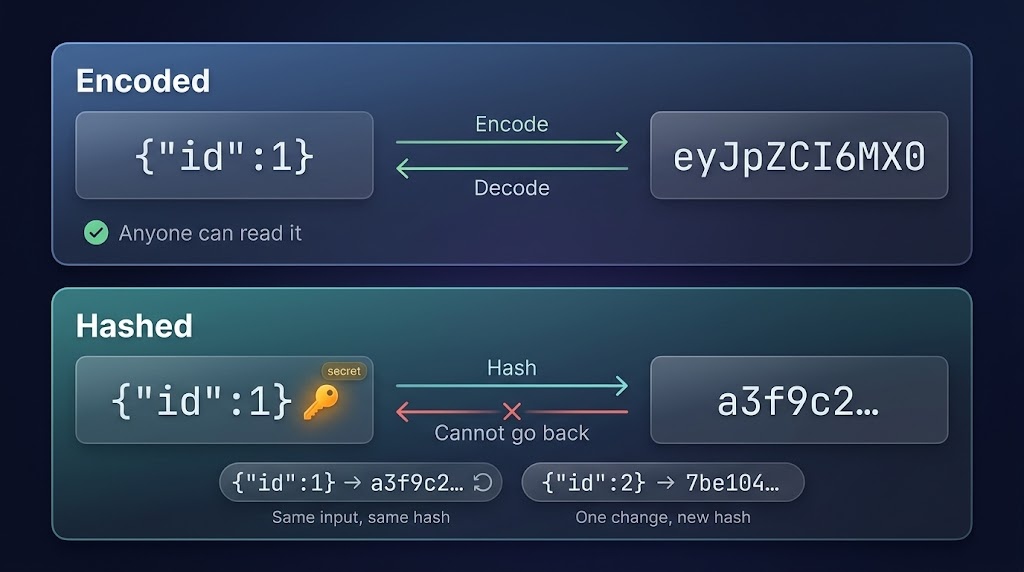
Encoded, Not Encrypted
The header and payload of a JWT are only encoded. Encoding can be reversed, so anyone can decode them and read the data inside.
// encode
const encoded = Buffer.from('{"id":1}').toString('base64url');
console.log(encoded); // eyJpZCI6MX0

// decode: we get the same data back
const decoded = Buffer.from(encoded, 'base64url').toString();
console.log(decoded); // {"id":1}
- Encoding works in both directions.
- No secret is needed to decode.
- That is why we never put passwords or secrets in a JWT.
Why Nobody Can Fake It
The signature is different. It is a hash, and a hash only works in one direction. We cannot go back from the signature to the original data.
HMAC-SHA256({"id":1}, secret)  →  a3f9c2...   // example value
HMAC-SHA256({"id":1}, secret)  →  a3f9c2...   // same input, same secret, same result
HMAC-SHA256({"id":2}, secret)  →  7be104...   // one change, a completely new result
- A hash cannot be reversed.
- The same data and the same secret always give the same signature, so the server can check it easily.
- If someone changes even one character in the payload, the signature no longer matches, and the server rejects the token.
- Without the secret, nobody can create a valid signature.
Login Flow using JWT
The complete flow has four steps:
- The user sends an email and a password to
/login. - The server checks the details. If they are correct, it creates a JWT with
jwt.sign(). - The server sends the token back to the client.
- The client sends this token with every next request, and the server verifies it. Let's build it. First, install the packages:
npm install express jsonwebtoken
Keep the secret in a .env file. It should be a long random string, and it must never be pushed to GitHub:
JWT_SECRET=put_a_long_random_string_here

// As a good practice never generate secret key through websites , generate it from your terminal with command

node -e "console.log(require('crypto').randomBytes(64).toString('hex'))"
Now the login route:
import express from 'express';
import jwt from 'jsonwebtoken';

const app = express();
app.use(express.json());

app.post('/login', (req, res) => {
  const { email, password } = req.body;

  // find the user in the database using the email
  // compare the password with the hashed password in the database
  // if the user is not found or the password is wrong:
  // return res.status(401).json({ error: 'Invalid email or password' });

  const user = { id: 1, email }; // imagine this came from the database

  const token = jwt.sign({ id: user.id }, process.env.JWT_SECRET, { expiresIn: '15m' });

  res.status(200).json({ token });
});
jwt.sign() takes three things: the payload, the secret and the options. Here, the token expires after 15 minutes.
Sending the Token with Requests
After login, the client has the token. Now it must send this token with every request, so the server can know who is calling. There are two common ways.
1. In the Authorization Header
The client sends the token in the Authorization header. The standard format is Bearer, then a space, then the token:
Authorization: Bearer eyJhbGciOiJIUzI1NiIs...
From the frontend, it looks like this:
fetch('http://localhost:3000/profile', {
  headers: { Authorization: `Bearer ${token}` },
});
We send the token ourselves with every request. This way works for web apps, mobile apps and other servers, and it is easy to test in Postman. In this blog, we use this way.
2. In a Cookie
For web apps, the recommended way is a cookie. The server sets it after login, and the browser sends it automatically with every request:
res.cookie('token', token, {
  httpOnly: true,     // JavaScript in the browser cannot read it
  secure: true,       // sent only over HTTPS
  sameSite: 'strict', // helps to protect against CSRF
});
- The browser sends the cookie for us.
- With
httpOnly, JavaScript cannot read it, so a stolen script cannot steal the token.
Mobile apps do not use the browser's cookies in the same way, so they use the header and keep the token in the device's secure storage.
Both ways have their own good and bad sides.
Protecting Routes using Tokens
Now we need a guard in front of our private routes. This is a perfect job for a middleware, which we already learned in the middleware blog.
function verifyToken(req, res, next) {
  const authHeader = req.headers.authorization; // "Bearer <token>"
  const token = authHeader?.split(' ')[1];

  if (!token) {
    return res.status(401).json({ error: 'No token provided' });
  }

  try {
    const payload = jwt.verify(token, process.env.JWT_SECRET);
    req.user = payload; // now every next step can use req.user
    next();
  } catch (err) {
    return res.status(401).json({ error: 'Invalid or expired token' });
  }
}
jwt.verify() checks the signature and the expiry for us. If anything is wrong, it throws an error, and we return 401.
Now we put it before the private route:
app.get('/profile', verifyToken, (req, res) => {
  // get the user from the database using req.user.id
  res.json({ message: `Hello user ${req.user.id}` });
});

app.listen(3000, () => console.log('Server running on port 3000'));
If the token is valid, the request reaches the route handler. If not, it stops at the middleware.
Token Validation Lifecycle
Every time a request comes to a protected route, the token goes through these checks:
- Is there a token? If not,
401. - Is the signature valid? If someone changed the token,
401. - Is it expired? If the
exptime has passed,401. - All good: the payload is saved in
req.user, and the request moves forward.
What if the Token is Stolen?
A JWT works like a pass: whoever holds it is treated as the user. If someone steals the token, they can use it until it expires. And the server cannot cancel a token before its expiry, because it does not store anything.
We can keep the token's life very short, like 15 minutes. But then the user would have to log in again every 15 minutes. The solution is to use two tokens.
Access Token and Refresh Token
- Access token: short life (for example, 15 minutes). It is sent with every request.
- Refresh token: long life (for example, 7 days). It is saved in the database, and it is used only to get a new access token when the old one expires.
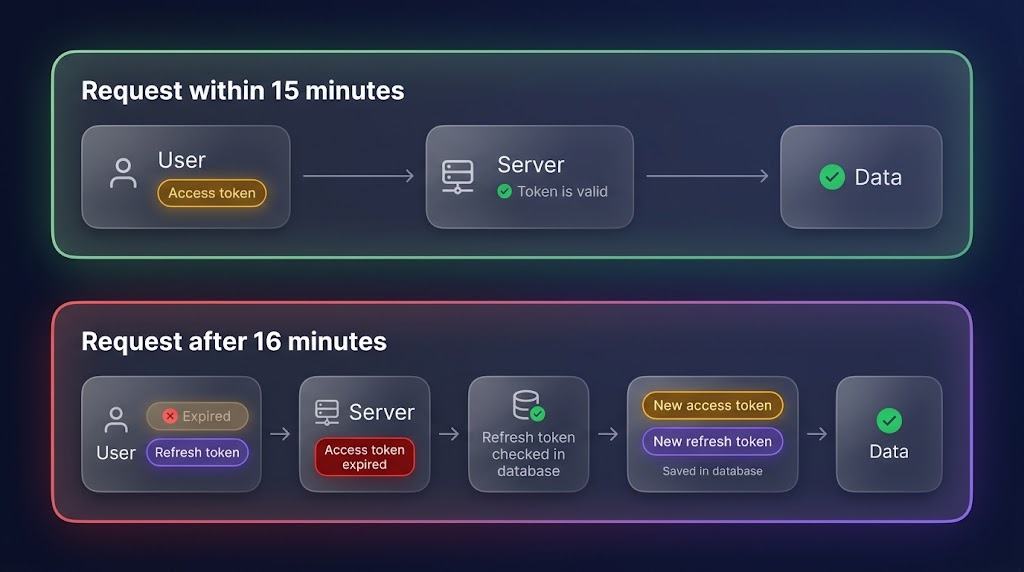
Here is how the flow works:
- The user logs in, and the server sends both tokens.
- The client sends the access token with every request.
- After 15 minutes, the access token expires, and the server returns
401. - The client sends the refresh token to
/refresh. - The server checks that the refresh token is valid and exists in the database, and sends a new access token.
- When the user logs out, the server deletes the refresh token from the database.
From now on, we use two secrets in .env:
ACCESS_SECRETREFRESH_SECRET.
The verifyToken middleware stays the same, but it now uses ACCESS_SECRET.
At login, we create both tokens:
const accessToken = jwt.sign({ id: user.id }, process.env.ACCESS_SECRET, { expiresIn: '15m' });
const refreshToken = jwt.sign({ id: user.id }, process.env.REFRESH_SECRET, { expiresIn: '7d' });

// save the refreshToken in the database

res.status(200).json({ accessToken, refreshToken });
The /refresh route gives a new access token:
app.post('/refresh', (req, res) => {
  const { refreshToken } = req.body;

  if (!refreshToken) {
    return res.status(401).json({ error: 'No refresh token provided' });
  }

  try {
    const payload = jwt.verify(refreshToken, process.env.REFRESH_SECRET);

    // check that this refresh token exists in the database
    // if it does not exist: return res.status(401).json({ error: 'Refresh token is not valid' });

    const accessToken = jwt.sign({ id: payload.id },          process.env.ACCESS_SECRET, { expiresIn: '15m' });
    res.status(200).json({ accessToken });
  } catch (err) {
    return res.status(401).json({ error: 'Invalid or expired refresh token' });
  }
});
And logout:
app.post('/logout', (req, res) => {
  // delete the refresh token from the database
  res.status(204).end();
});
Now if an access token is stolen, it works only for a few minutes. And if something goes wrong, the server can delete the refresh token from the database, so the user's session ends. This is how we cancel a session, even though a JWT itself cannot be cancelled.
Does the user have to log in again after 15 minutes?
No. Only the access token expires after 15 minutes. The refresh token stays alive for 7 days, so the app uses it quietly to get a new access token. The user does not even notice it.
The refresh token ends only in three cases:
- The user logs out, and the server deletes it from the database.
- The server revokes it, for example if it thinks the token was stolen.
- The 7 days are over, and the user has to log in again.
This is why you stay logged in to many apps for days or weeks, for example your Google account. If you come back within the refresh token's life (24 hours, 7 days or whatever the app sets), you do not have to log in again. The app gets a new access token in the background, and you continue where you left off.
You can find more of my work at abdulrdeveloper.me
Read more posts at blog.abdulrdeveloper.me
About the author
- CS student and full-stack developer from Pakistan. Building with JavaScript, TypeScript, React, Next.js and Node.js. Currently in ChaiCode Web Dev Cohort 2026.
Comments
Join the discussionNo comments yet. Be the first to comment.