The Guard at Your API’s Gate : Middleware in Express, explained simply

Introduction
In a real application, a lot of work happens before the route runs like logging the request, reading the JSON body, checking if the user is logged in and validating the input.
If we write all of this inside every route, the code becomes repetitive very fast. Express solves this with middleware.
In this blog, we will understand what middleware is, how next() works, why order matters, and how to use the different types of middleware in real projects.
What is Middleware?
A middleware is a function that runs between the request and the response. It receives three things:
req: the requestres: the responsenext: a function that passes control to the next step
function myMiddleware(req, res, next) {
  // do something with req or res
  next(); // move to the next step
}
A middleware can do four things:
Run any code.
Change
reqandres(for example, addreq.user).End the request by sending a response.
Pass the request forward by calling
next().
Think of it as a security check at an airport. Before you reach the gate (the route handler), you pass through a few checks: ticket, ID, baggage. If any check fails, you are stopped there. If all pass, you reach the gate.
Two Forms of Middleware
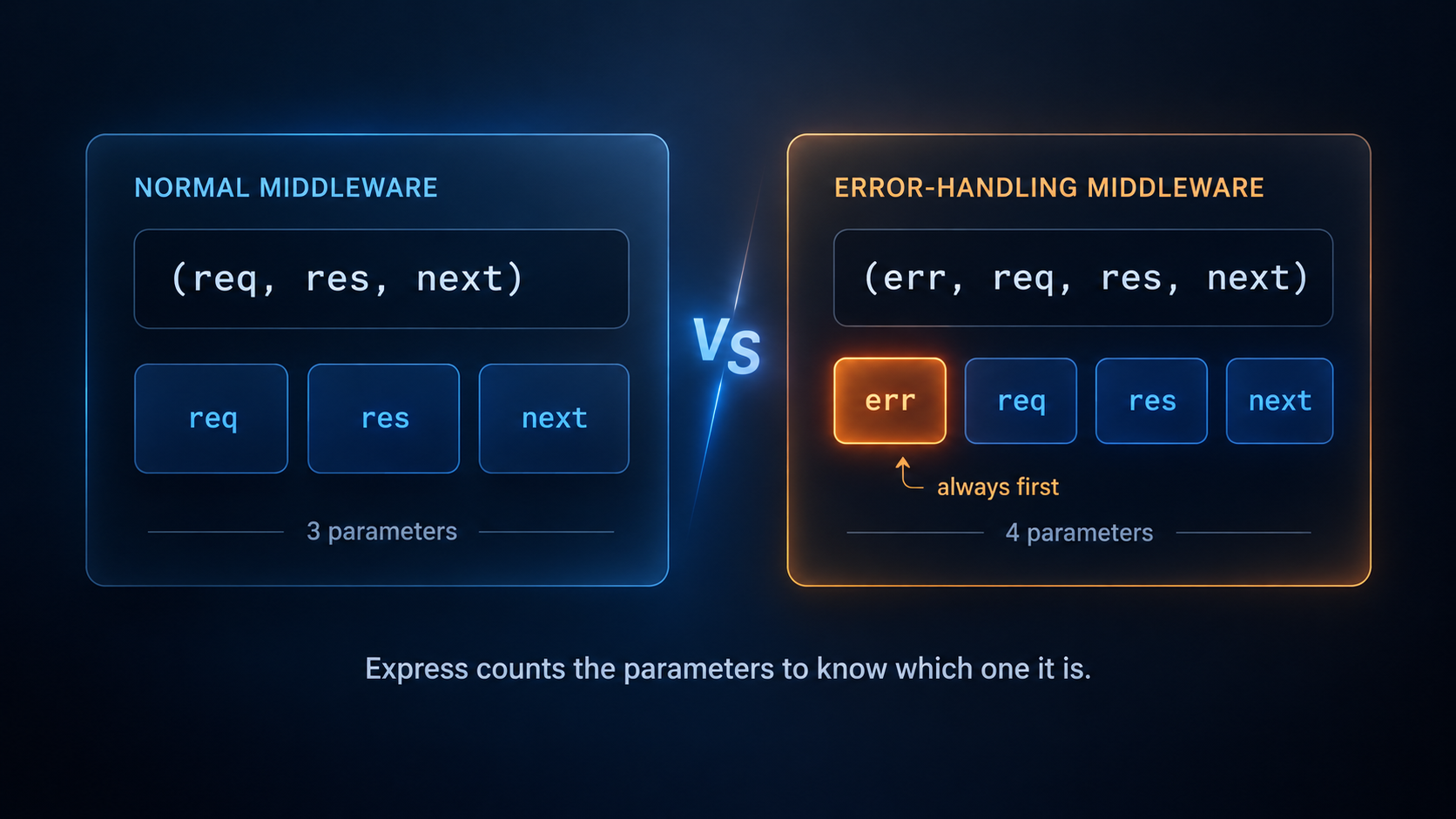
Express has two forms of middleware. Express tells them apart by the number of parameters.
// Normal middleware: 3 parameters
function myMiddleware(req, res, next) {
  next();
}

// Error-handling middleware: 4 parameters
function myErrorHandler(err, req, res, next) {
  res.status(500).json({ error: 'Something went wrong' });
}
Normal middleware has 3 parameters:
req,res,next.Error-handling middleware has 4 parameters:
err,req,res,next. The first one is alwayserr.
All four parameters must be written, even if you do not use err inside the function. If you remove err, only three parameters are left, and Express treats it as a normal middleware.
Many beginners never write an error handler, because Express has a default one built in. But writing your own gives you control: you decide the response, the status code and what gets logged. We will see how in the Error-handling section.
Your First Middleware
Let`s say we want to log every request: its method and URL. Without middleware, we would write the log in every route:
app.get('/', (req, res) => {
  console.log(`${req.method} ${req.url}`); // repeated
  res.send('Home page');
});

app.get('/about', (req, res) => {
  console.log(`${req.method} ${req.url}`); // repeated
  res.send('About page');
});

app.get('/users', (req, res) => {
  console.log(`${req.method} ${req.url}`); // repeated
  res.json('Users page');
});
The same line is copied three times. With 50 routes, it will be copied 50 times, and if we want to change the log, we must change it in 50 places. Even worse, if we forget it in one route, that request is never logged.
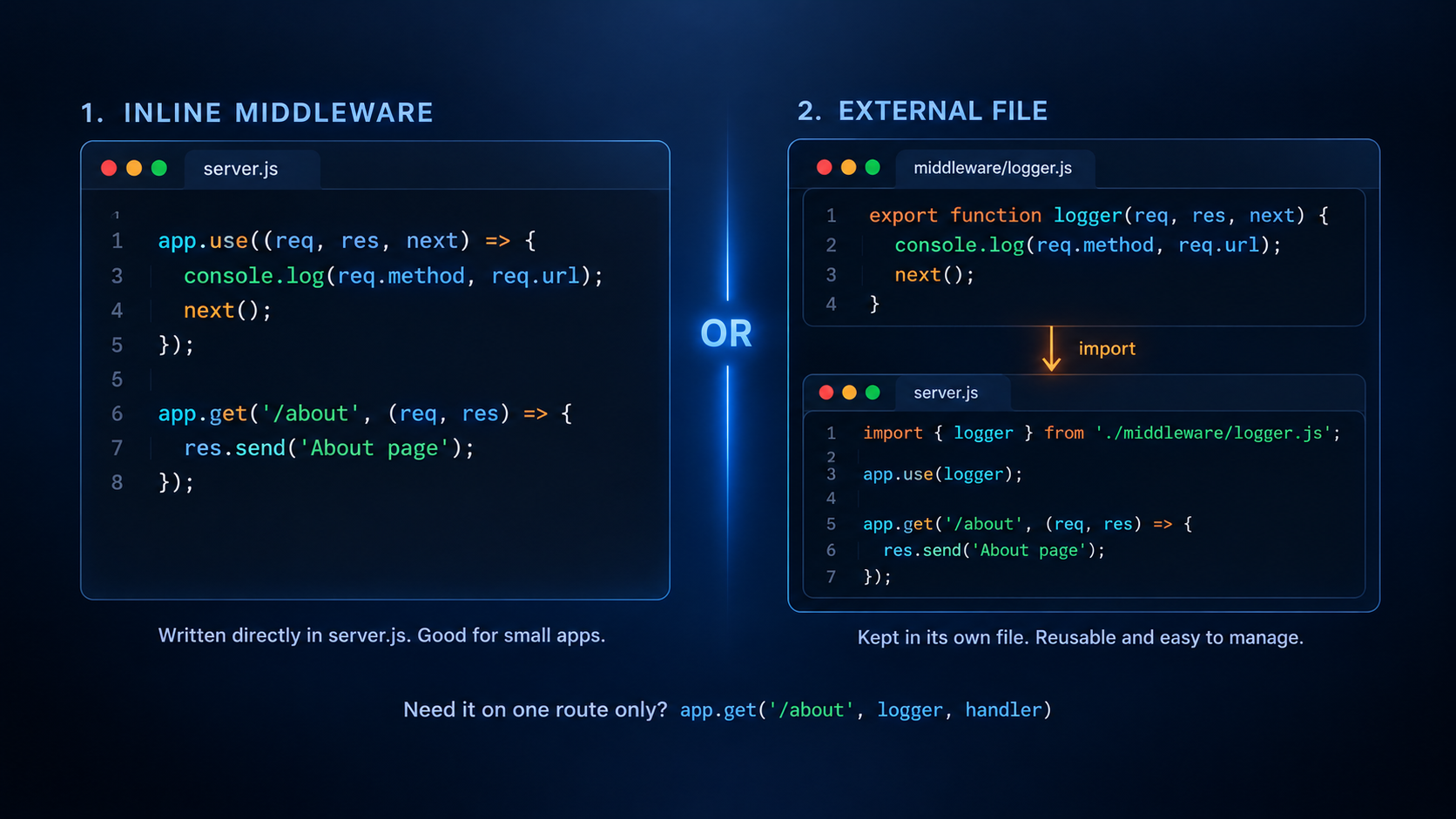
Middleware solves this. We write the logic once, and it runs for every request:
import express from 'express';

const app = express();

// Middleware: runs for every request
app.use((req, res, next) => {
  console.log(`${req.method} ${req.url}`);
  next();
});

app.get('/', (req, res) => res.send('Home page'));
app.get('/about', (req, res) => res.send('About page'));
app.get('/users', (req, res) => res.json('Users page'));

app.listen(3000, () => console.log('Server running on port 3000'));
Now open /, /about and /users in the browser and look at your terminal:
GET /
GET /about
GET /users
Notice that the middleware is written before the routes. Express reads from top to bottom, so it must come first.
All three routes are logged, and our routes did not change at all. They stay clean and only do their own job.
app.use() registers the middleware for every request. After it prints the log, next() passes the request to the next step, which is the route. Any new route we add later is logged automatically.
next() Explained
next() is what keeps the request moving. There are only two possible endings for a middleware:
Call
next(): the request continues to the next middleware or route.Send a response: the request ends here, and nothing after it runs.
If you do neither, the request is stuck, and the client waits until it times out.
// Wrong: no next() and no response, the request hangs
app.use((req, res, next) => {
  console.log('Request came');
});

// Correct
app.use((req, res, next) => {
  console.log('Request came');
  next();
});
Always call next() if you want the request to continue. It passes control to the next middleware or route handler. Without next() or a response, the request gets stuck, and the client keeps waiting.
if (!token) {
  return res.status(401).json({ error: 'No token provided' });
}
next();
Middleware Execution Order
Middleware runs in the order you write it, from top to bottom. This is the same rule as route order from part 1.
app.use((req, res, next) => {
  console.log('First');
  next();
});

app.use((req, res, next) => {
  console.log('Second');
  next();
});

app.get('/', (req, res) => {
  console.log('Route handler');
  res.send('Done');
});
A request to / prints:
First
Second
Route handler
Because of this, placement matters. Always put middleware before the routes that need it. Otherwise, it may not run for those requests, and things like express.json() won't be able to parse the request body before the route handler uses it.
Types of Middleware
1. Application-level Middleware
This is what we have used so far. It is attached to the whole app with app.use().
app.use(logger);              // runs for every request
app.use('/api', apiLogger);   // runs only for URLs starting with /api
We can also attach a middleware to one route only. Just place it before the handler:
app.get('/profile', auth, (req, res) => {
  res.json({ message: 'Your profile' });
});
You can pass many middlewares in a row. They run left to right:
app.post('/users', auth, validateUser, (req, res) => {
  // runs only if auth and validateUser both called next()
});
2. Router-level Middleware
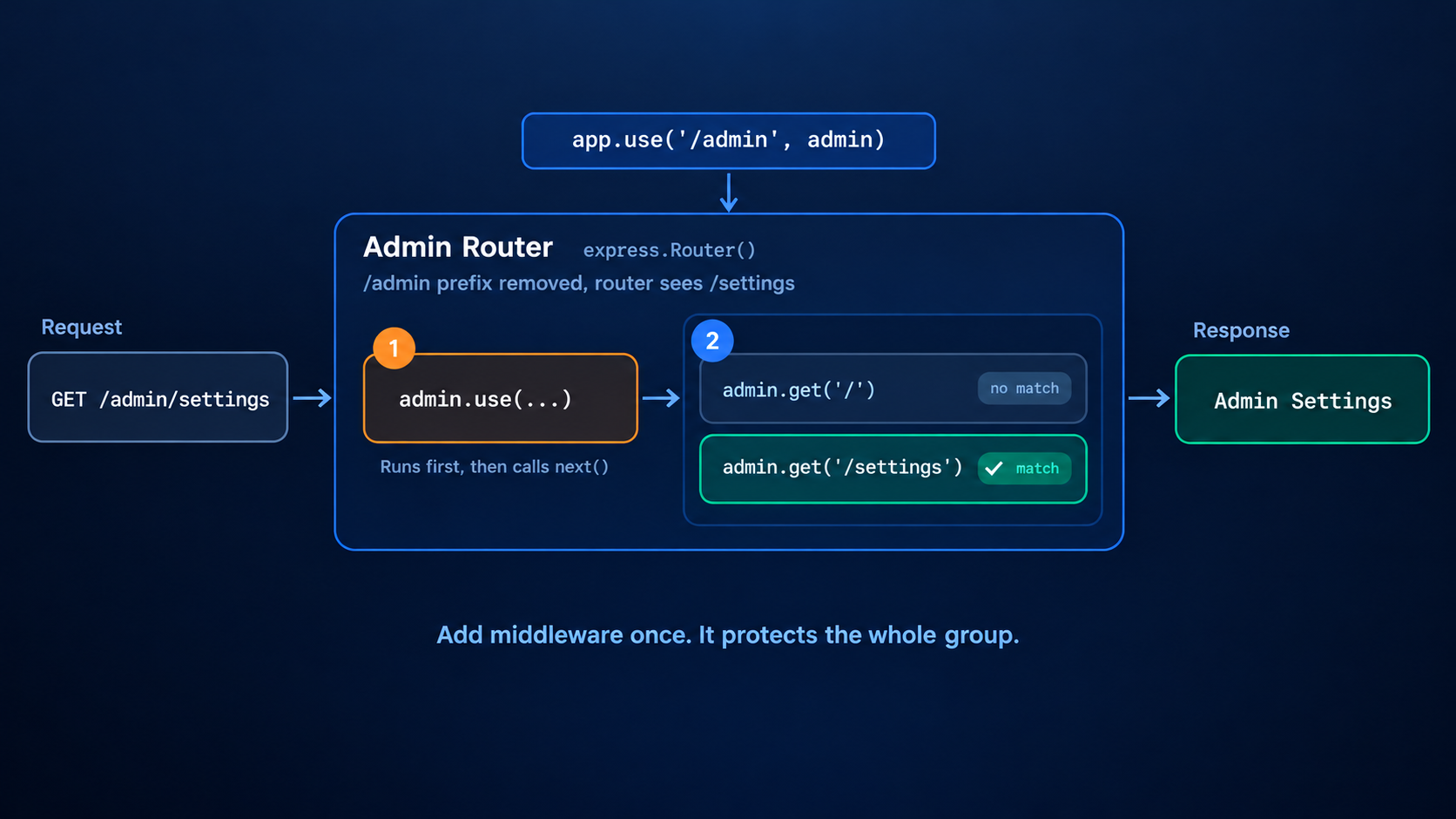
Imagine your app has 10 admin routes. Instead of adding the same middleware to all 10 routes, we can group them together using express.Router().
const express = require('express');
const app = express();

const admin = express.Router();

// Runs before every admin route
admin.use((req, res, next) => {
  console.log('Checking admin access...');
  next();
});

admin.get('/', (req, res) => {
  res.send('Admin Dashboard');
});

admin.get('/settings', (req, res) => {
  res.send('Admin Settings');
});

// All admin routes start with /admin
app.use('/admin', admin);
Working:
express.Router()creates a separate router to keep admin routes together.admin.use()adds middleware that runs before the admin routes.admin.get('/')handles the admin dashboard.admin.get('/settings')handles the settings page.app.use('/admin', admin)connects this router to the main app. Every route inside it starts with/admin.So
/becomes/admin/, and/settingsbecomes/admin/settings.
That`s how you can also keep group related routes together, add middleware once, and connect the group to your main app.
3. Built-in Middleware
Express comes with a few ready-made middlewares.
| Middleware | What it does |
|---|---|
express.json() |
Reads a JSON body and puts it in req.body |
express.urlencoded({ extended: true }) |
Reads HTML form data and puts it in req.body |
express.static('public') |
Serves files from a folder (images, CSS, JS) |
app.use(express.json());
app.use(express.urlencoded({ extended: true }));
app.use(express.static('public'));
Serving static files: with express.static('public'), a file at public/style.css is available at http://localhost:3000/style.css. We do not write any route for it. The middleware checks if the file exists, sends it, and ends the request. If the file does not exist, it calls next() and the request continues to your routes.
We can also add a prefix:
app.use('/assets', express.static('public'));
// public/logo.png is now available at /assets/logo.png
4. Error-handling Middleware
This one is special. It has four parameters, and the first one is err. We will see it in detail below.
Third-party Middleware
Many packages from npm are middleware too. For example, cors (cross-origin requests), helmet (security headers), and morgan (request logging). You install them and use them with app.use().
Error-handling Middleware
Errors will happen: a database fails, a value is missing, some code throws. Instead of handling errors in every route, we handle them in one place.
An error-handling middleware has four parameters. Express knows it is an error handler because of the err first parameter, so all four must be written, even if you do not use next.
javascript
app.use((err, req, res, next) => {
  console.error(err.message);
  res.status(err.status || 500).json({ error: 'Something went wrong' });
});
It must be placed after all routes and other middleware.
To send an error to it, pass the error to next():
app.get('/users/:id', (req, res, next) => {
  const user = null; // imagine the database found nothing

  if (!user) {
    const error = new Error('User not found');
    error.status = 404;
    return next(error); // skips all normal middleware, goes to the error handler
  }

  res.json(user);
});
In Express 5, if an async route throws an error or a promise is rejected, Express passes it to the error handler automatically. In Express 4 you had to catch it and call next(err) yourself.
app.use((req, res) => {
  res.status(404).json({ error: `Cannot ${req.method} ${req.originalUrl}` });
});
The Middleware Chain
Now let's put it together. This is a request to delete a user:
app.use(express.json());
app.use(logger);

app.delete('/users/:id', auth, requireRole('admin'), (req, res) => {
  // delete the user from the database
  res.status(204).end();
});

app.use(notFound);
app.use(errorHandler);
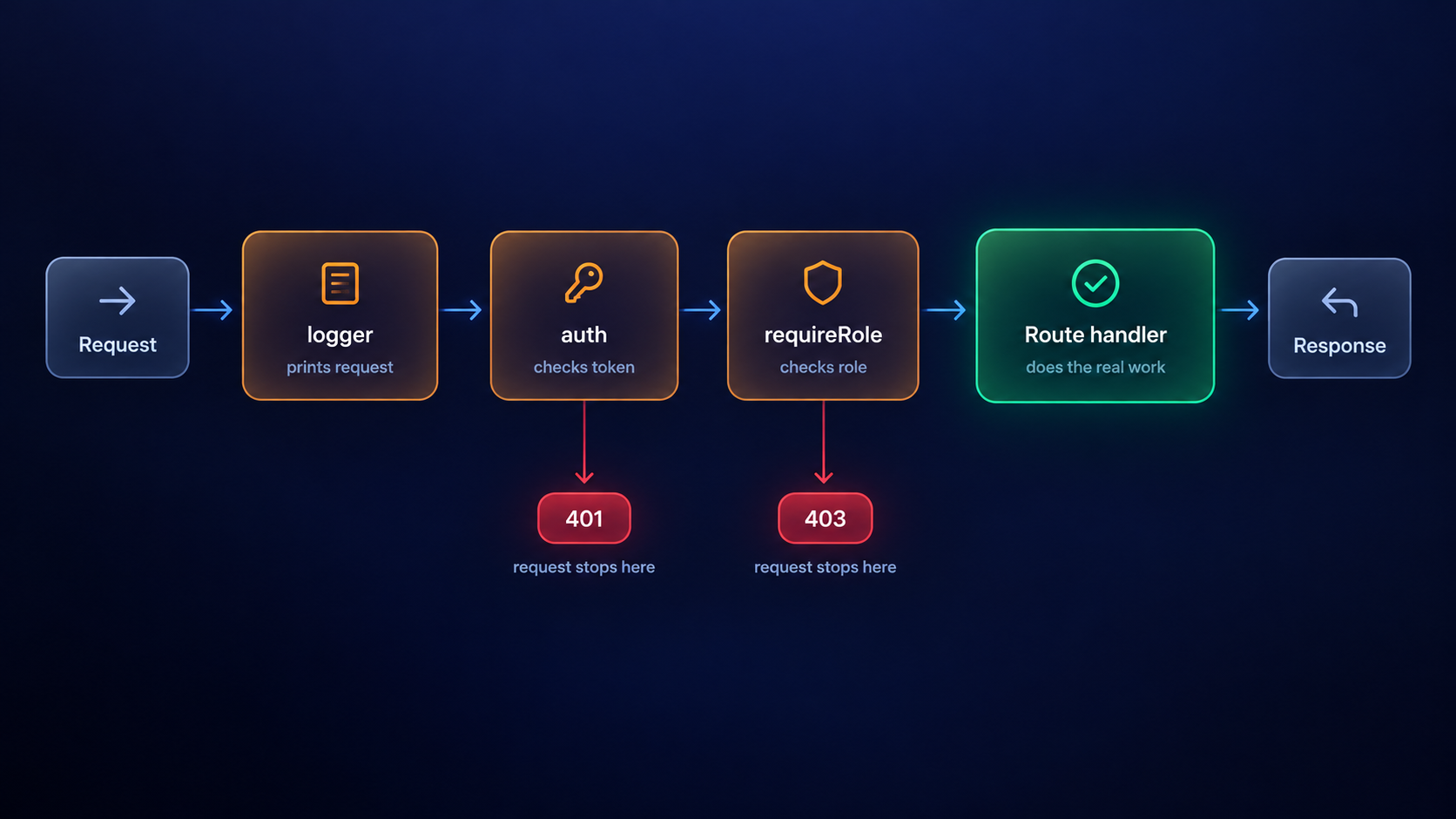
The request passes through:
express.json(): reads the bodylogger: prints the requestauth: checks the token (stops with401if it fails)requireRole('admin'): checks the role (stops with403if it fails)Route handler: does the real work and sends the response
If any step fails, the request ends there, and the later steps never run. Each middleware does one small job, and together they form a pipeline.
You can find more of my work at abdulrdeveloper.me
Read more posts at blog.abdulrdeveloper.me