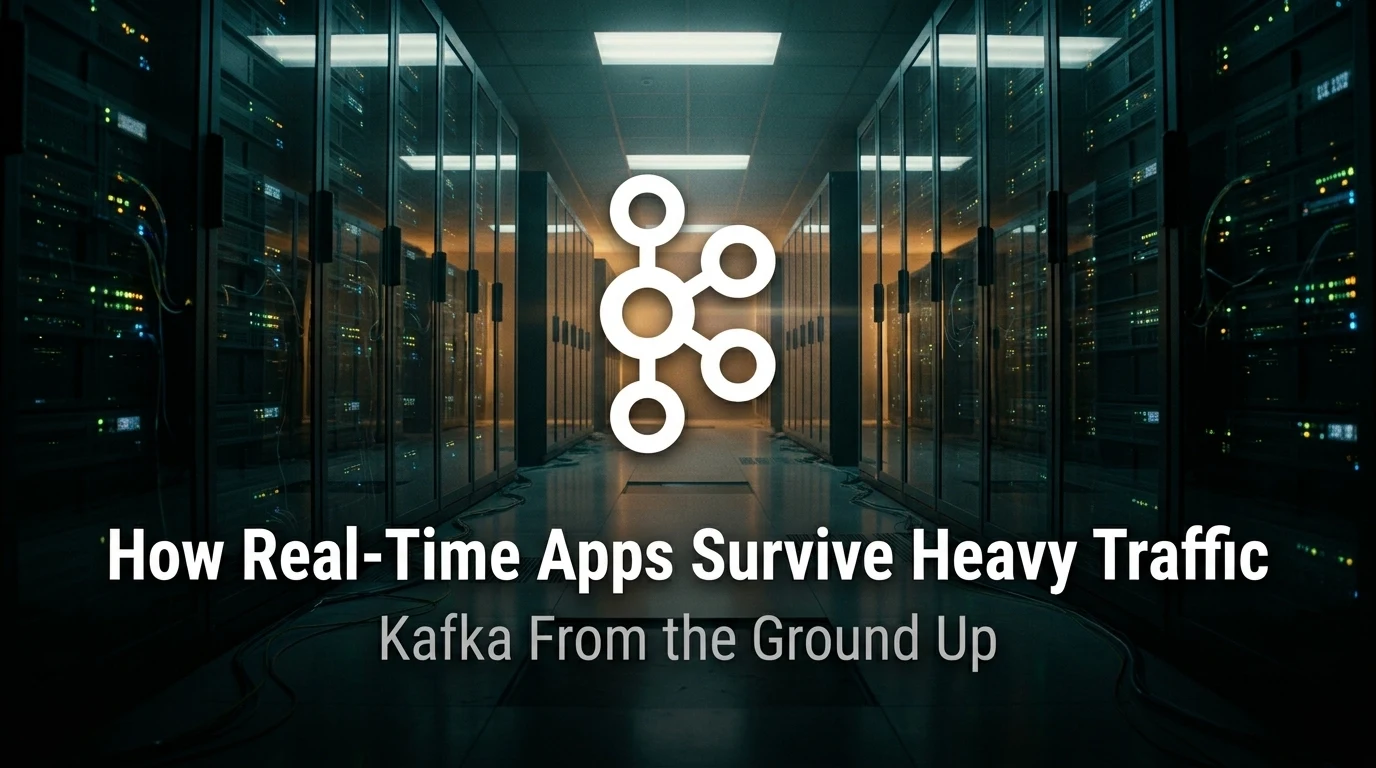
How Real-Time Apps Survive Heavy Traffic: Kafka From the Ground Up
We open Zomato, order some food, and then watch the rider coming toward us on the map. That small bike icon moves because the rider's phone keeps sending its location to the server, again and again, every few seconds.
Now think about the whole city. Thousands of riders, each sending an update every few seconds, all day. Where does all that data go? What happens to the database? And how does the customer's map still move smoothly?
The answer in many big systems is Apache Kafka. In this we will understand what Kafka is, why a database struggles with this kind of work, and what Kafka does differently inside. We will go step by step, and we will look at the internals too, because that is where the real idea is.
The Problem: One Update, One Database Insert
Let's start with the simplest way to build this. The rider's phone sends the location over a WebSocket, and the server does two things:
socket.on("rider:location", (location) => {
  sendToCustomer(location);   // show it on the customer's map
  db.insert(location);        // save it in the database
});
Every update is sent to the customer and saved in the database. It works perfectly with 10 riders.
Now do some simple math. Say we have 100,000 riders, and each one sends an update every 5 seconds:
100,000 riders / 5 seconds = 20,000 inserts every second in DB
Twenty thousand writes per second, all day, only for locations. A database can handle a lot, but this is a heavy and constant load, and it creates three problems:
- The database becomes the bottleneck. Everything waits for it.
- The customer's map gets slow. The same handler that saves to the database also sends the update to the customer. If the insert is slow, the whole handler is slow.
- If the database goes down, updates are lost. Nobody is holding them.
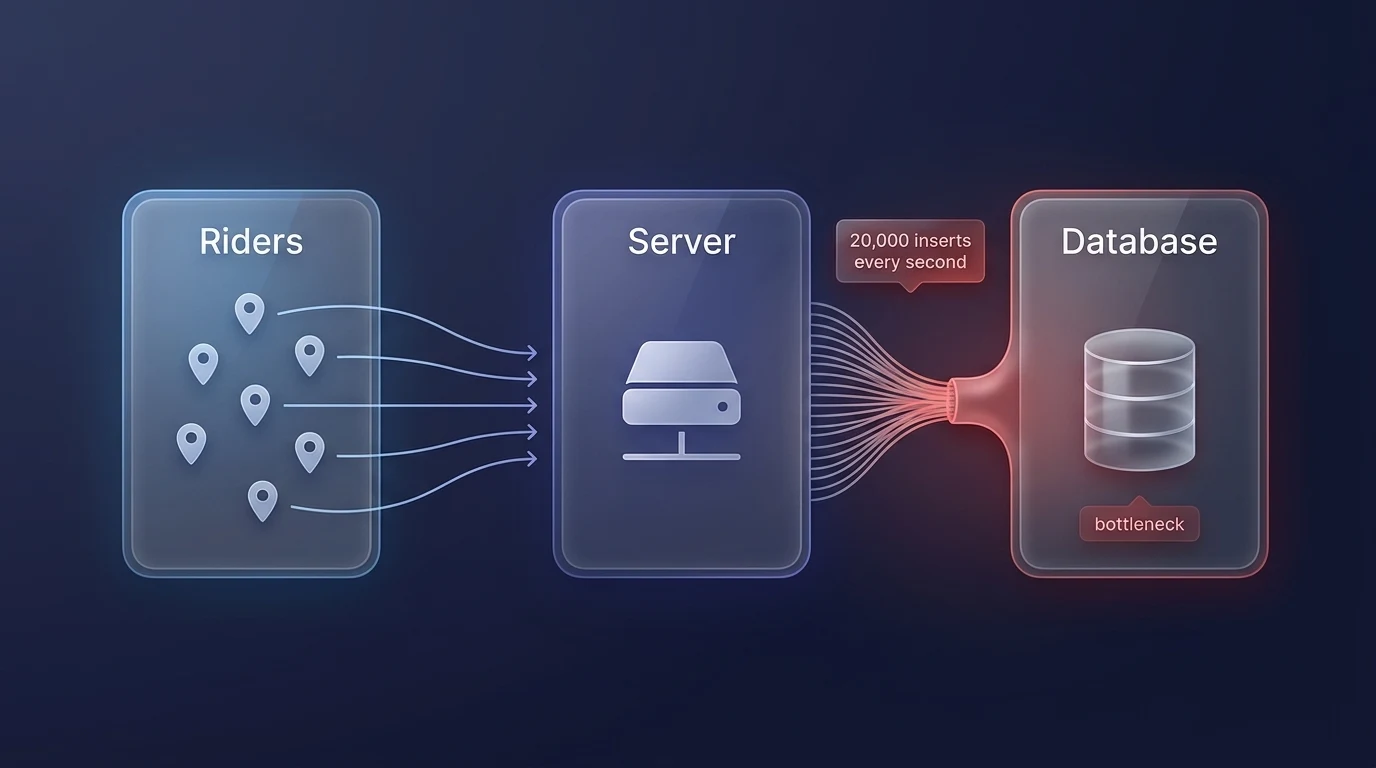
What we need is something in the middle. It should accept data extremely fast, keep it safe, and let the database take it at its own speed. That "something" is Kafka.
What Is Kafka?
Kafka is a message broker. A broker is a middleman that sits between the one who sends data and the ones who use it.
There are three parts:
- Producer: the one that sends messages. In our app, the server that receives the rider's location.
- Broker: Kafka itself. It receives the messages from producer (server), stores them, and hands them out.
- Consumer: the one that reads messages. For example, the service that saves to the database. A producer sends a message like this:
Producer.send
  topic:   "rider-updates"
  message: { riderId: "r1", latitude: 31.52, longitude: 74.35 }
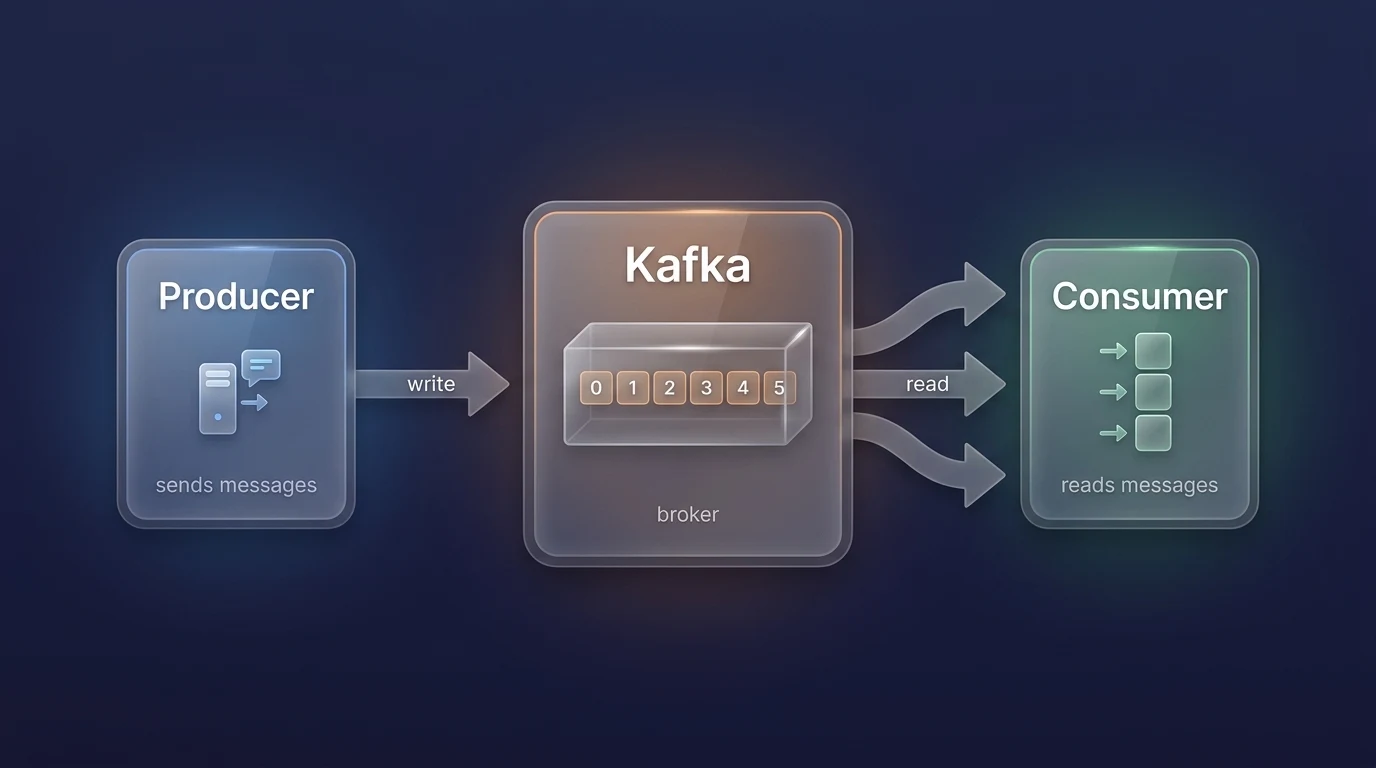
Think of Kafka as a very fast, very reliable notebook placed between two people. One person keeps writing in it. The others read from it whenever they are ready. The writer never waits for the readers.
One thing to be clear about: Kafka is not a database you search. You cannot ask it "what was rider 42's last location?" It is built to move and remember a stream of events, not to answer questions about them. We will see why this is exactly the reason it is so fast.
Topics, Partitions and Keys
Topic
A topic is a named channel. All rider locations go into a topic called rider-updates. Orders could go in orders, payments in payments. Producers write to a topic, and consumers read from a topic.
Partition
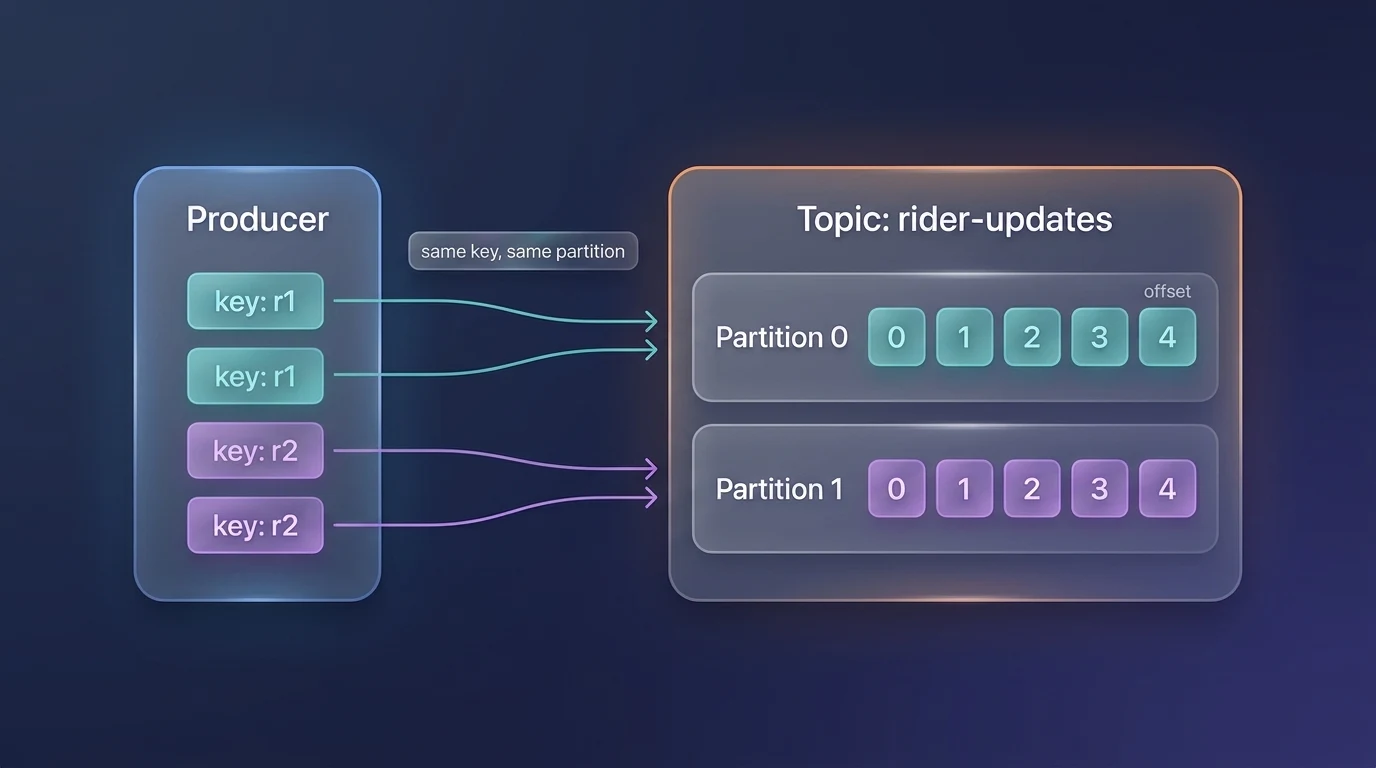
A topic can become huge. If it were just one long list, only one worker could read it at a time. So Kafka splits a topic into partitions.
Each partition is its own separate, ordered list of messages. Every message inside a partition gets a number: 0, 1, 2, 3 and so on. This number is called the offset. It is simply the position of the message in that list.
Topic: rider-updates

Partition 0:  [0] [1] [2] [3] [4] ...
Partition 1:  [0] [1] [2] [3] ...
Why split it? Because now different consumers can read different partitions at the same time. More partitions means more parallel work.
Key
How does Kafka decide which partition a message goes to? The producer can attach a key to the message. Kafka uses the key to pick the partition, and the same key always goes to the same partition.
If we use the rider's id as the key, all updates from rider r1 land in the same partition, in the order they were sent. This matters because order is only guaranteed inside one partition. We want rider r1's locations in the right order, or the bike will jump backwards on the map.
You can also choose the partition yourself. In the class example the producer sent riders going "north" to partition 0 and everyone else to partition 1. In real systems, using a key is the common way.
Why Is a Database Slow for This?
Before we look at how Kafka is fast, we need to see what a database does when you insert one row. This is the part most people skip.
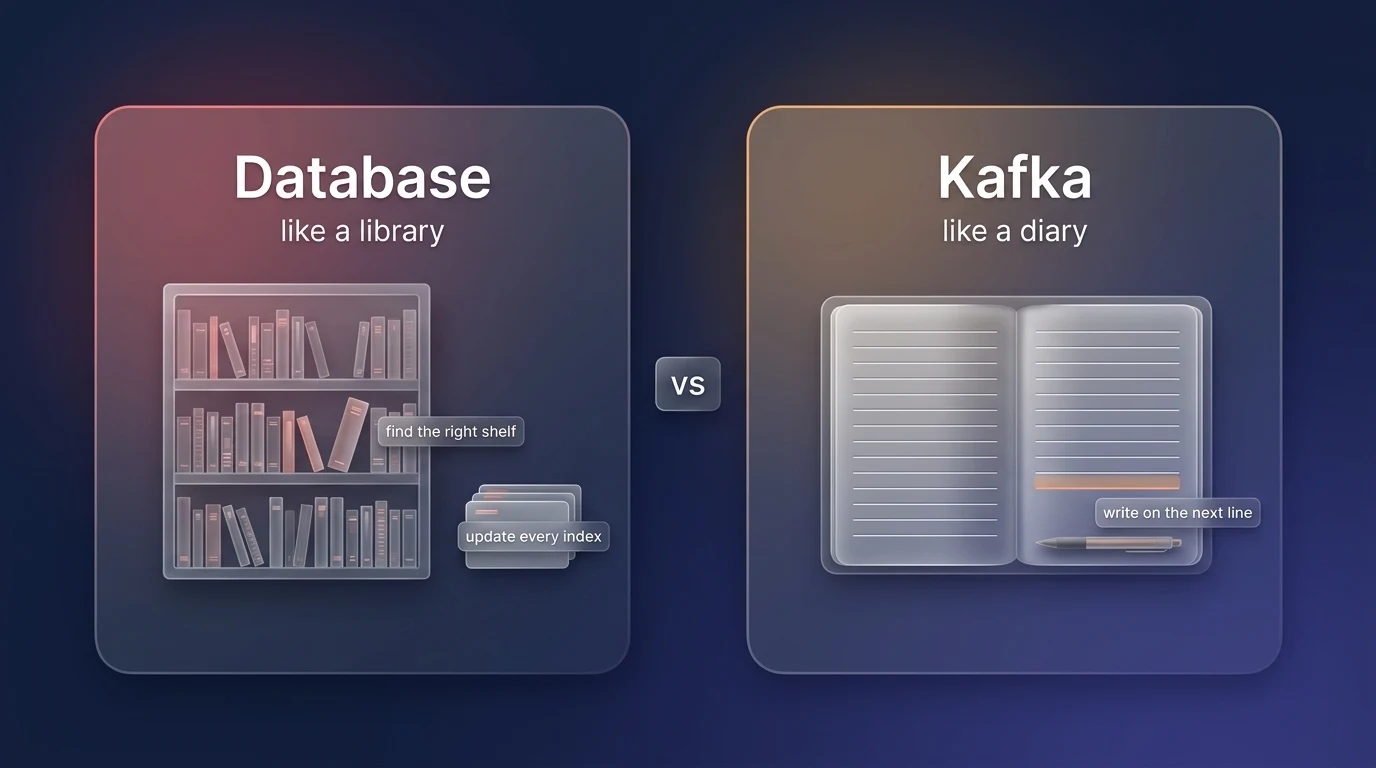
Imagine a library. You have a new book, and the library has thousands of books arranged in a strict order. To put your book away, you must first find the correct shelf and the correct position on that shelf. And if the library also keeps catalogue cards (by author, by title, by subject), you must update every one of them.
A database insert is very similar. Here is what happens:
1. Find the right place. A table is usually stored with indexes. An index is a sorted structure (most often a B-tree) that helps the database find rows fast later. To insert a row, the database has to walk through the index to find where this row belongs. That means jumping to different places in the file.
2. Take locks and track the transaction. Databases promise ACID: your data stays correct even if many users write at the same time or the machine crashes in the middle. To keep that promise, the database locks things, tracks the transaction and decides who is allowed to see what.
3. Write a safety log and force it to disk. Before saying "done", the database writes the change to a log and makes sure it has really reached the disk. This is how your data survives a power cut.
4. Update every index. If the table has 5 indexes, the row has to be placed in 5 different sorted structures.
All of this happens for every single insert. Now multiply by 20,000 per second.
This is not a weakness of databases. This work is the price of what they promise. Because the database keeps everything sorted and indexed, you can later ask "show me all orders from last Tuesday" and get the answer in milliseconds. The database does extra work at write time to make reading smart.
For our rider locations, we do not need most of that at write time. We just need to record "this happened" quickly, in order. And that is exactly what Kafka is built for.
How Kafka Is Fast Inside
The Diary: Append-Only Log
Think of a diary. When you write today's entry, you do not search for the right page. You open the diary and write on the next empty line. You never go back to edit yesterday's page, and you never squeeze a new line in the middle.
Kafka works like this. Each partition is an append-only log: a file on disk where new messages are only ever added at the end.
[0] [1] [2] [3] [4] [5] <-- new message goes here
- No searching for a position.
- No sorted index to rearrange.
- No editing of old messages.
- No locks between rows and no transaction between messages. The offset is just the line number. A consumer says "give me everything from offset 120" and Kafka reads forward from there.
(In reality a partition is stored as a few segment files, and Kafka only writes to the newest one. But the idea is the same: always the end of the file.)
Sequential Beats Random
This design has a big advantage on the disk. Writing at the end of a file means the disk is working in a straight line. This is called sequential access. A database insert often jumps around the file, which is random access.
Reading a book page by page is much faster than opening random pages. Disks, especially old spinning ones, are far better at sequential work. Even modern SSDs prefer it. Because Kafka only does sequential work, it gets a lot of speed from the same disk.
Memory First, Disk Later
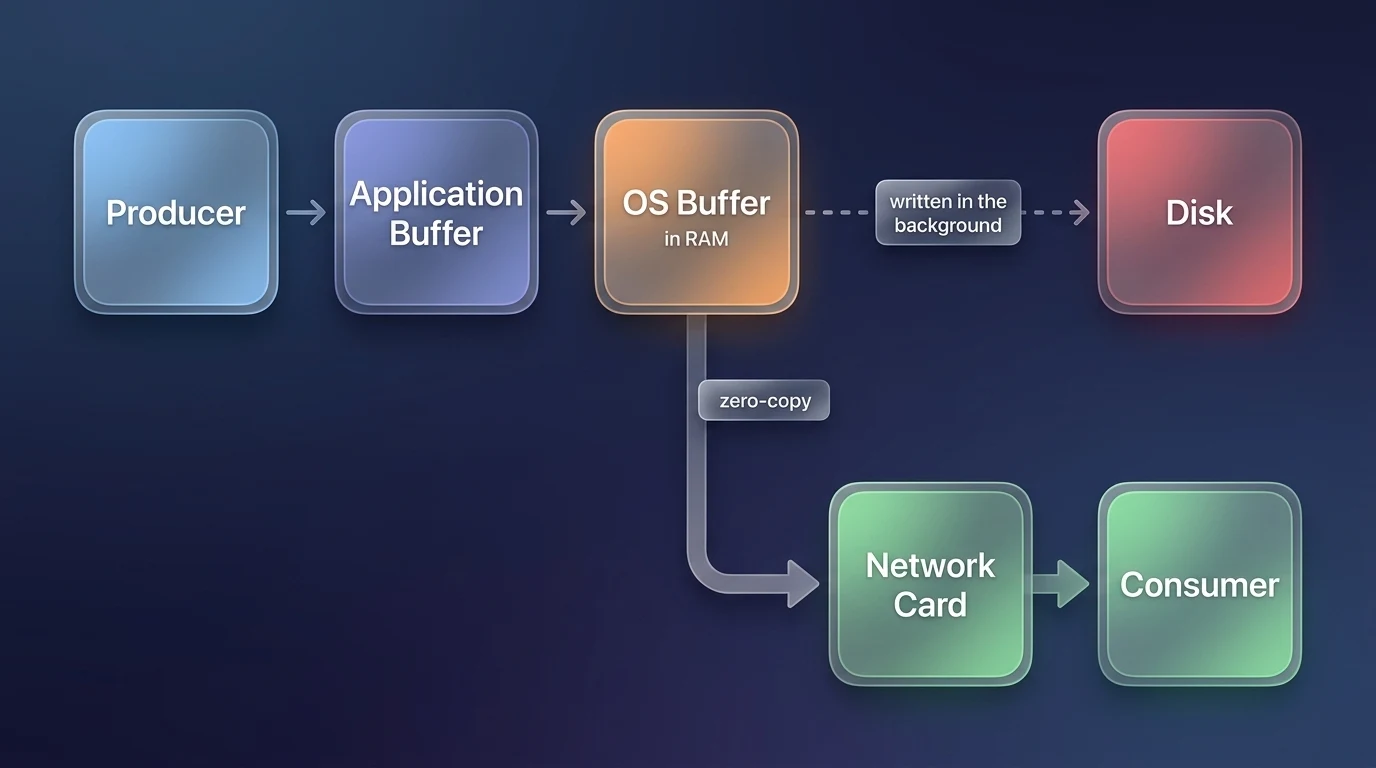
There is another trick. When Kafka receives a message, it does not wait for the disk on every single message. This is the path the data takes:
Producer -> Application Buffer -> OS Buffer (in RAM) -> Disk (written in the background)
The operating system keeps recently written data in memory (the OS buffer, also called the page cache) and writes it to the disk asynchronously, in the background. So the producer is told "got it" very quickly.
"But what if the machine crashes before it reaches the disk?" Kafka's answer is replication: it keeps copies of each partition on other brokers. Safety comes from having several copies, not from forcing every message to the disk one by one.
Zero-Copy: Sending Data Without Touching It
Now the consumer side. Normally, when a program sends a file over the network, the data is copied again and again:
Disk -> OS buffer -> Application memory -> Socket buffer -> Network card
Every copy uses CPU and memory. But Kafka does not need to look at the message. It only needs to deliver it. So it uses a feature of the operating system (called sendfile, which Java exposes as transferTo()) that sends the data directly from the OS buffer to the network card, skipping the application memory.
Disk / OS buffer -> Network card
This is the zero-copy principle. Less copying means less CPU and more messages per second. And since recently written data is usually still in the OS buffer, consumers often read straight from memory.
One Trade-off
A diary is fast to write in, but terrible to search in. If you want to find one thing, you must read through it. Kafka is the same. You cannot ask "what is the last location of rider 42?". That is a job for a database.
This is why real systems use both: Kafka to absorb the heavy flow of events, and a database to store the results where you can search them.
Kafka Does Not Delete After Reading
One more important point. In a normal queue, once a message is read, it is gone. In Kafka, messages stay for a set time (7 days by default), whether they were read or not. Reading only moves your own bookmark forward. This small detail is what makes the next section possible.
Consumers and Consumer Groups
A consumer reads messages from a topic. But in a real system, many different services need the same data:
- one service saves locations to the database,
- one sends them to the customer's phone through the socket server,
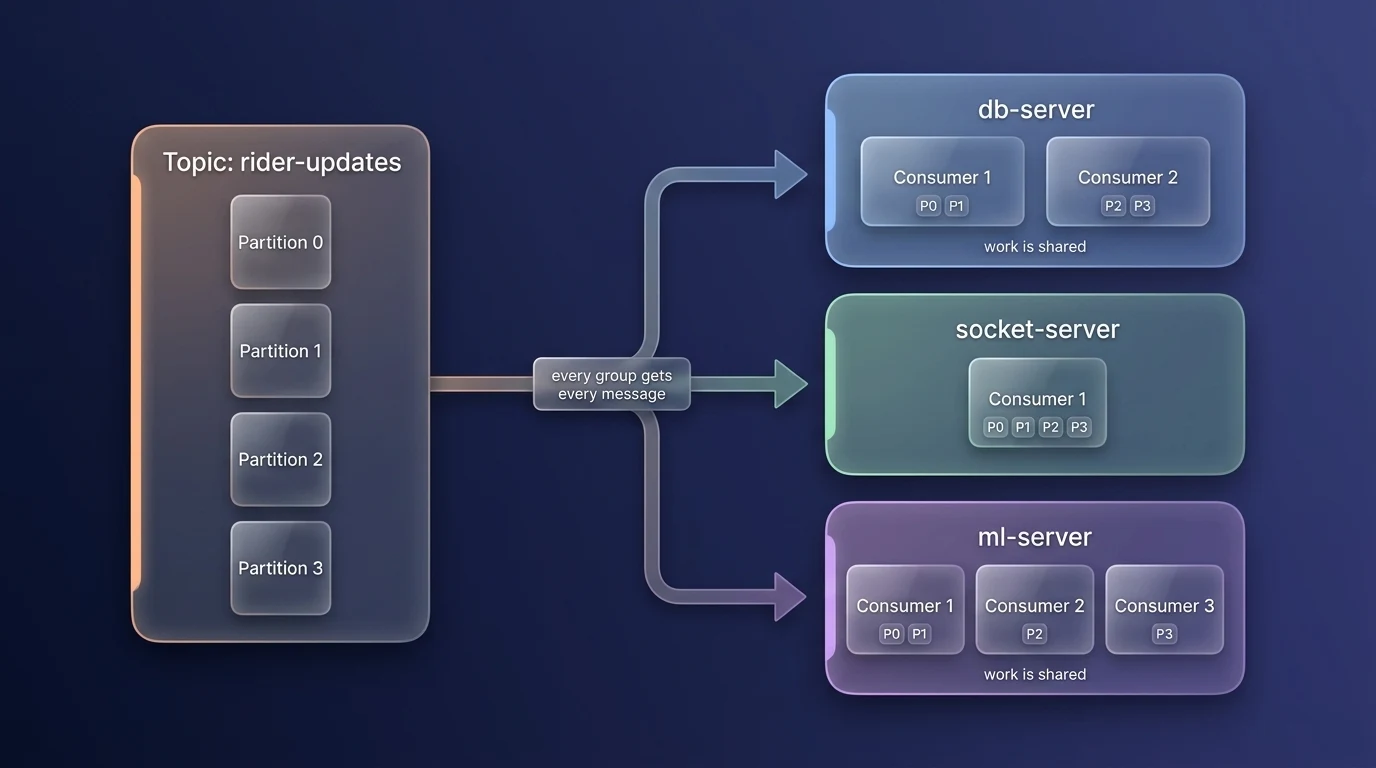
- one uses them to predict the delivery time. Kafka handles this with consumer groups. Each service gets its own group name, such as
db-server,socket-serverandml-server. There are two rules, and they are the heart of Kafka.
Rule 1: Different groups each get every message
Every group receives all the messages, independently. The database group, the socket group and the ML group all see every location update. Each group keeps its own bookmark (its own offset), so they do not affect each other.
Rule 2: Inside one group, consumers share the work
If a group has several consumers, each partition is given to only one consumer of that group. So the group splits the work.
Say rider-updates has 4 partitions, and the db-server group has 2 consumers:
Consumer A reads Partition 0 and Partition 1
Consumer B reads Partition 2 and Partition 3
Nobody reads the same message twice inside the group, and the work is divided.
Two things to remember:
- Extra consumers sit idle. If a group has more consumers than partitions, the extra ones get nothing. So the number of partitions decides how much you can parallelise.
- If a consumer crashes, Kafka notices and gives its partitions to the other consumers in the group. This is called a rebalance.
The Bookmark
Because Kafka keeps the messages and each group has its own offset, a slow consumer is not a problem. It simply reads a bit behind and catches up. And a brand new group can even start from the very beginning and read the whole history. In the class example, the consumer was started with "from beginning", which replays everything already in the topic.
How Kafka Fixes Our Problem
Now let's rebuild the rider system with Kafka in the middle. The server only does one thing: send the update to Kafka.
socket.on("rider:location", async (loc) => {
  await producer.send({
    topic: "rider-updates",
    messages: [{ key: loc.riderId, value: JSON.stringify(loc) }],
  });
});
Then the three groups work independently:
Rider -> Server -> Kafka (rider-updates)
                     |-> db-server      -> saves to the database
                     |-> socket-server  -> pushes to the customer's phone
                     |-> ml-server      -> predicts delivery time
What did we gain?
- The customer's map is no longer blocked by the database. The socket group reads from Kafka on its own.
- The database works at its own speed. It can also save in batches, for example 500 rows in one go, which is much cheaper than 500 separate inserts.
- If the database goes down for 10 minutes, nothing is lost. The messages wait in Kafka. When the database comes back, its consumer catches up from where it stopped.
- Scaling is easy. Add partitions and consumers.
- New features need no change in the producer. Want fraud detection tomorrow? Add a new consumer group. The server does not even know. This is what "high throughput system" means: lots of data flowing continuously, and no single part is forced to keep up with all of it at once.
One Update's Journey
Let's follow one single location update from start to end, using everything we learned.
- The rider's phone sends
{ riderId: "r1", lat: 31.52, lng: 74.35 }to the server. - The server (producer) sends it to Kafka with the key
r1, and does nothing else. It does not wait for the database or the customer. - Kafka picks the partition. The key
r1always maps to the same partition, say Partition 1. Other riders may go to other partitions. - The broker appends the message at the end of Partition 1, as the next offset (say offset 4,821). It lands in the OS buffer in memory first, and the OS writes it to the disk in the background. Copies go to other brokers for safety.
- The producer gets a quick "got it" and is free to handle the next update.
- The
socket-servergroup reads offset 4,821 and pushes the location to the customer's phone. The bike moves on the map. - The
db-servergroup reads the same offset a little later, collects it with hundreds of others, and saves them to the database in one batch. - The
ml-servergroup also reads it and uses it to update the delivery time. Notice that steps 6, 7 and 8 do not know about each other and do not wait for each other. If the database is slow in step 7, steps 6 and 8 are not affected at all. This independence is the real gift of Kafka.
Kafka vs Redis (Quick Look)
You may think: "Redis is also very fast, so why not Redis?"
Redis stands for Remote Dictionary Server. It keeps its data in RAM as its primary storage. That makes it extremely fast for lookups, but memory is limited and expensive, so it is best for things like caches and quick lookups.
Kafka keeps its data on disk as an append-only log. Disk is cheap and big, and Kafka stays fast because of sequential access, the OS buffer and zero-copy. So Kafka can hold large streams of events for days.
They do different jobs, and many systems use both. (Redis also has a feature called Streams, which is a topic of its own.)
Zookeeper vs KRaft
In a real Kafka setup, many brokers run together, and they must agree on things like "who is the leader of this partition?". In older versions, a separate system called Zookeeper did this coordination. In newer versions, Kafka does it by itself with a built-in mode called KRaft, and the latest versions have removed Zookeeper completely. For learning on your own machine, one Kafka container is enough.
When NOT to Use Kafka
Kafka is powerful, but it is not free. It is one more system to run, monitor and understand.
- Small traffic: if you get a few hundred writes per second, a normal database handles it without any trouble. Kafka would be extra work.
- You need to search the data: Kafka is not for queries. Use a database.
- A simple background job: a smaller tool is often enough. A good rule: do not start with Kafka. Build the simple version first. When you can actually see the bottleneck (a slow database, a blocked handler, lost updates), that is the time to think about Kafka.
If You Want to Practice?
I built a small live location tracker while learning this, using Node.js, Socket.IO, Kafka and MongoDB. You can see Kafka working with real code: a producer, consumers in different groups, topics and partitions.
- GitHub repo: github.com/abdulrdeveloper/tracely Clone it, run Kafka with Docker, open the map in two tabs, and then try the experiments: add a second consumer, change the group names, stop a consumer and start it again, and watch what happens. That is the fastest way to make these ideas stick.
A database is built to find things. Kafka is built so that it never has to look. Once you see this difference, you know exactly when to use which.
About the author
I'm Abdul Rahman, a full stack developer who writes about the things I learn while building.
- Portfolio: abdulrdeveloper.me
- Blog: blog.abdulrdeveloper.me
- GitHub: abdulrdeveloper
About the author
- CS student and full-stack developer from Pakistan. Building with JavaScript, TypeScript, React, Next.js and Node.js. Currently in ChaiCode Web Dev Cohort 2026.
Comments
Join the discussionNo comments yet. Be the first to comment.